
Somfy Z-Wave to RTS Interface (ZRTSI #1811265) — Installation Instructions
Instructions for the Somfy Z-Wave to RTS Interface (ZRTSI, #1811265) — bridge controller setup, Base Node and Virtual Node inclusion/exclusion, RTS motor programming and testing, factory reset, and device properties.
Full text manual (for reference)
Instructions for the Somfy Z-Wave® to Radio Technology Somfy® Interface (ZRTSI, #1811265) — a Z-Wave bridge controller that translates Z-Wave transmissions into motor control commands for Somfy's RTS (Radio Technology Somfy) motorized products.
Overview
The ZRTSI resides as a bridge controller node within a Z-Wave network and acts as a repeating node in the mesh network. It supports Network Wide Inclusion (NWI), taking advantage of Z-Wave mesh topology, and works alongside Z-Wave devices from any manufacturer in the same network.
- 1 Base Node + 16 Virtual Nodes, each virtual node corresponding to one of 16 RTS channels
- Once an RTS channel is programmed to the ZRTSI, its virtual node duplicates all settings for that channel within the Z-Wave network
- Requires 110V AC power (standard outlet)
- Somfy recommends one ZRTSI per 25'–35' coverage area where RTS motors are present
Home Screen Indicators
- "S" blinks to indicate RTS signal transmission (visible only while RTS commands are being sent)
- "Z" indicates the ZRTSI's Base Node is included in a Z-Wave Network
Left/Right directional buttons navigate menus (cycling past "BACK" returns to the first item); the center Select button makes a selection. After 10 minutes of inactivity, the LCD backlight turns off — press any button to wake it.
Section 1 — Including the ZRTSI Base Node into a Z-Wave Network
- Plug the ZRTSI into a standard AC outlet. Press Select to illuminate the screen — it should show "SOMFY" with no system indicators (factory default, ready to configure). If "Z" is present, the unit was previously configured — reset it first (Section 7).
- Navigate to the Base Node Include screen from the Home Screen.
- Enable Inclusion Mode on your Primary Z-Wave Controller.
- On the ZRTSI, activate "Base Node Include" by pressing Select.
- Screen shows "BASE NODE INCLUDING" then either "BASE INCLUDE SUCCESS!" or "BASE INCLUDE FAIL", returning to the Base Node Sub Menu.
Once successfully included, the "Z" indicator appears and "Base Node Include" is replaced by "Base Node Exclude" in the menu. If inclusion fails, retry steps 2–4, or restore factory defaults (Section 7) if still unsuccessful.
Section 2 — Including ZRTSI Virtual Nodes
Virtual Nodes can only be included after the Base Node is included. Each Virtual Node maps directly to an RTS Channel (VNode 1 = RTS Chan 1, etc.).
- Navigate to the Virtual Node Inclusion Selection Menu.
- Enable Inclusion Mode on the Primary Z-Wave Controller.
- Navigate to the Virtual Node to include; briefly press and release Select. Screen shows "VIRTUAL NODE INCLUDING" then "Vxx INCLUDE SUCCESS!" or "Vxx INCLUDE FAIL" (xx = 01–16).
- Follow your Primary Z-Wave Controller's instructions for naming/organizing the new device.
- On success, the ZRTSI returns to the Selection Menu automatically, showing the next available Virtual Node.
- Repeat for all desired Virtual Nodes.
Included Virtual Nodes show an asterisk (*) next to their RTS Channel in the RTS Channel Programming menu, and drop out of the Inclusion Selection Menu. If inclusion fails, retry or move the ZRTSI closer to the Primary Z-Wave Controller.
Section 3 — RTS Programming
Note: All RTS motorized products must have limits set and be fully operational from an independent RTS control (handheld, in-wall, or tabletop) before programming to the ZRTSI.
- Navigate to the RTS Channel Selection Menu.
- Press and hold the programming button on the motorized product's separate RTS control until the product jogs. (For multichannel controls, select the correct channel first.)
- On the ZRTSI, select the RTS Channel to program (Somfy recommends starting with Channel 1), then press and hold Select until the product jogs again — a blinking "S" indicates RTS signal transmission.
- Repeat for each additional motorized product, advancing to the next available RTS channel each time (up to 16 total).
Group Programming: To group multiple motorized products under one channel, don't select a new ZRTSI channel — repeat the RTS programming steps for each product while staying on the same channel, then advance to the next channel only when starting a new group.
Section 4 — RTS Testing
- Navigate to the RTS Test Channel Selection Menu.
- Select the channel to test; on the Test Command screen choose UP, STOP, or DOWN, then press Select to activate.
- Select Back to return, and repeat for all programmed channels.
Section 5 — Excluding Virtual Nodes
- Navigate to the Virtual Node Exclusion Selection Menu.
- Enable Exclusion Mode on the Primary Z-Wave Controller.
- Select the Virtual Node to exclude; briefly press Select. Screen shows "VIRTUAL NODE EXCLUDING" then "Vxx EXCLUDE SUCCESS!" or "Vxx EXCLUDE FAIL".
- On success, the ZRTSI returns automatically to the Exclusion Selection Menu, and the asterisk disappears from the corresponding RTS Channel.
- Repeat for all desired Virtual Nodes.
Section 6 — Excluding the Base Node
Note: All Virtual Nodes must be excluded before excluding the Base Node.
- Enable Exclusion Mode on the Primary Z-Wave Controller.
- Navigate to the Base Node Exclude screen and activate the command via Select.
- Screen shows "BASE NODE EXCLUDING" then "BASE EXCLUDE SUCCESS!" or "BASE EXCLUDE FAIL".
- On success, the "Z" indicator disappears from the Home Screen.
Section 7 — Restoring Factory Default (Z-Wave Reset)
Note: This resets Z-Wave programming only — RTS programming is unaffected.
- Navigate to the Z-Wave Reset Sub Menu and select "PROCEED WITH Z-WAVE RESET".
- When "ARE YOU SURE?" appears, press and hold Select (5 seconds) until "Z-WAVE RESET SUCCESS!" or "Z-WAVE RESET FAIL" appears — screen shows "Z-WAVE RESETTING" while in progress.
- Retry if it fails.
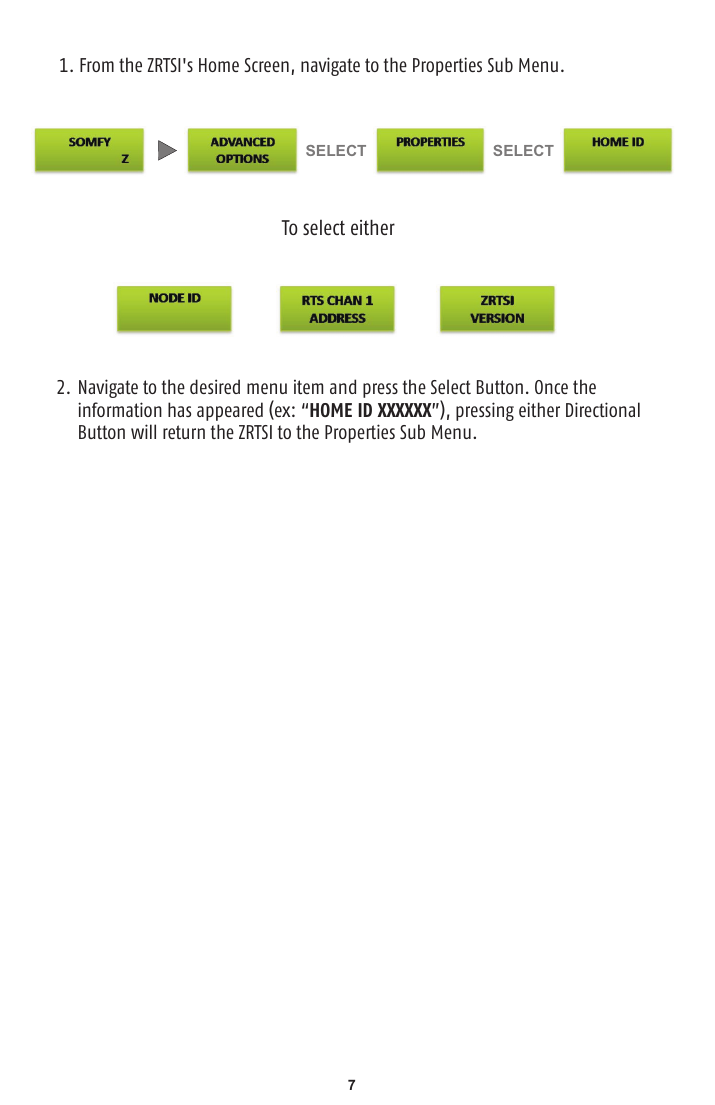
Section 8 — ZRTSI Properties
Access device details directly on the unit:
- Home ID — received from the Primary Z-Wave Controller upon inclusion; only visible once included
- Node ID — the Base Node's unique address within the Z-Wave network; only visible once included
- ZRTSI Version — certified version is 01.08.05; contact Somfy support if a different version appears
- RTS Address — the ZRTSI's unique RTS address
General Notes
- This is a menu-driven unit — the "L" and "R" buttons navigate inside any menu; "SELECT" executes the highlighted item.
- The "L" and "R" buttons work in a circular buffer (wrap around).
- After 10 minutes of inactivity, the backlight powers down and the default Somfy screen displays. Any Z-Wave inclusions made before power-down are retained.
- Pressing any button at the main Somfy screen turns the backlight back on.
Contact / Support
www.somfypro.com
Somfy Systems, Inc. — North America Headquarters
121 Herrod Blvd, Dayton, NJ 08810
Phone: 800-227-6639 / 609-395-1300 — Fax: 609-395-1776
Florida: 6100 Broken Sound Pkwy NW, Suite 14, Boca Raton, FL 33487 — Phone: 877-227-6639 / 561-995-8376 — Fax: 561-995-7502
California: 15291 Barranca Pkwy, Irvine, CA 92618 — Phone: 877-727-6639 — Fax: 949-727-3775
Somfy Canada (Somfy ULC): 5178 Everest Drive, Mississauga, Ontario L4W 2R4 — Phone: 1-800-66-SOMFY / (905) 564-6446 — Fax: (905) 238-1491