
Optex TR-20U — Wireless 2000 Annunciator System Repeater Installation Instructions
Installation instructions for the Optex TR-20U Repeater, part of the OPTEX WIRELESS 2000 Annunciator System — extends range between wireless sensors and receivers.
Full text manual (for reference)
Installation instructions for the Optex TR-20U Repeater, part of the OPTEX WIRELESS 2000 Annunciator System. The TR-20U extends the transmission range between wireless sensor units and receivers, allowing coverage of larger properties. This document is image-based (scanned); a full transcription is below, and the original diagrams are embedded for wiring and parts reference.
Features
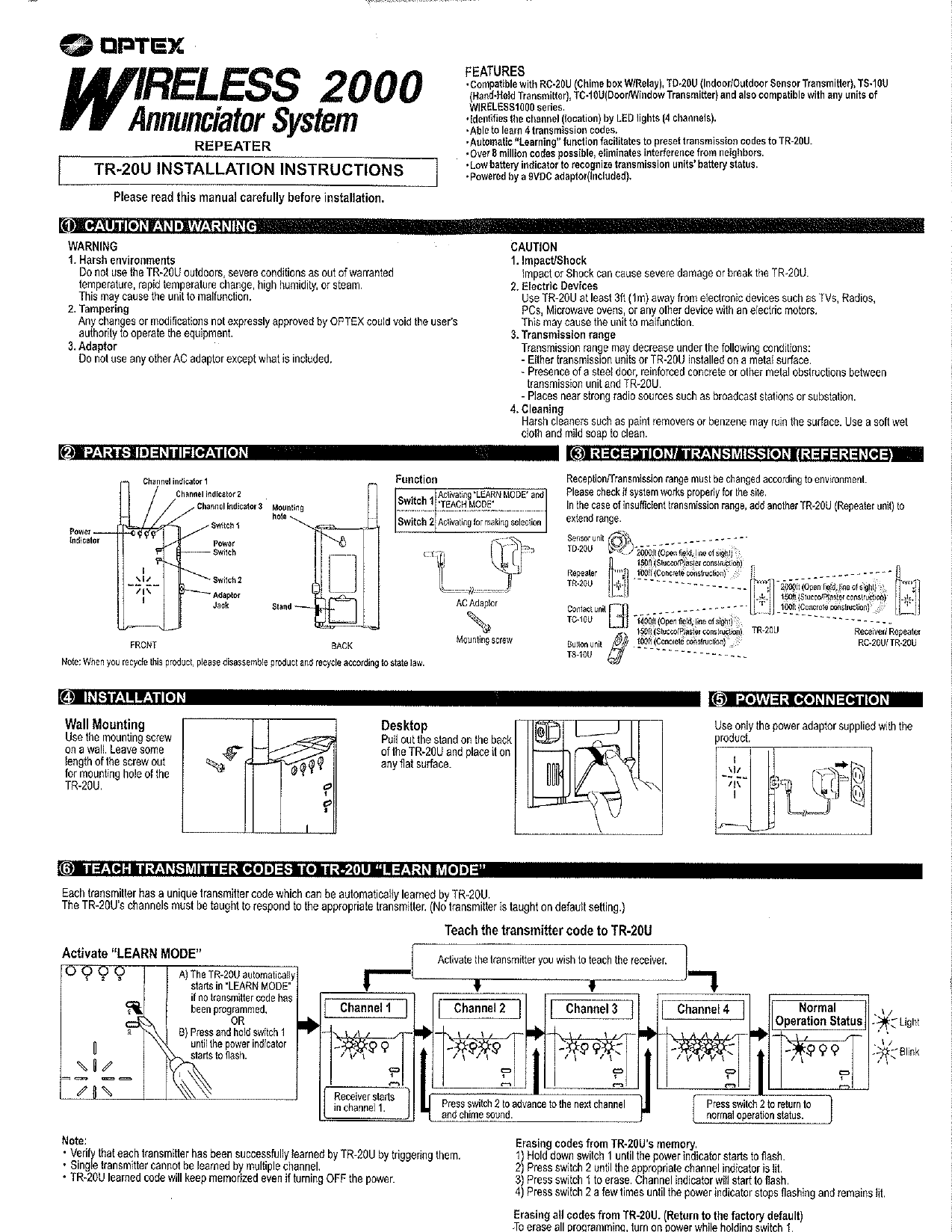
- Compatible with RC-20U (Chime box w/Relay), TD-20U (Indoor/Outdoor Sensor Transmitter), TS-10U (Hand-Held Transmitter), TC-10U (Door/Window Transmitter), and any WIRELESS1000 series units
- Identifies channel (location) via 4-channel LED lights
- Able to learn 4 transmission codes with automatic "Learning" function
- Over 8 million possible codes — eliminates interference from neighbors
- Low battery indicator for transmission units
- Powered by included 9VDC adaptor
Reference Diagrams
Critical Safety Warnings
- Do not use outdoors or in severe conditions (out-of-warranty temperature range, rapid temperature change, high humidity, or steam) — may cause malfunction.
- Any unauthorized changes/modifications could void the user's authority to operate the equipment.
- Do not use any AC adaptor other than the one included.
- Impact or shock can cause severe damage to the unit.
- Use at least 3ft (1m) away from TVs, radios, PCs, microwaves, or other devices with electric motors.
- Transmission range may decrease near metal surfaces, steel doors, reinforced concrete, or strong radio sources (broadcast stations, substations).
- Clean only with a soft, damp cloth and mild soap — harsh cleaners can damage the surface.
Reception/Transmission Range (Reference)
| Unit | Open Field (line of sight) | Stucco/Plaster | Concrete Construction |
|---|---|---|---|
| Sensor unit TD-20U | 2000 ft | 150 ft | 100 ft |
| Repeater TR-20U | 2000 ft | 150 ft | 100 ft |
| Contact unit TC-10U | 1400 ft | 150 ft | 100 ft |
In the case of insufficient transmission range, add another TR-20U repeater to extend coverage.
Installation
- Wall Mounting: Use the supplied mounting screw on a wall, leaving enough of the screw exposed for the TR-20U's mounting hole.
- Desktop: Pull out the stand on the back of the unit and place it on a flat surface.
Teach Transmitter Codes to TR-20U ("Learn Mode")
Each transmitter has a unique code that TR-20U can automatically learn.
- Activate Learn Mode: The TR-20U starts automatically in Learn Mode if no code is programmed, OR press and hold Switch 1 until the power indicator flashes.
- Activate the transmitter you wish to teach.
- Receiver starts at Channel 1. Press Switch 2 to advance through Channels 1→2→3→4→Normal Operation Status.
Notes: Verify each transmitter is successfully learned by triggering it. A single transmitter cannot be learned by multiple channels. Learned codes are retained even when power is off.
Erasing Codes
- Erase one channel: Hold Switch 1 until the power indicator flashes; press Switch 2 until the target channel indicator lights; press Switch 1 to erase (indicator flashes); press Switch 2 until the power indicator stops flashing.
- Erase all codes (factory reset): Turn on power while holding Switch 1.
Teach Transmitter Codes to Receiver ("Teach Mode")
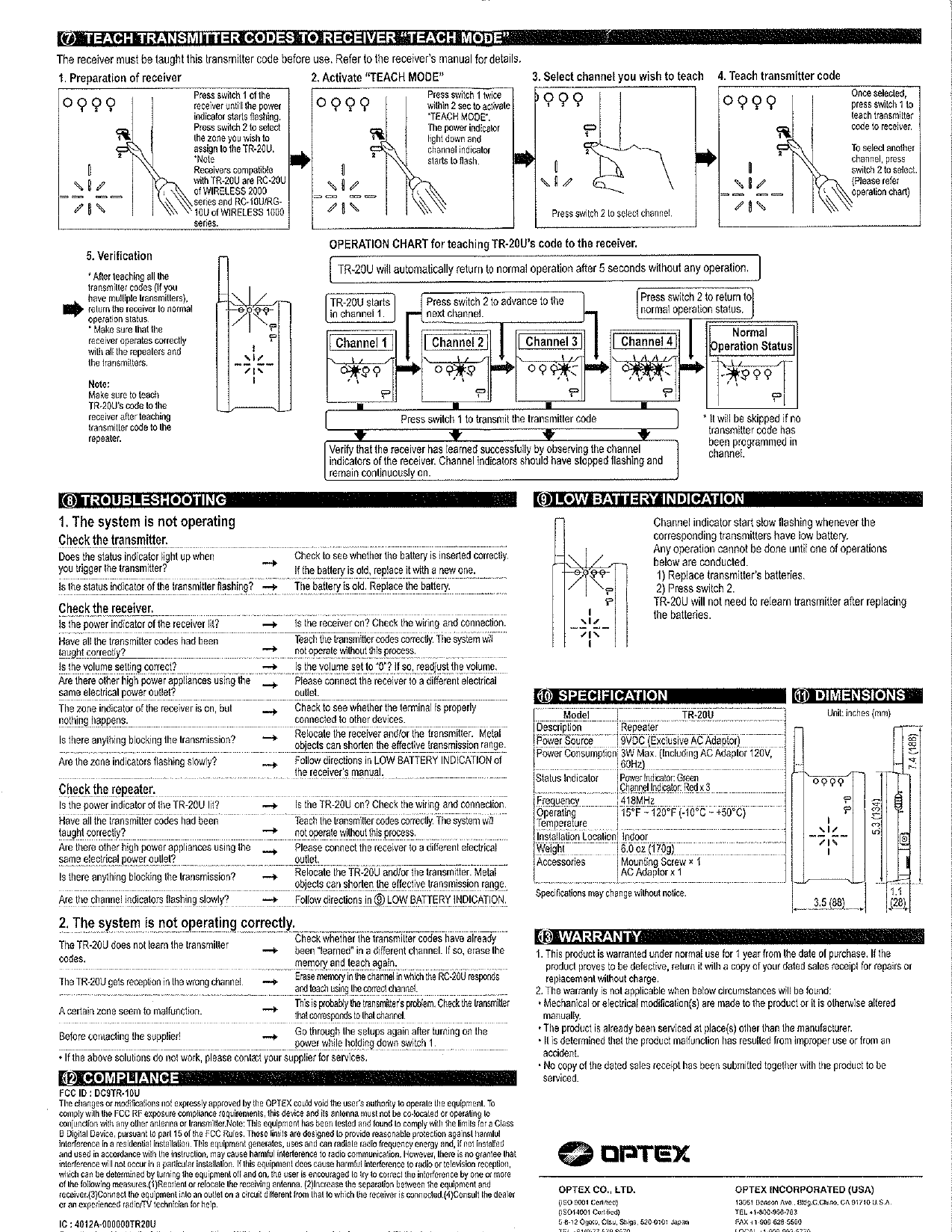
The receiver (RC-20U of WIRELESS 2000 series, or RC-10U/RG-10U of WIRELESS 1000 series) must also be taught the TR-20U's code.
- Press Switch 1 on the receiver until the power indicator flashes; press Switch 2 to select the zone for the TR-20U.
- On the TR-20U, press Switch 1 twice within 2 seconds to activate Teach Mode.
- Press Switch 2 on the TR-20U to select the channel to teach.
- Press Switch 1 to transmit the code to the receiver.
- Verify the receiver's channel indicators stop flashing and remain solidly on.
The TR-20U automatically returns to normal operation after 5 seconds of inactivity.
Low Battery Indication
The channel indicator slow-flashes when a corresponding transmitter has a low battery. To clear: replace the transmitter's batteries, or press Switch 2. No relearning is needed after replacing batteries.
Troubleshooting
- System not operating: Check transmitter battery orientation/freshness; check receiver power indicator, wiring, and taught codes; check volume setting; check for electrical interference from other appliances; check for obstructions blocking transmission (metal objects reduce range); check for slow-flashing zone indicators (low battery).
- TR-20U doesn't learn transmitter codes: The code may already be learned on a different channel — erase and re-teach.
- TR-20U reports on the wrong channel: Erase the memory on the incorrectly responding channel and re-teach using the correct channel.
- Before contacting your supplier: Redo setup by turning on power while holding Switch 1 (factory reset), then reprogram.
Specifications
| Model | TR-20U (Repeater) |
| Power Source | 9VDC (exclusive AC adaptor) |
| Power Consumption | 3W max. (including AC adaptor, 120V, 60Hz) |
| Status Indicators | Power (Green), Channel x3 (Red) |
| Frequency | 418MHz |
| Operating Temperature | 15°F ~ 120°F (-10°C ~ +50°C) |
| Installation Location | Indoor |
| Weight | 6.0 oz (170g) |
| Accessories | 1 Mounting Screw, 1 AC Adaptor |
Compliance
FCC ID: DC9TR-10U | IC: 4012A-000000TR20U. Changes or modifications not expressly approved by OPTEX could void the user's authority to operate the equipment. Tested and found to comply with FCC Part 15, Class B limits.
Warranty
Warranted under normal use for 1 year from the date of purchase; return with a copy of the dated sales receipt for repair or replacement without charge. Warranty is void if the product has been modified, serviced by unauthorized parties, damaged from misuse/accident, or if no dated receipt is submitted.
Manufacturer Contact
OPTEX CO., LTD. — 5-8-12 Ogoto, Otsu, Shiga, 520-0101 Japan
OPTEX INCORPORATED (USA) — 13061 Benson Ave., Bldg. C, Chino, CA 91710, USA | Tel: +1-800-966-7883