
Jasco/GE ZB1001 Zigbee In-Wall Tamper-Resistant Smart Outlet (JA43102) — Manual
Installation and pairing guide for the Jasco/GE ZB1001 (model 43102) Zigbee In-Wall Tamper-Resistant Smart Outlet.
Full text manual (for reference)
Installation and pairing guide for the Jasco/GE ZB1001 (model 43102) Zigbee In-Wall Tamper-Resistant Smart Outlet — a Zigbee-certified in-wall duplex receptacle with one always-on outlet and one remotely/manually controllable smart outlet.
Key Features
- One Zigbee remote-controlled outlet, plus one always-ON outlet
- Remote ON/OFF control via any Zigbee controller/network (Zigbee Certified — works with Zigbee Gateway products)
- Manual ON/OFF control via the front manual/program button
- Blue LED indicates outlet location in a dark room (configurable — see LED Cycle Options below)
Important Load Limits
The device plugged into the Zigbee-controlled outlet must not exceed 1000W incandescent, 1/2HP motor, 1800W (15A) resistive, or 3.75A LED/CFL. The combined maximum rating for BOTH outlets together is 1800W (15A) resistive load.
Wiring / Installation Steps
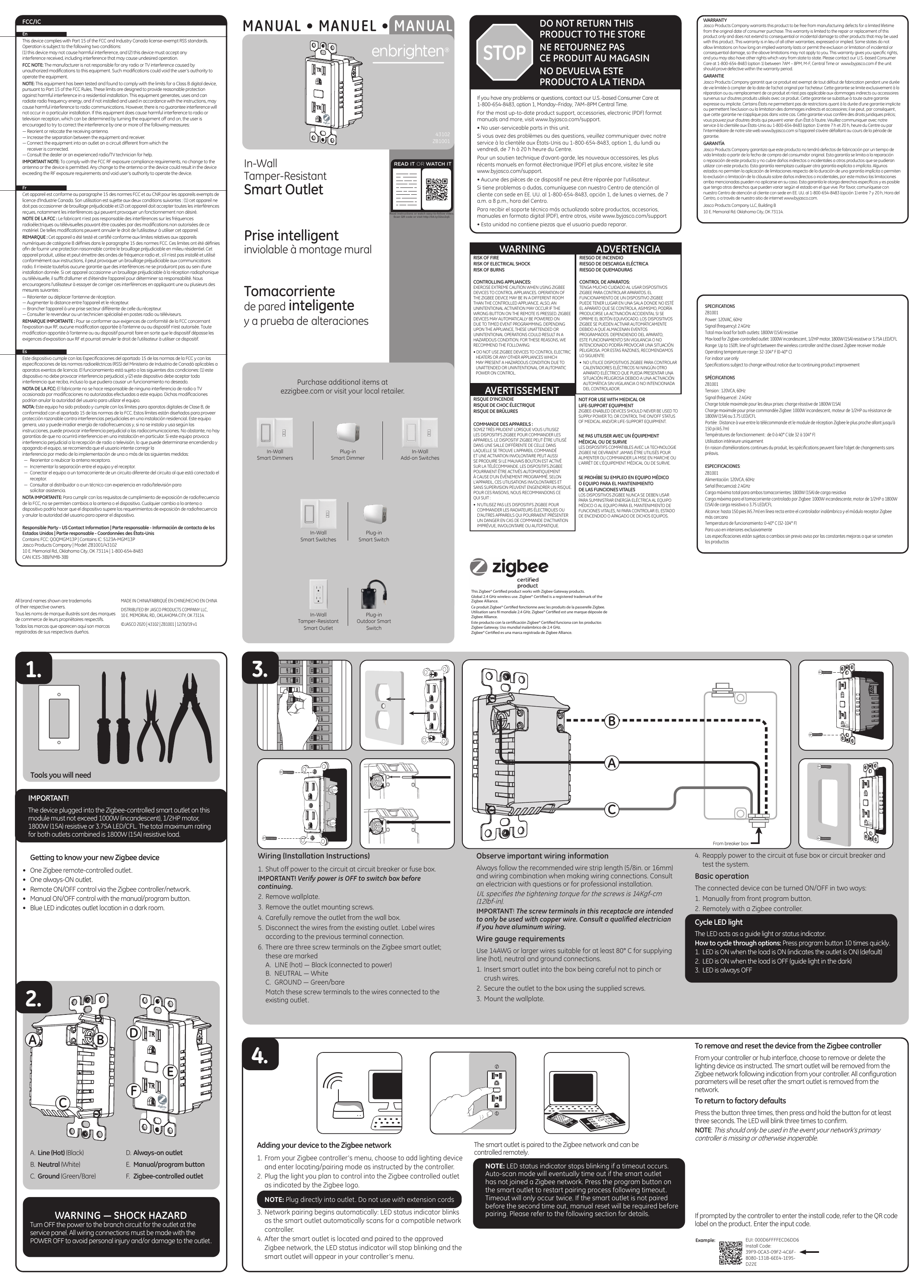
- Shut off power to the circuit at the breaker box or fuse box. Verify power is OFF before continuing.
- Remove the wallplate.
- Remove the outlet mounting screws.
- Carefully remove the outlet from the wall box.
- Disconnect the wires from the existing outlet, labeling each wire by its previous terminal connection.
- Match wires to the three screw terminals on the new Zigbee smart outlet:
- A. LINE (hot) — Black (connected to power)
- B. NEUTRAL — White
- C. GROUND — Green/bare
- Insert the smart outlet into the box carefully, without pinching or crushing wires.
- Secure the outlet to the box using the supplied screws, then mount the wallplate.
- Reapply power at the fuse box/circuit breaker and test the system.
Wiring Requirements
- Follow the recommended wire strip length: 5/8 in. (16mm).
- UL specifies screw tightening torque of 14 Kgf-cm (12 lbf-in).
- Screw terminals are intended for copper wire only — consult a qualified electrician if you have aluminum wiring.
- Use 14 AWG or larger wire rated for at least 80°C for line (hot), neutral, and ground connections.
Adding the Device to Your Zigbee Network
- From your Zigbee controller's menu, choose "Add Lighting Device" and enter pairing/locating mode as instructed.
- Plug the device you want to control directly into the Zigbee-controlled outlet (marked with the Zigbee logo). Do not use an extension cord.
- Pairing begins automatically — the LED status indicator blinks while scanning for a compatible network.
- Once paired, the LED stops blinking and the outlet appears in your controller's menu, ready for remote control.
If your controller prompts for an install code, refer to the QR code label on the product for the EUI and install code (format example: EUI 000D6FFFFECD6DD6, Install Code 39F9-0CA3-09F2-4C6F-8080-131B-6EE4-1E95-D22E — actual codes are unique per unit).
Pairing timeout notes: The LED stops blinking if a timeout occurs. Auto-scan mode will eventually time out if the outlet hasn't joined a network — press the program button to restart pairing. Timeout only occurs twice; if not paired by the second timeout, a manual reset is required before pairing can resume.
Basic Operation
The connected device can be turned ON/OFF two ways: manually via the front program button, or remotely via your Zigbee controller.
LED Cycle Options
Press the program button 10 times quickly to cycle through LED behavior options:
- LED is ON when the load is ON (default — indicates outlet is on)
- LED is ON when the load is OFF (acts as a guide light in the dark)
- LED is always OFF
Remove / Reset from the Zigbee Controller
From your controller/hub interface, choose to remove or delete the device as instructed. It will be removed from the Zigbee network, and all configuration parameters will reset.
Return to Factory Defaults
Press the program button 3 times, then press and hold for at least 3 seconds. The LED will blink 3 times to confirm the reset. Only use this if your network's primary controller is missing or inoperable.
Specifications
| Power | 120VAC, 60Hz |
| Signal frequency | 2.4GHz (global wireless use) |
| Total max load (both outlets combined) | 1800W (15A) resistive |
| Max load, Zigbee-controlled outlet | 1000W incandescent, 1/2HP motor, 1800W (15A) resistive, or 3.75A LED/CFL |
| Range | Up to 150 ft. line of sight between wireless controller and nearest Zigbee receiver module |
| Operating temperature | 32–104°F (0–40°C) |
| Use | Indoor use only |
Important Safety Warning — Zigbee Appliance Control
- Exercise extreme caution when using Zigbee devices to control appliances — the Zigbee device may be operated from a different room than the controlled appliance, and pressing the wrong remote button, or timed-event programming, may cause unintended/unattended activation.
- Do NOT use Zigbee devices to control electric heaters or any appliance that could be hazardous if activated unattended or automatically.
- Never use Zigbee-enabled devices to power or control medical or life-support equipment.
- Risk of fire, electrical shock, and burns — turn off power at the service panel before wiring, and never exceed the load ratings above.
Warranty
Jasco Products Company warrants this product free from manufacturing defects for a limited lifetime from the original date of consumer purchase (repair/replacement only; no consequential/incidental damage coverage). Contact U.S.-based Consumer Care at 1-800-654-8483 (option 1), M–F 7AM–8PM Central Time, or visit www.byjasco.com. Distributed by Jasco Products Company LLC, 10 E. Memorial Rd., Building B, Oklahoma City, OK 73114. Made in China.