
Hamilton CapTel 2400iBT Captioned Telephone — User Manual
Complete user manual for the Hamilton CapTel 2400iBT captioned telephone — setup, making/answering calls, captions, contacts, answering machine, settings, and troubleshooting.
Full text manual (for reference)
User manual for the Hamilton CapTel 2400iBT captioned telephone — a phone designed for people with hearing loss that displays word-for-word captions of everything the caller says, generated by a free Captioning Service over the Internet. This page summarizes setup, everyday operation, and the most useful settings; the full downloadable PDF covers every menu screen in detail.
How CapTel Works
Every time you make or receive a call, the CapTel 2400iBT also connects over the Internet to a free Captioning Service. A Captioning Assistant uses speech-recognition technology to caption everything the caller says, and the captions appear on the phone's 10.1" touchscreen display in near real-time. The phone itself does not generate captions — it relies on the Captioning Service connection.
Key Specifications
| Dimensions | 12.56" W × 9.54" H × 3.64" D, 3 lbs. 2.3 oz. |
| Display | 10.1" backlit, graphical LCD color touchscreen, 1024 × 600 pixels, resistive touch panel |
| Power | AC adapter 5.9–6.0V 2Amps, UL listed (barrel is negative) |
| Connections | RJ11 telephone line (analog, VOIP, DSL with filter, FIOS — no digital PBX unless analog port available); 3.5mm headset jack; Bluetooth®; Ethernet or WiFi; AC power |
| Amplification | 0–40dB gain with Captions on; 0–18dB gain with Captions off; customizable to match personal audiogram |
| Captions | 9 font sizes (0.20"–0.90"), 5 font styles, adjustable font/background colors |
| Conversation Memory | 360,000 characters — minimum 10 hours of conversation captions, up to 100 conversations |
| Contacts / Favorites / Speed Dial | 100 contacts, 10 favorites, 4 speed dial entries |
| Caller ID History | Last 100 calls |
| Answering Machine | 100 recordable messages, up to 90 seconds each, personalized or default greeting, selectable ring count |
| Approvals | FCC ID: D8K-CAPTEL2400; ACTA Product-Labeling Number: US:D8KTE00BCAP2400; FCC Part 15B; REN = 0.0B |
Front Panel Overview
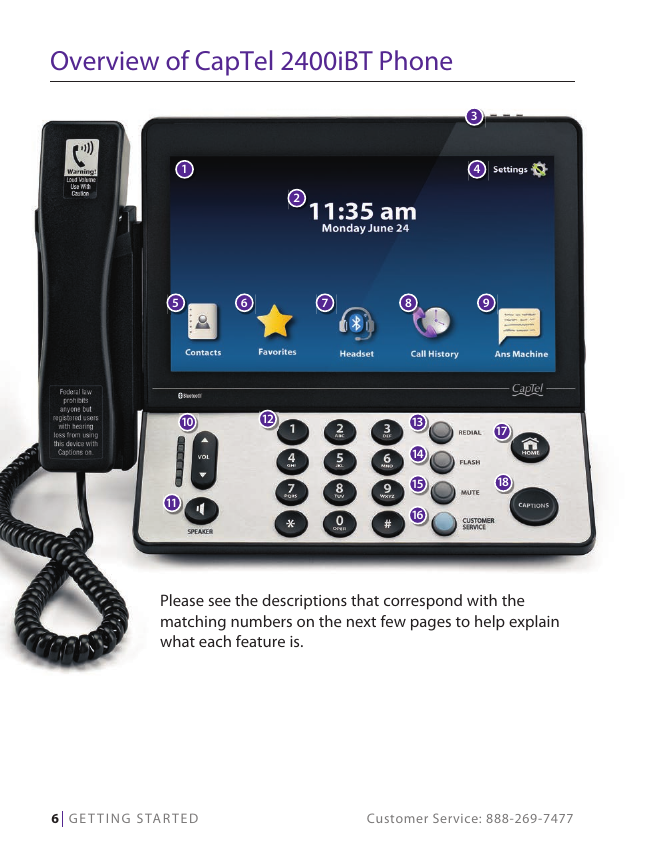
- Touch Screen Display — shows captions, Caller ID, Answering Machine messages, Contacts, and more.
- VOLUME — adjusts up to 40dB gain. WARNING: maximum volume on captioned calls is extremely loud; people who don't need amplification should avoid the highest setting. Volume resets to mid-range each time you hang up unless you save it (Settings → General Settings → Save Volume On).
- SPEAKER — hands-free conversation via built-in speaker.
- REDIAL — dials the most recently called number.
- FLASH — sends a brief hook-flash for services like Call Waiting.
- MUTE — silences your outgoing audio; you can still hear the caller and see captions.
- CUSTOMER SERVICE — one-touch speed dial to CapTel Customer Service, available 24/7 (closed major holidays).
- HOME — returns to the main menu screen from anywhere.
- CAPTIONS — toggles word-for-word captioning on/off at any time during a call (blue light = on).
Back panel: Telephone jack (RJ11), Ethernet jack, LNK/ACT status light (Ethernet only — doesn't light for WiFi), Power jack, and a fold-out kickstand.
Setup Requirements
- High-speed Internet access via Ethernet cable or WiFi network (a router may be required for multiple devices).
- Telephone service — analog line, DSL with filter, VOIP, fiber optic, or Digital Cable phone service. Does NOT work with digital PBX systems unless an analog port is available.
- Standard electrical outlet for the AC adapter — use ONLY the adapter that came with the phone; other adapters may cause damage.
The Initial Setup wizard walks you through: language selection (English/Español), telephone line connection, optional dialing prefix (for offices requiring "9" to get an outside line), network connection (wired or WiFi), and time/date confirmation.
Making and Answering Calls
- Check that the CAPTIONS button's blue light is on (press it to enable if not).
- Lift the handset, or press SPEAKER for hands-free, or touch Headset if using a Bluetooth device.
- Dial using the keypad — the display shows connection status to the Captioning Service, then captions appear as the call proceeds.
- Adjust volume anytime during the call with the VOL up/down arrows.
- Hang up normally when finished.
Incoming calls: the display lights up and shows Caller ID info if available. Lift the handset (or press SPEAKER) and ensure CAPTIONS is on to see the conversation captioned live. You can also touch "send to ans machine" to route a call directly to the Answering Machine.
Bluetooth: pair a headset or neckloop via Settings → Connections → Bluetooth → On → Scan → select your device → Pair. Only one Bluetooth device can be active at a time; the active device's name appears in the top-left of the display.
Viewing and Managing Captions
- Corrections: the Captioning Service occasionally corrects word errors in real time — corrected words appear in [brackets].
- Review during a call: touch Pause Captions, then swipe/scroll to review earlier captions; touch "Back to Live Captions" to resume.
- Review after hanging up: go to Call History, select the call, and touch "review captions" (requires Save Captions On, which is the default).
- Save Captions setting: Settings → General Settings → Save Captions On/Off — controls whether conversation captions are retained after each call (default: On).
- Erase captions: from Call History, select a call and touch Delete (also removes it from Call History).
- Font/color customization: Settings → Display → Display Colors (caption/background color) and Font Settings (5 styles, adjustable size) — cannot be changed during a live call.
- Caption scrolling style: line-by-line or smooth scrolling, configurable in General Settings.
Answering Machine
Stores up to 100 messages, 90 seconds each. If you use external voice mail instead, turn the internal Answering Machine off to avoid conflicts (only one answering device should be active at a time).
- Setup: Ans Machine → setup internal answering machine → toggle On/Off.
- Playback: select a message from the list, touch PLAY, then lift the handset (or touch speaker) to listen; captions appear alongside. Touch re-caption to regenerate captions, Call to call back, or Delete to erase.
- Personal greeting: Settings → Answering Machine → Greeting Message → record new greeting (or use the default: "Hello. No one is available to take your call. Please leave a message after the tone.").
- Remote Message Retrieval: Settings → Answering Machine → Remote Access → On, then set a 4-digit PIN. Calling in from another CapTel phone lets you see captions of messages remotely; calling from any other phone only lets you hear the audio.
- Voice mail captioning: if you rely on carrier voice mail instead, CapTel can still caption those messages — just dial into your voice mail system normally with CAPTIONS on.
- Delete all messages: Settings → Answering Machine → Delete All Messages.
Contacts, Favorites & Speed Dial
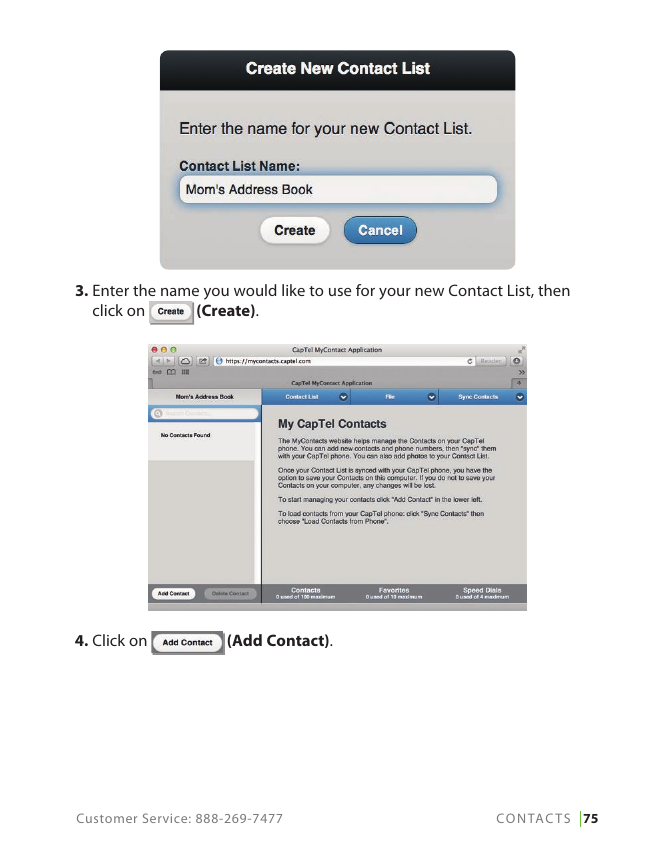
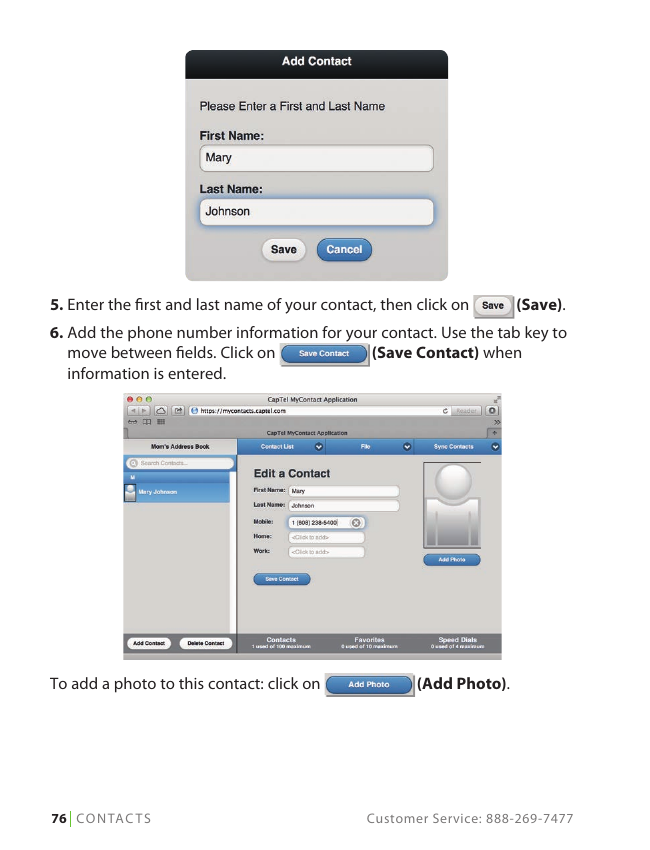
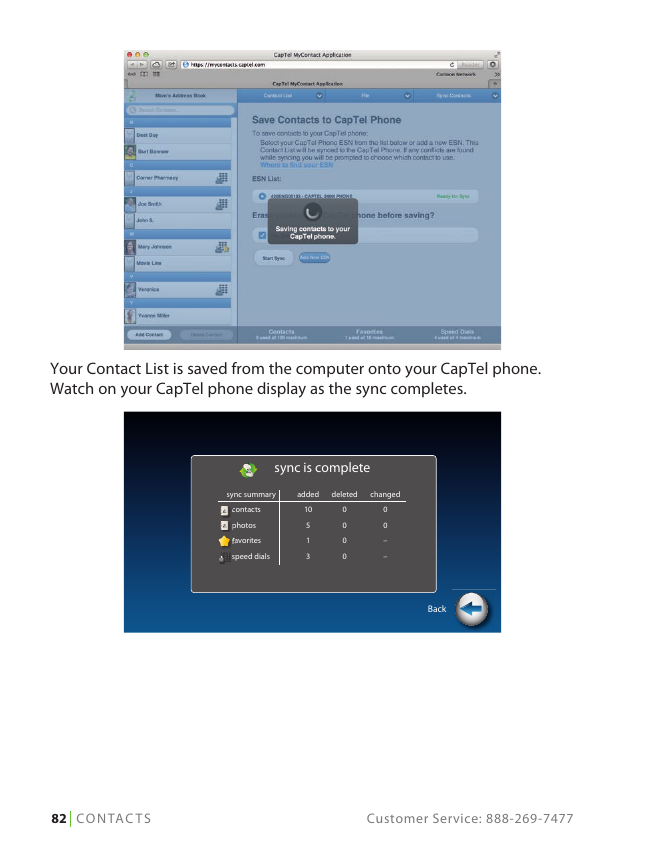
Store up to 100 contacts, with photos, multiple numbers, and Speed Dial/Favorites assignment. Contacts can be managed on the phone directly, or via the MyContacts.CapTel.com desktop app and synced to the phone over USB/network.
- Favorites (up to 10) — appear automatically on the dial screen when you lift the handset for one-touch dialing by name or photo. Must first exist as a Contact.
- Speed Dial (up to 4) — same one-touch convenience; also supports photo dialing.
- MyContacts.CapTel.com lets you manage Favorites, Speed Dials, multiple saved Contact Lists, and back up/restore contact data to your computer.
Key Settings
| Setting | What it does |
|---|---|
| Display Brightness / Screen Timeout / Night Mode | Adjust screen appearance and power-saving behavior |
| Connections / WiFi / Bluetooth | Manage network and Bluetooth pairing |
| Saving Captions After Hang Up | Toggle whether conversation captions persist after each call (default On) |
| Captions Button / Ring Flasher | Configure default caption behavior and visual ring alerts |
| Saving Conversation Volume | Persist your preferred volume level across calls instead of resetting to mid-range |
| Keypad Lights / Language | Keypad illumination and English/Español selection |
| Ringer Volume / Pitch / Tone Control | Customize ring and call audio characteristics |
| Time & Date / About / Software Update | System info and downloading the latest CapTel software (phone reboots after update) |
Advanced Settings
- Dialing Prefix — auto-dial a prefix (e.g. "9") for office phone systems on all Contact/Speed Dial/Call History/Answering Machine calls.
- Dynamic or Static IP — default is Dynamic (DHCP); use Static only if your network requires it.
- Review Captions on Hang Up — automatically enters conversation review mode after every call (default off).
- Line in Use Detector — lets you join an in-progress call on another extension and still get captions by picking up the CapTel handset (default on).
- Voice Activity Detector — ends an Answering Machine recording early if the caller stops talking, rather than waiting the full 90 seconds (default off).
Troubleshooting
Power Reset: if Internet connectivity issues affect the phone's operation, unplug the CapTel 2400iBT from power, wait 10 seconds, then plug back in. The phone will re-run setup checks (language, Internet connection, time/date) and check for software updates automatically.
Regulatory & Support
FCC ID: D8K-CAPTEL2400. Complies with FCC Part 15B and Part 68 / ACTA requirements. REN = 0.0B. RF exposure compliance requires at least 20 cm separation between the antenna and all persons for Bluetooth/wireless operation.
Customer Service: 1-888-269-7477 (V/TTY), available 24/7 (closed major holidays) — press the CUSTOMER SERVICE button on the phone to speed-dial directly. Spanish-language support: 1-866-670-9134. Email: CapTel@CapTel.com. Fax: (608) 204-6167. Mail: CapTel Customer Service, 450 Science Drive, Madison, WI 53711.
CapTel is a product of Ultratec, Inc. © 2016, 2017 Ultratec, Inc. All rights reserved. Ultratec and CapTel are registered trademarks of Ultratec, Inc.