
FIBARO Single Switch (FGBHS-213) for HomeKit — Quick Start Guide
Quick start guide covering installation, wiring, and HomeKit pairing for the FIBARO Single Switch flush-mounted power-metering module.
Full text manual (for reference)
Overview
The FIBARO Single Switch (FGBHS-213) is a flush-mounted, HomeKit-compatible module with power metering, designed to fit in standard wall switch boxes to control electric devices via HomeKit (Bluetooth Low Energy) or via a directly wired switch button.
Safety Warnings
Danger of Electrocution: The Single Switch operates in home electrical installations. Faulty connection or use may result in fire or electric shock. All work on the device must be performed only by a qualified, licensed electrician, observing national regulations. Voltage may be present at the terminals even when the device is switched off — always disconnect voltage (disable the fuse) before performing any maintenance or wiring changes.
- Connect only according to one of the approved wiring diagrams. Incorrect connection can risk health, life, or property.
- The device is designed for installation in a wall switch box with a depth of at least 60mm.
- The building's electrical system must be protected with an overcurrent fuse rated no higher than 10A.
- Applied load inconsistent with the technical specification may damage the load and/or the device.
Wiring Diagrams
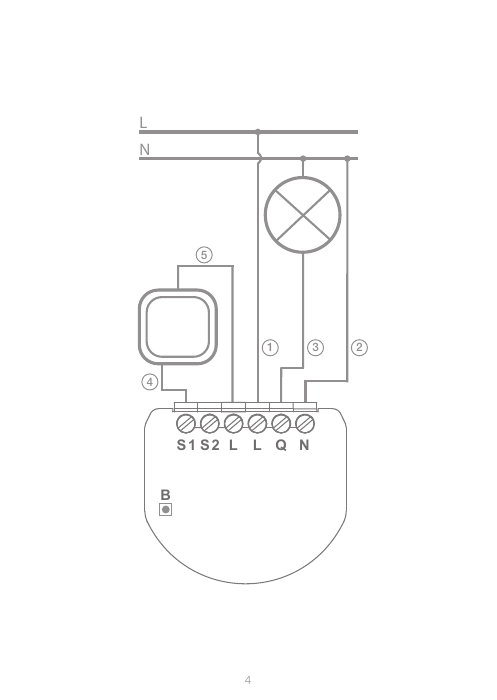
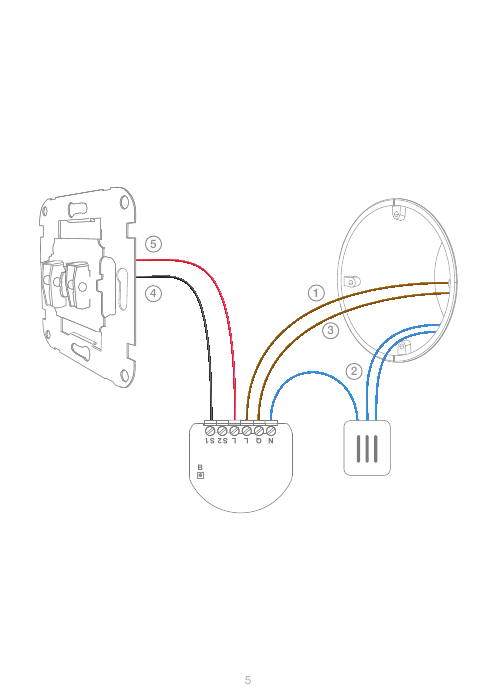
Wire Descriptions
| Label | Wire |
|---|---|
| 1 | Live wire |
| 2 | Neutral wire |
| 3 | Load wire |
| 4 | Switch button wire |
| 5 | Switch power wire |
Wire colors are only indicative — consult an electrician to confirm which wire is which in your installation.
First Launch / Installation Steps
- Switch off the mains voltage.
- Open the wall switch box.
- Disconnect the wiring from the switch.
- Switch on the mains voltage briefly and, using a voltage tester, identify the Live wire.
- Switch off the mains voltage again.
- Connect the Live wire to the L terminal and the power terminal of the switch.
- Connect the Neutral wire to the N terminal.
- Connect the Load wire to the Q terminal.
- Connect the S1 terminal to the button terminal of the switch.
- Put the device and wires into the wall switch box and close it.
- Switch on the mains voltage.
- Open the FIBARO app and tap the add-device icon; the app will guide you through pairing.
Setup Code
The Setup Code is printed on the back of the guide. Keep it in a safe place — you may need it for re-pairing.
Resetting to Factory Defaults
- Open the wall switch box.
- Press and hold the button.
- When the LED glows yellow, release the button.
- Click the button again to confirm.
Specifications
| Power Supply | 100-240V~ 50/60 Hz |
| Rated Load Current (resistive) | 8A |
| Radio Protocol | Bluetooth® Low Energy |
| Radio Frequency | 2.4 GHz |
| Max. Transmit Power | +9.5 dBm |
| Operating Temperature | 0-35°C |
| Dimensions (L x W x H) | 42.5 x 38 x 20.4 mm |
| EU Directives Compliance | RED 2014/53/EU, RoHS 2011/65/EU, RoHS 2015/863 |
Guarantee
Fibar Group S.A. guarantees the device against material and manufacturing defects for 24 months from date of purchase by a consumer (12 months for business customers). The manufacturer will repair or replace defective components free of charge at its discretion. The guarantee does not cover mechanical damage, misuse, unauthorized repairs, or damage from external causes (flood, fire, lightning, power surges, etc.). Contact FIBARO support at fibaro.com/support to file a claim.
Additional Resources
For video guides, parameters, full technical manuals, and declarations of conformity, visit manuals.fibaro.com/en/hk-switch.