
Channel Vision ARIA A0325 — Bluetooth Audio Streaming Source Receiver Manual
Setup and installation guide for the Channel Vision ARIA A0325 Bluetooth 4.2 Audio Streaming Source Receiver, covering app pairing, wiring, and single/multi-room installation.
Full text manual (for reference)
Setup and installation guide for the Channel Vision ARIA A0325 Audio Streaming Source Receiver — a Bluetooth 4.2 streaming module for whole-home ARIA Audio systems, covering pairing, wiring, and multi-room installation.
Overview
- Model: A0325 — ARIA Audio Streaming Source Receiver with built-in Bluetooth 4.2 module
- Streams music from smartphones, tablets, computers, and Bluetooth devices (e.g. Amazon Alexa) into an ARIA Audio system
- Features "deep sleep" power-saving mode, customized zone naming, security code settings, and a property-management app reset control
- Melody 3D surround sound and bass boost audio enhancements via the ARIA Audio app
- Operating range: up to 147 ft in ideal line-of-sight; reduced by walls, concrete, and RF interference
Getting Started
- Open your phone's Bluetooth settings and connect to the ARIA Audio receiver, identified by the "ARIA Audio" name.
- By factory default there is no password — any device can pair while in "OPEN" mode, indicated by 2 LEDs flashing on the front of the A0325.
- Once paired, a slow green LED flashes every 3 seconds. Open your music app (Pandora, Spotify, etc.) and play.
- For systems with multiple A0325 units or nearby neighbor systems, rename your device and enable the security access code to prevent accidental cross-connections.
Operation & Indicators
- 2 LEDs flashing: ARIA is "OPEN" for any user to pair
- Green LED slow flash (every 3s): a user is connected and can play music
- Power LED solid: contact Channel Vision support
- Auto-reconnect on entering the room can be toggled on/off in the app
- Each user's phone must set up the app once to connect to the A0325 — the phone is remembered thereafter
- Using the A0325 with a non-ARIA stereo receiver/amplifier may require L & R output — see model A0305 or A0326 for that use case
Mobile App Pairing Steps
- Download the "ARIA Audio by Channel Vision" app from the Android or iOS store.
- Open the app and select the Bluetooth icon.
- Select the Refresh button.
- Select "ARIA Audio" — it appears on the left of your phone's Bluetooth name list.
- Go to your smartphone's Bluetooth settings and select the ARIA Audio module.
- Select the ARIA Audio pair request (the passkey shown is not used).
- Immediately open the ARIA app, go to Settings, and enter the password 0000 within 10 seconds.
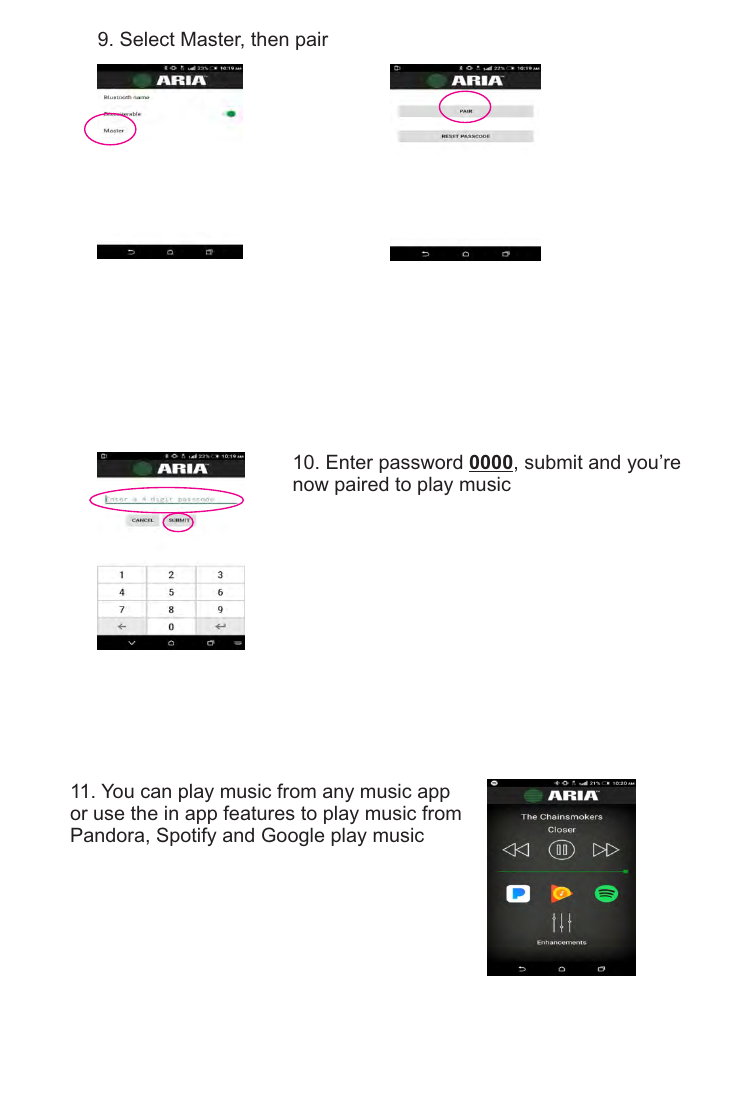
- Select "Master", then Pair.
- Enter password 0000, submit — you're now paired and can play music.
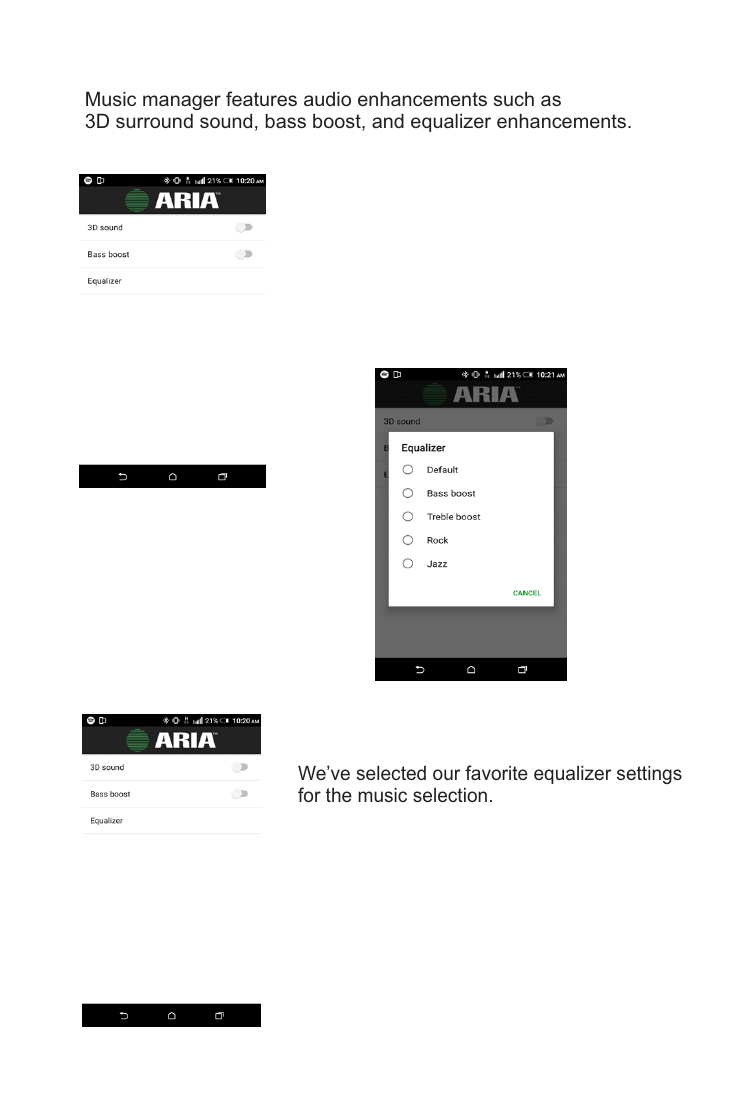
You can play music from any music app, or use the in-app Music Manager for audio enhancements such as 3D surround sound, bass boost, and equalizer presets.
Wiring & Installation
The A0325 uses a TIA-568A RJ-45 modular plug. Pinout for the audio output side:
| Wire | Function |
|---|---|
| Green/White | Left channel ground |
| Green | Left channel |
| Orange/White | Right channel ground |
| Orange | Right channel |
| Blue / Blue/White | Not used |
| Brown/White | Ground |
| Brown | 24V DC |
A factory jumper on pins 1 & 2 sets the Bluetooth level for use with a 100W amplifier.
Single Zone Audio
Plug the RJ-45 output (bottom RJ-45) of the A0325 into an ARIA Audio amplifier (e.g. the A0350 flush-mount amplifier) for a single-zone custom audio installation.
Multi-Room Application
Using a zone output of the ARIA Audio hub, run a CAT5 cable into the RJ-45 input of the A0325, then connect the A0325's RJ-45 output into the RJ-45 input of the A0350 amplifier. Repeat for each zone. Connect the A0325 to the P-2014 distribution module input for multi-room Bluetooth streaming to every room.
Main Source Installation
Using a CAT5 cable, place the RJ-45 output of the A0325 into the CAT5 audio input on the ARIA Audio hub.
Troubleshooting
| Symptom | Steps |
|---|---|
| Not linking with streaming source device | If both front lights are flashing, Bluetooth source is not connected — begin with app setup instructions before phone Bluetooth settings. Warning: do not turn volume all the way up if no audio is present — this could damage speakers if audio suddenly reconnects. |
| Linked but no audio present | 1. Verify the music source is active before pairing. 2. Confirm the slow green flashing LED (paired state), then turn up volume on the phone/amplifier. 3. Try a different source device. 4. Verify the source device is actually in play mode. |
Volume Level Compatibility
Output level from streaming sources varies by brand. The A0325 is adjusted to match most audio source devices, but in some cases levels may differ — use the source device's own volume control to match your main audio source level.
Regulatory
Tested to comply with FCC Class B digital device standards (Part 15). Provides reasonable protection against harmful interference in residential installations. Unauthorized changes or modifications not approved by the manufacturer could void the user's authority to operate the equipment.