
Channel Vision AB-303 — Bluetooth Input Module Installation Guide
Installation and operation instructions for the Channel Vision AB-303 Bluetooth Input Module for A-BUS Audio Systems, adding local wireless Bluetooth streaming to individual A-BUS rooms.
Full text manual (for reference)
Installation and operation instructions for the Channel Vision AB-303 Bluetooth Input Module for A-BUS Audio Systems — adds local wireless Bluetooth streaming input to individual A-BUS equipped rooms.
Overview
The AB-303 A-BUS Bluetooth local input module provides a local wireless input connection for streaming audio from smartphones, tablets, and computers with Bluetooth capability to individual A-BUS equipped rooms. When paired, it automatically switches the music source from the main audio source to the local Bluetooth source. This local connection remains active until pairing is disconnected or the Bluetooth device moves out of range. If pairing remains enabled on the Bluetooth device, it will automatically reconnect and resume audio when back in range.
Features
- Adds Bluetooth streaming capability to existing or new A-BUS systems
- Functions as a main or local audio source
Operation — Pairing
To pair to the AB-303, consult your Bluetooth device's pairing instructions. The Bluetooth LIM identification code has the prefix "AB" followed by the individual code number. When pairing succeeds, a blue LED lights up on the front plate. For systems with multiple AB-303 units, it's recommended to rename each unit's code to easily identify each room before completing installation.
Operating Range
Bluetooth is designed for wireless communication within a single room. In ideal conditions, range can reach up to 50 feet, but this can be significantly reduced by interference from other communication devices, electrical wiring, and room construction materials such as brick walls and concrete floors. Near maximum range, the signal may intermittently drop in and out as signal strength varies.
Bluetooth Source Volume Level Compatibility
Output level from Bluetooth-enabled devices varies by brand. Although the AB-303 is adjusted to match the output of most Bluetooth devices, levels may differ in some cases. Use the source device's own adjustable volume level to match the main audio source's volume.
Room Identification
Each AB-303 pairs using an individual code number with the prefix "AB" (e.g. ABxxx). This code can be renamed to an individual room identifier (Bedroom 1, Study, Patio, etc.) prior to installation. Download the renaming software at www.a-bus.com/bt, connect the AB-303 to a PC via its mini USB socket, and follow the on-screen prompts to rename the device.
Installation Diagram
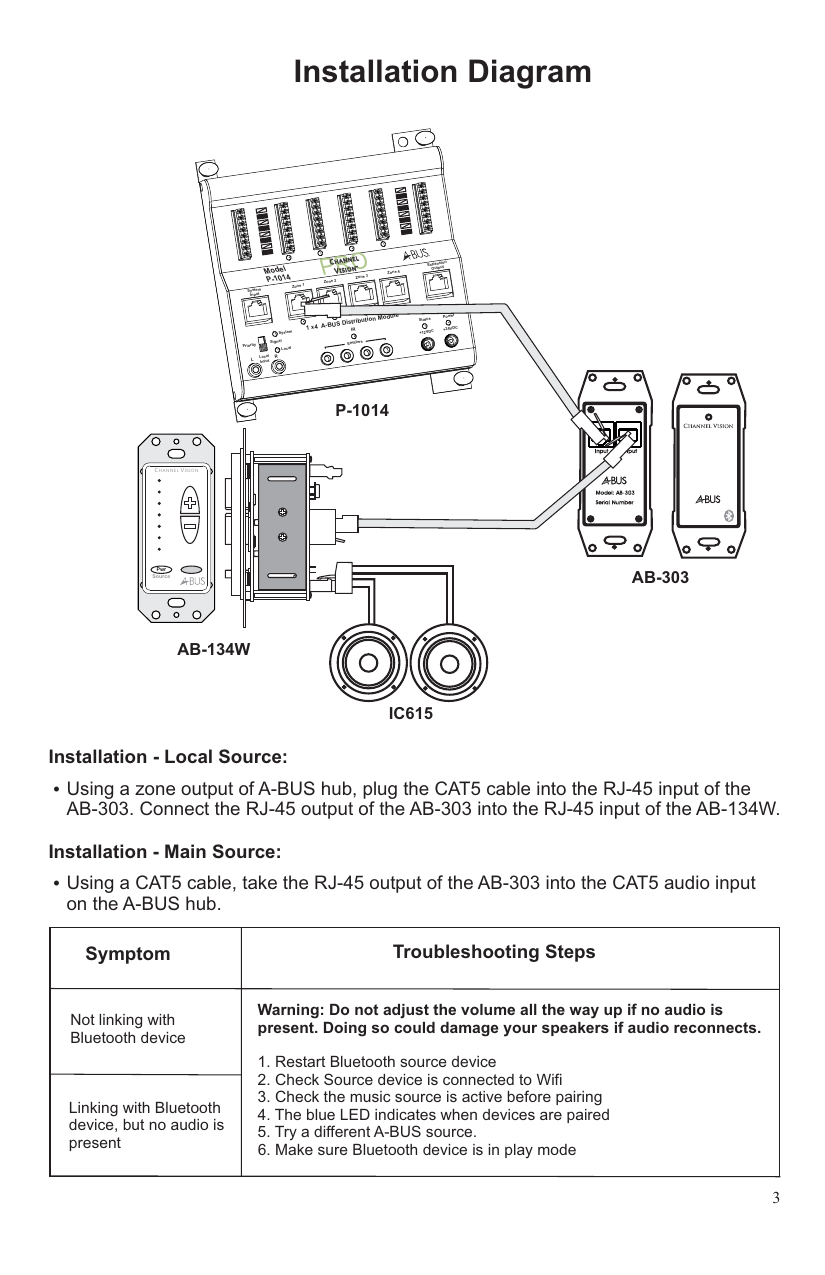
Installation — Local Source
Using a zone output of the A-BUS hub, plug the CAT5 cable into the RJ-45 input of the AB-303. Connect the RJ-45 output of the AB-303 into the RJ-45 input of the AB-134W (wall keypad/controller).
Installation — Main Source
Using a CAT5 cable, connect the RJ-45 output of the AB-303 into the CAT5 audio input on the A-BUS hub.
Troubleshooting
| Symptom | Troubleshooting Steps |
|---|---|
| Not linking with Bluetooth device | Warning: Do not turn the volume all the way up if no audio is present — this could damage speakers if audio suddenly reconnects. Restart the Bluetooth source device and retry pairing. |
| Linking with Bluetooth device, but no audio is present |
|
Warranty
Channel Vision Technology will repair or replace any defect in material or workmanship occurring during normal use with new or rebuilt parts, free of charge in the USA, for one year from the date of original purchase — no mail-in warranty card needed. Does not cover shipping damage, failures from other manufacturers' products, or failures due to accident, misuse, abuse, or alteration. Extended only to the original purchaser through an authorized reseller; proof of purchase date is required for warranty repairs.
For mail-in service during the warranty period, call (714) 424-6500 to obtain a Return Authorization number before shipping.
Compliance
Tested to comply with FCC Class B digital device standards under Part 15 of the FCC Rules, providing reasonable protection against harmful interference in residential installations. A-BUS is a registered trademark of LeisureTech Electronics, covered by multiple US, Australian, New Zealand, Mexican, and Canadian patents.
Channel Vision Technology, 234 Fischer Avenue, Costa Mesa, CA 92626 — (714) 424-6500 / (800) 840-0288, www.channelvision.com, techsupport@channelvision.com