
AprilAire S86WMUPR Wi-Fi Control — Dehumidifier Installation Guide
Wi-Fi installation guide for the AprilAire S86WMUPR Wi-Fi control, covering wiring to a whole-home dehumidifier, dehumidifier display configuration, and the full Wi-Fi control setup menu.
Full text manual (for reference)
Wi-Fi Installation Guide for the AprilAire S86WMUPR Wi-Fi Control, used with AprilAire whole-home dehumidifiers to add Wi-Fi connectivity and thermostat integration.
1. Wiring
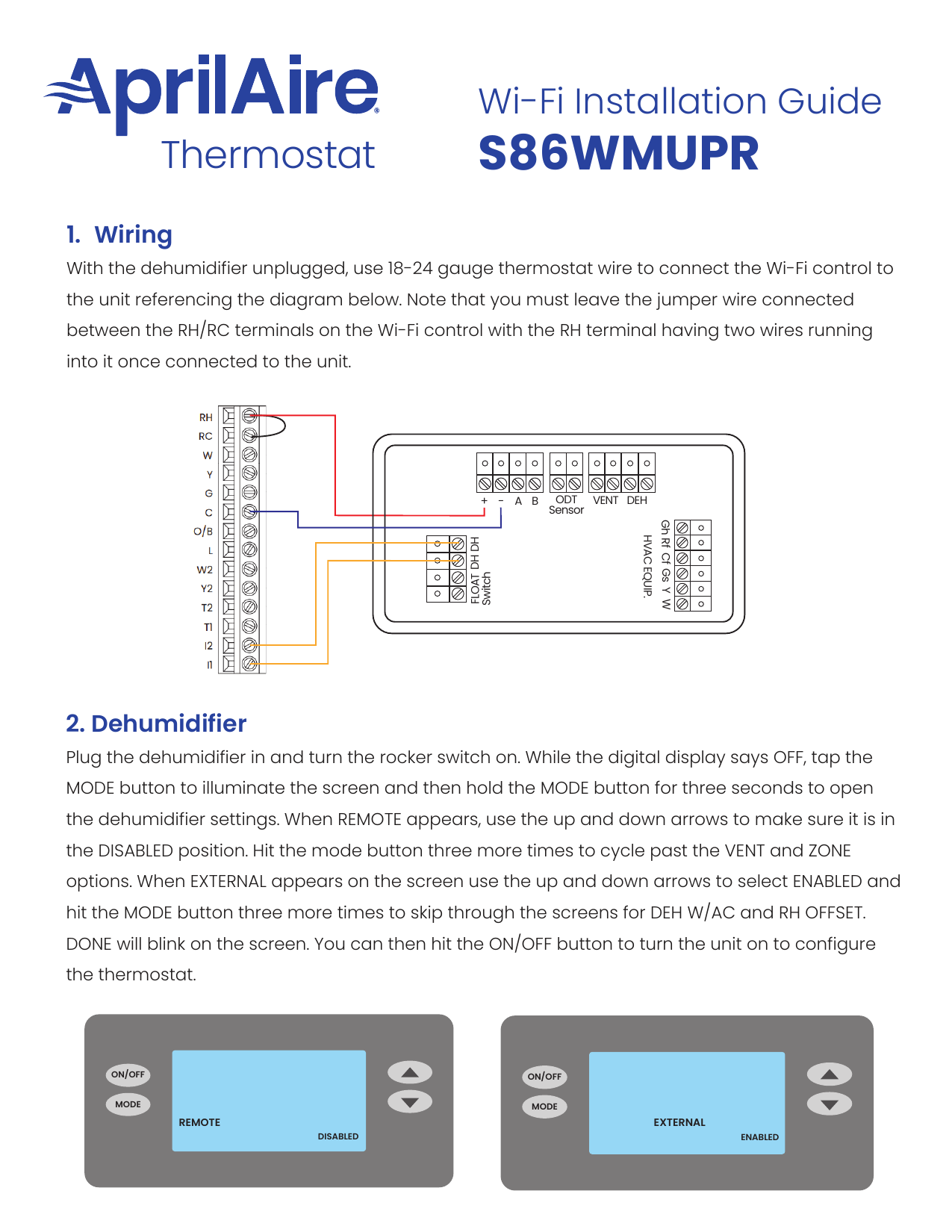
With the dehumidifier unplugged, use 18–24 gauge thermostat wire to connect the Wi-Fi control to the unit. Leave the jumper wire connected between the RH/RC terminals on the Wi-Fi control, with the RH terminal having two wires running into it once connected to the unit.
2. Configure the Dehumidifier
- Plug in the dehumidifier and turn the rocker switch on.
- While the digital display says OFF, tap the MODE button to illuminate the screen, then hold MODE for three seconds to open the dehumidifier settings.
- When REMOTE appears, use the up/down arrows to set it to DISABLED.
- Press MODE three more times to cycle past VENT and ZONE.
- When EXTERNAL appears, use the up/down arrows to select ENABLED.
- Press MODE three more times to skip through the DEH W/AC and RH OFFSET screens until DONE blinks.
- Press ON/OFF to turn the unit on and proceed to thermostat configuration.
Dehumidifier Configuration Reference
3. Wi-Fi Control Setup Menu
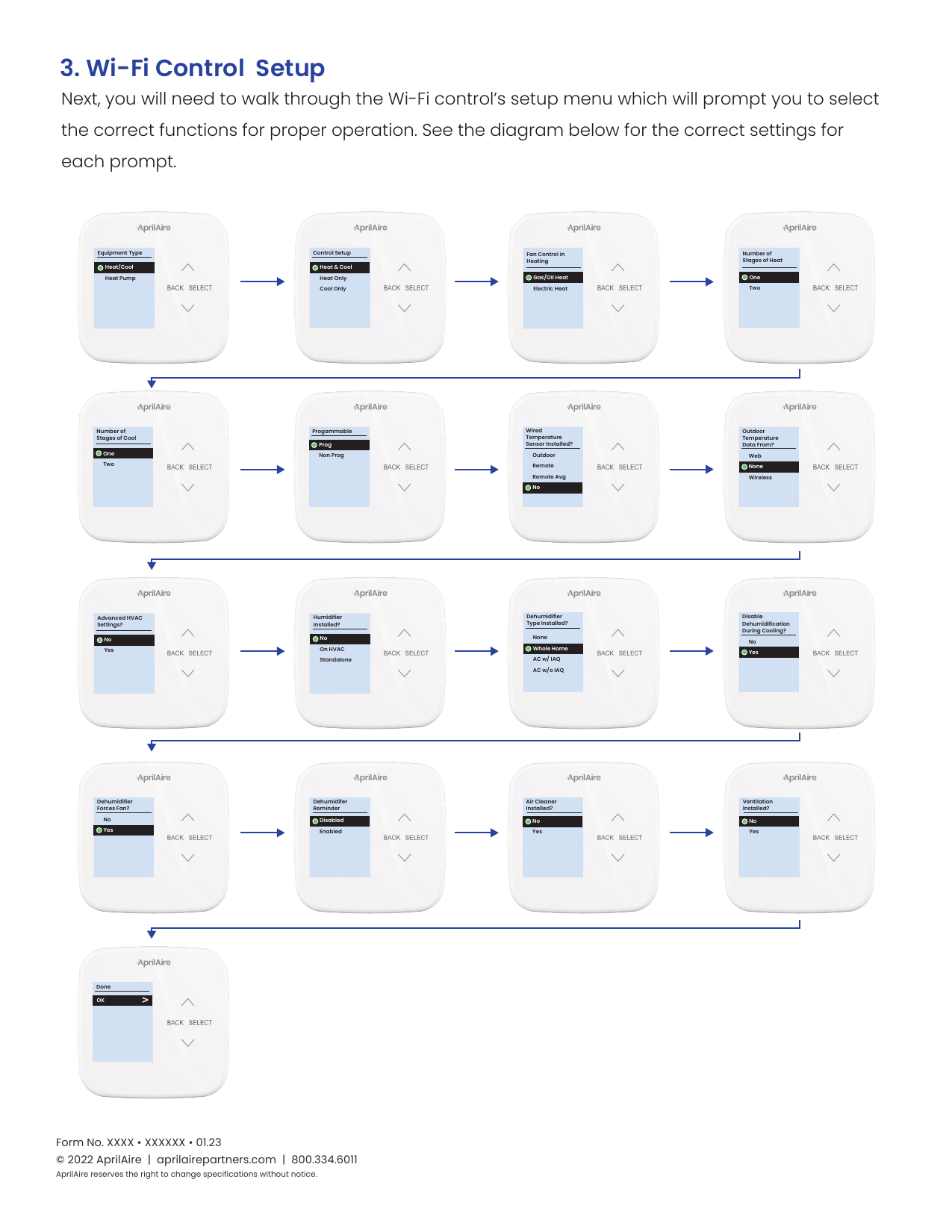
Walk through the Wi-Fi control's setup menu, selecting the correct function at each prompt for a typical whole-home dehumidifier + HVAC installation:
- Equipment Type: Heat/Cool or Heat Pump
- Control Setup: Heat & Cool / Heat Only / Cool Only
- Fan Control in Heating: Gas/Oil Heat or Electric Heat
- Number of Stages of Heat: One or Two
- Number of Stages of Cool: One or Two
- Programmable: Prog or Non-Prog
- Wired Temperature Sensor Installed?: Outdoor / Remote / Remote Avg / No
- Outdoor Temperature Data From?: Web / None / Wireless
- Advanced HVAC Settings?: No / Yes (On HVAC / Standalone)
- Humidifier Installed?: No / On HVAC / Standalone
- Dehumidifier Type Installed?: None / Whole Home / AC w/ IAQ / AC w/o IAQ
- Disable Dehumidification During Cooling?: No / Yes
- Dehumidifier Forces Fan?: No / Yes
- Dehumidifier Reminder: Disabled / Enabled
- Air Cleaner Installed?: No / Yes
- Ventilation Installed?: No / Yes
After completing all prompts, select "Done" and confirm "OK" to save your settings.
Setup Menu Flowchart
© 2022 AprilAire | aprilairepartners.com | 800.334.6011. AprilAire reserves the right to change specifications without notice.