
Menu
-
-
Home Automation
- Home Automation Controllers
- Lighting & Appliance Controls
- Home Automation Sensors
-
Ventilation, Temperature & Flood Controls
- Ecovent Ventilation Controls
- Keen Home Ventilation Controls
- La Crosse Weather Reporting System
- Sensaphone Temperature/Flood
- Winland Temperature/Flood Reporting
- Ezlo Water/Flood Detection
- WaterBug Water/Flood Detection
- WaterCop Water/Flood Detection
- Specialty Water/Flood Detection
- Temperature & Heat Sensors
- Smart Irrigation Controllers
- Smart Thermostats & Ventilation Controls
- Drapery & Blind Opener Systems
- Window Opener Systems
- Door & Gate Opener Systems
- Garage Remotes & Controllers
- Smart Door Locks
-
Security
-
Home Intercom Systems
-
Specials
-
Audio/Video
-
Independent Living
-
Structured Wiring
-
More...
-
Our Brands
- 2GIG
- A&D Medical
- ABB
- Adorne
- Advanced Dynamics
- Aeotec
- Alfred
- American Hunter
- Applied Digital (ADI)
- AprilAire
- Aria Audio Technology
- Arlington Industries
- Applied Digital (ADI)
- AprilAire
- BackBoxx™
- Bellman & Symfon
- BlueSpray
- Cabletronix
- Caregiver Smart Home Automation
- Chamberlain
- Chief Manufacturing
- Cool Components
- Dakota Alert
- Danalock
- DataComm
- Data-Tronix
- D+H
- Displine
- DoorBell Fon
- DynaQuip Controls - Watercop
- Ecovent
- Elk Products
- Enbrighten
- Evolve Technologies
- Ezlo
- FirstAlert
- Flipper
- Flic
- GE
- GoControl
- Go Simply Connect
- Greenfield Direct
- Hamilton CapTel
- Home Controls In-House Exclusives
- HomeSeer
- Honeywell Home
- ION Digital
- Inovonics Wireless
- Interstate Batteries
- Intrasonic Technology (IST)
- Jasco
- KBSound
- Keen Home
- Kwikset
- La Crosse Alerts
- Letzgo Products
- Leviton
- Linear
- Linxura
- Lithe Audio
- Luxul
- Mail Chime
- MedReady
- myTouchSmart
- Napco Security Systems
- NETIO
- Nice North America
- NuTone
- OEM Systems Co.
- Presence Speakers
- On-Q By Legrand
- Open Sesame
- Optex
- Platinum Tools
- Powerline Control Systems
- Qolsys
- Resideo
- Risco Group
- Russound
- RYSE
- STI
- Sanus
- Satco
- Seco-Larm
- Security Door Controls (SDC)
- Sensaphone
- Sensative
- Serene Innovations
- Shelly
- Simply Automated, Inc. (SAI)
- Skylink
- Somfy Systems
- Sonic Alert
- Speco Technologies
- Stelpro
- Street Smart Security
- Structured Cable Products (SCP)
- TekTone
- Tripp Lite
- Truth Hardware
- U-Tec
- UCS
- USP
- Vera
- Versa
- VMP - Video Mount Products
- VSSL
- WeBoost
- Winland Electronics
- X10
- Yale
- ZTECH
- Shop By Compatibility
- Home Essentials
- Central Vac
-
Our Brands
-
- Orders
- Profile
- 1-858-693-8887
- Login
-
United States (USD $)
Add description, images, menus and links to your mega menu
A column with no settings can be used as a spacer
Link to your collections, sales and even external links
Add up to five columns
Add description, images, menus and links to your mega menu
A column with no settings can be used as a spacer
Link to your collections, sales and even external links
Add up to five columns
ABB-free@home Thermostat (ABTH11) — Quick Start Guide
September 08, 2026 2 min read
Quick start guide for the ABB-free@home Wireless Thermostat (ABTH11), covering the touchscreen controls and Eco energy-saving mode.
Full text manual (for reference)
Quick start guide for the ABB-free@home® Wireless Thermostat (ABTH11) — covers the touchscreen controls, heating/cooling modes, and energy-saving Eco mode.
Overview
The ABB-free@home Thermostat is a wireless thermostat you can operate at home, at the office, or from anywhere via the free@home app. The large display shows the current temperature and setpoint temperature, and can optionally display the outdoor temperature instead.
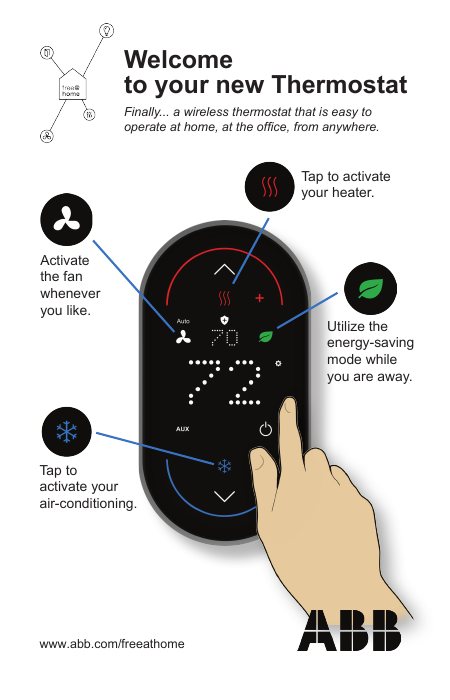
Touchscreen Controls
| Symbol | Function |
|---|---|
| Temp Values | Large number = current temperature; small number = setpoint temperature. Can be configured to show outdoor temp instead. |
| Arrows | Tap up or down to change the setpoint temperature. |
| Settings | Tap to enter settings mode, tap again to exit. |
| Fan | Set to ON or AUTO (default). Tap to turn the fan on manually. |
| Heating | Tap to enable/disable heating mode. Indicator glows red while actively heating. |
| Cooling | Tap to enable/disable cooling mode. Indicator glows blue while actively cooling. |
| Eco | Energy-saving mode for when you're away — decreases the heating setpoint or increases the cooling setpoint. Tap to activate/deactivate. |
| On/Off | Tap to turn the thermostat (and all connected appliances) OFF/ON. Only the protection function stays active while off. |
| Accessory | Activate/deactivate an accessory function such as a humidifier or dehumidifier. |
| Auxiliary Heating | Only used when a heat pump is controlled — indicator is on when auxiliary heating is enabled. |
| Protection | Indicates heating/cooling was automatically activated to protect the HVAC system and home from overload or extreme temperatures. |
Cleaning the Screen
Press and hold the large temperature number for 3 seconds to lock the screen for cleaning.
For the complete system manual, visit www.abb.com/freeathome.
Subscribe
Sign up to get the latest on sales, new releases and more …