
Speco P32S36GM — Rackmount Managed Ethernet PoE Switch User Manual
User manual for the Speco P32S36GM — Rackmount Managed Ethernet PoE Switch.
Full text manual (for reference)
User manual for the Speco P32S36GM — Rackmount Managed Ethernet PoE Switch. This 1U rack-mounted switch is designed for demanding environments (rail transit, safe city, intelligent transportation, outdoor surveillance) with high/low temperature resistance, lightning protection, and support for routing, switching, security protocols, and ERPS for improved network reliability.
Front Panel Overview
- Console port
- Power light
- Reset button
- System running light
- PoE interface
- SFP optical interface
- Grounding stud
- AC power input (100-240V, 50/60Hz)
Note: Connect the power supply correctly — incorrect connection could damage the equipment.
Indicator & Button Reference
| Indicator | Status | Meaning |
|---|---|---|
| Power input (PWR) | Light off | No power input |
| Steady green | Power input is normal | |
| System (SYS) | Light off | Device is not powered on |
| Flashing green | Device is initializing | |
| Steady green | Equipment is working | |
| Ethernet electrical port | Green light off | Port is not connected |
| Steady green | Port is connected | |
| Flashing green | Port sending/receiving data | |
| Yellow light | PoE is not supplying power | |
| Yellow light off | PoE is supplying power | |
| Ethernet optical port | Light off | Port is not connected |
| Steady green | Port is connected | |
| Flashing green | Port sending/receiving data | |
| Reset button | Long press (10+ seconds) | Restores factory settings |
Serial Console Port
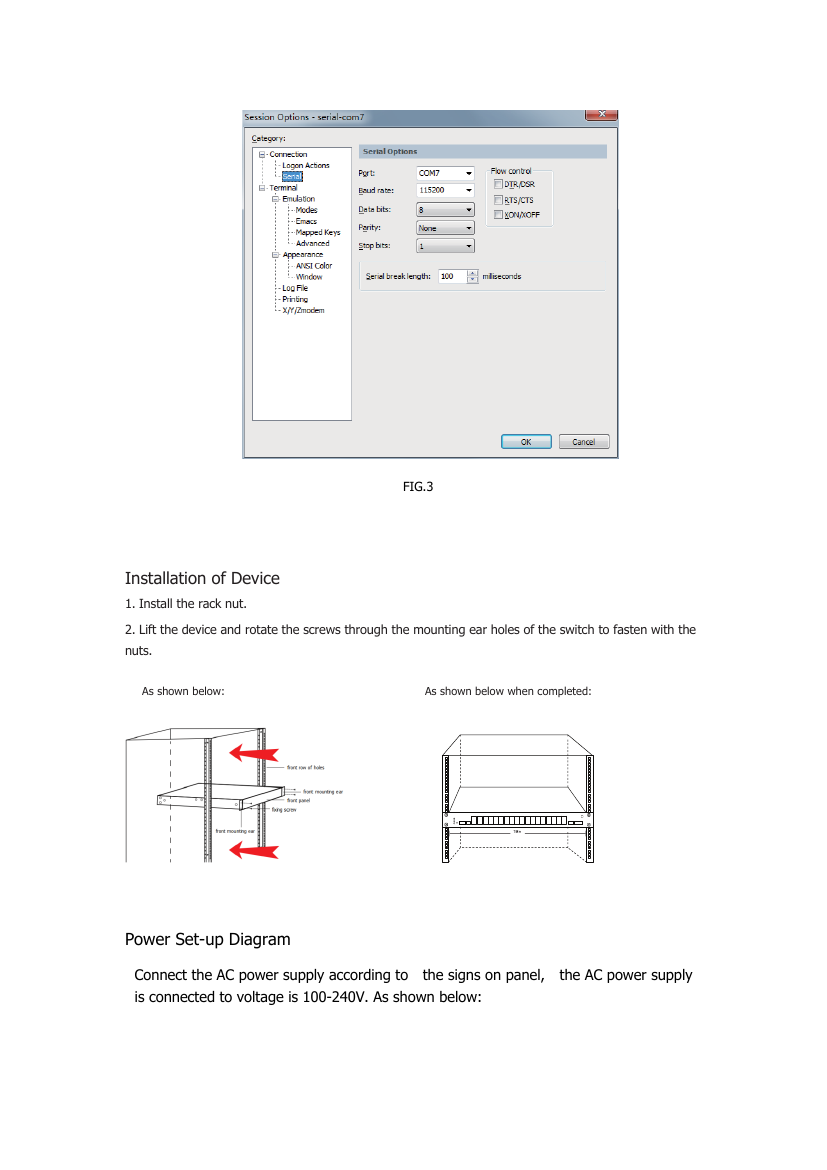
Interface parameters: baud rate 115200, data bit 8, parity none, stop bit 1, no flow control.
Rack Installation
- Install the rack nut.
- Lift the device and align the mounting ear holes; fasten screws through the holes into the nuts.
Power Setup
Connect the AC power supply according to the panel labeling. Accepted AC input voltage range: 100-240V.
Network Cable Installation
- Use Cat5e or Cat6 network cable for Ethernet ports.
- Both 568A and 568B wiring standards are acceptable; crossover and straight-through cables are both supported.
- 568A standard: white/green, green, white/orange, blue, white/blue, orange, white/brown, brown (pins 3, 6, 1, 4, 5, 2, 7, 8)
- 568B standard: white/orange, orange, white/green, blue, white/blue, green, white/brown, brown (pins 1, 2, 3, 4, 5, 6, 7, 8)
- Crossover cable: one end 568A, the other 568B.
- Straight-through cable: both ends the same standard (typically both 568B).
PoE Setup
PoE (Power over Ethernet) supports IEEE 802.3af and 802.3at standards. The switch requires a DC 48V-58V power supply for PoE operation. The PoE connection matches the standard network cable connection — pins 1, 2, 3, 6 are used for both data transmission and PoE power delivery.
Included Accessories
- Switch unit
- Power line
- Console cable
- Certificate of Conformity
- Warranty card & manual
Warranty
Speco Technologies warrants this product to be free from manufacturing or material defects for 2 years from the date of purchase. This warranty does not extend to products subjected to misuse, neglect, accident, improper installation, or use in violation of the provided instructions, nor to units repaired or altered outside the factory. Broken cases, batteries, or other physically damaged parts are not covered.
Upon customer request, Speco Technologies will repackage merchandise in new cartons and replace missing accessories at the customer's expense. This warranty gives specific legal rights, which may vary by state.
Speco Technologies is constantly developing and improving products and reserves the right to modify product design and specifications without notice. Rev. 12/21/20.
Speco Technologies, 200 New Highway, Amityville, NY 11701 — www.specotech.com