
SkylinkHome TB-318 Wall Mount Transmitter — User Manual
Full instruction manual for the SkylinkHome Wall Mount Transmitter (TB-318), including programming, installation, and troubleshooting.
Full text manual (for reference)
Full instruction manual for the SkylinkHome™ Wall Mount Transmitter, Model TB-318 — a wireless wall switch for controlling lighting and home automation via SkylinkHome™ receiver modules. This manual is a scanned diagram sheet; the images below are the full original pages.
Introduction
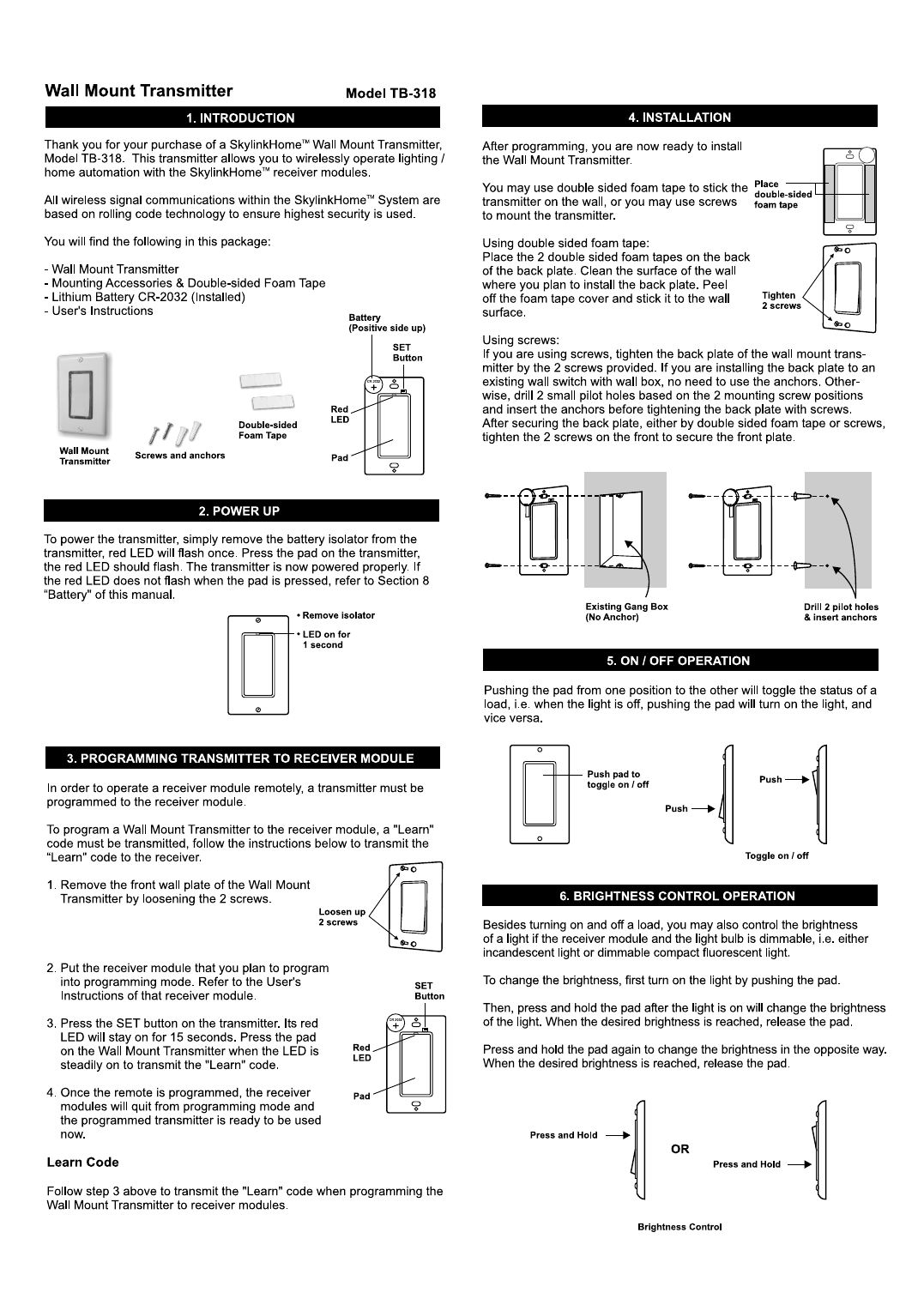
The TB-318 wirelessly operates lighting and home automation with SkylinkHome™ receiver modules. All wireless communication uses rolling code technology for security.
Box Contents
- Wall Mount Transmitter
- Mounting Accessories & Double-sided Foam Tape
- Lithium Battery CR-2032 (Installed)
- User's Instructions
Power Up
Remove the battery isolator from the transmitter; the red LED flashes once. Press the pad — the red LED should flash again, confirming power. If the LED does not flash when pressed, see Battery section below.
Programming Transmitter to Receiver Module
- Remove the front wall plate by loosening the 2 screws.
- Put the receiver module into programming mode (per its own instructions).
- Press the SET button — the red LED stays on for 15 seconds. Press the pad while the LED is steadily on to transmit the "Learn" code.
- Once programmed, the receiver exits programming mode and is ready to use.
Installation
Use double-sided foam tape or screws to mount. For foam tape: clean the wall surface, peel the cover, and stick the back plate to the wall. For screws: tighten the back plate with the 2 provided screws (use anchors unless mounting to an existing gang box), then secure the front plate with its 2 screws.
On/Off & Brightness Control
Pushing the pad toggles the load on/off. If the receiver module and bulb support dimming (incandescent or dimmable CFL), press and hold the pad after turning the light on to adjust brightness; release at the desired level. Press and hold again to reverse direction.
Erasing the Transmitter from Receivers
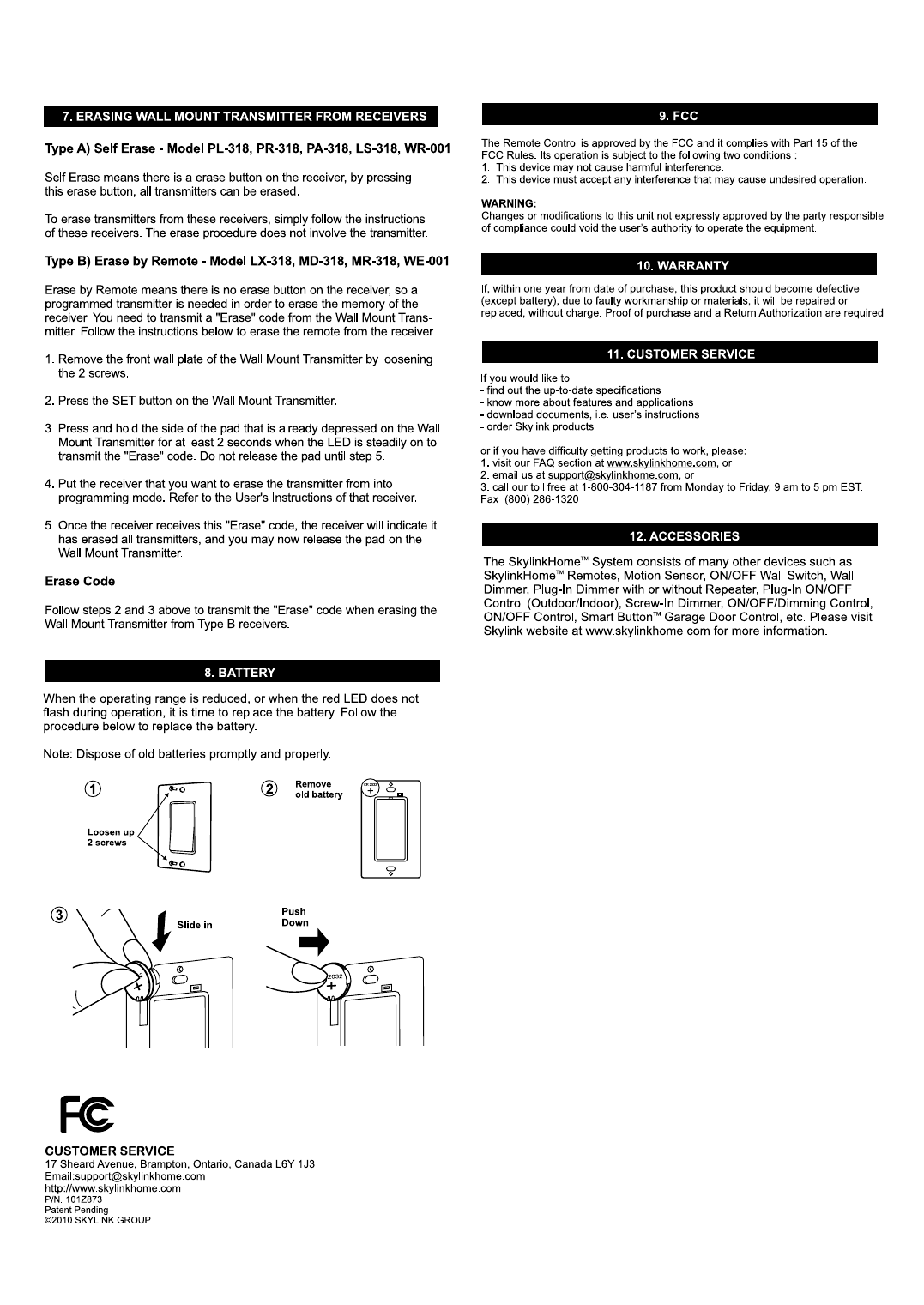
Type A — Self Erase (Models PL-318, PR-318, PA-318, LS-318, WR-001): Use the erase button on the receiver itself; no transmitter action needed.
Type B — Erase by Remote (Models LX-318, MD-318, MR-318, WE-001):
- Remove the front wall plate (loosen 2 screws).
- Press the SET button.
- Press and hold the already-depressed side of the pad for at least 2 seconds while the LED is steadily on to transmit the "Erase" code. Do not release until step 5.
- Put the target receiver into programming mode.
- Once the receiver confirms erasure, release the pad.
Battery Replacement
Replace the battery when operating range decreases or the LED stops flashing during operation. Dispose of old batteries promptly and properly.
FCC Notice
Complies with Part 15 of the FCC Rules. Operation is subject to the conditions that this device may not cause harmful interference and must accept any interference received. Changes or modifications not expressly approved by the party responsible for compliance could void the user's authority to operate the equipment.
Warranty
Warranted for one year from date of purchase against defects in workmanship or materials (excluding battery). Defective units will be repaired or replaced without charge; proof of purchase and a Return Authorization are required.
Customer Service
Skylink Group, 17 Sheard Avenue, Brampton, Ontario, Canada L6Y 1J3 · support@skylinkhome.com · www.skylinkhome.com · Toll-free: 1-800-304-1187 (Mon-Fri, 9am-5pm EST) · Fax: (800) 286-1320