
SimplyProAV Dongler (DO-L001) — 4K HDMI Dongle Adapter Ring Instructions
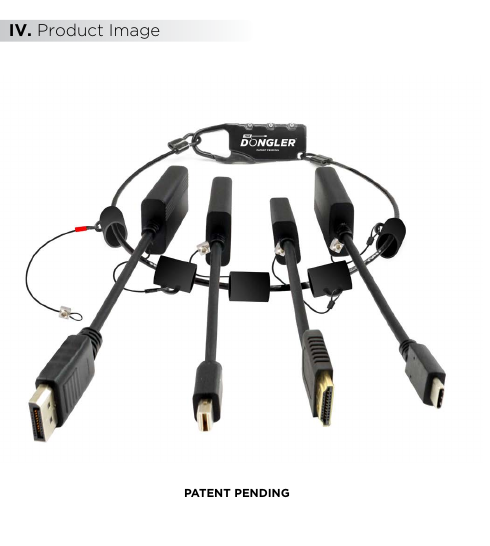
Instruction manual for the SimplyProAV Dongler (P/N DO-L001) — a security ring and combination lock system that discourages theft or accidental removal of HDMI dongles and adapters at AV installations.
Full text manual (for reference)
Instruction manual for the SimplyProAV Dongler™ (P/N: DO-L001) — a 4K HDMI dongle security ring that deters casual theft or inadvertent removal of HDMI dongles and adapters at commercial AV installations.
Note: The Dongler™ is not designed to be an invulnerable protection measure — it's designed to discourage casual theft or accidental removal of attached dongles and adapters.
Package Contents
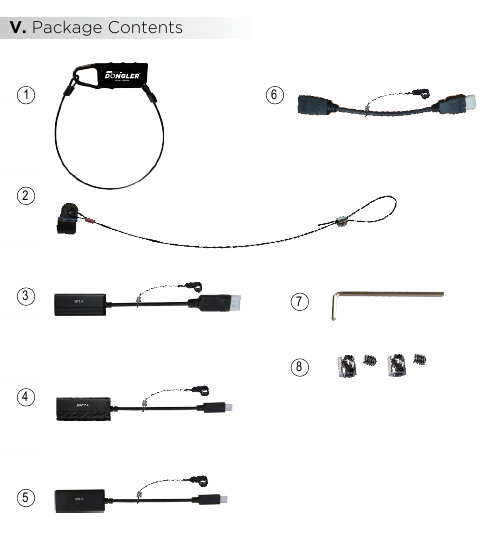
| # | Product | Description | Qty |
|---|---|---|---|
| 1 | The Dongler | Plastic-coated steel ring connected to a combination lock | 1 |
| 2 | HDMI Cable Harness | For securely connecting your Dongler to the device HDMI cable | 1 |
| 3 | DP1.4 Dongle | DisplayPort 1.4 to HDMI 2.0b pigtail adapter | 1 |
| 4 | MDP1.4 Dongle | Mini DisplayPort 1.4 to HDMI 2.0b pigtail adapter | 1 |
| 5 | USB-C Dongle | USB Type-C to HDMI 2.0b pigtail adapter | 1 |
| 6 | HDMI Port Saver | HDMI(M) to HDMI(F) cable adapter | 1 |
| 7 | Hex Tool | Wrench to adjust hex screws | 1 |
| 8 | Hex Screws | Extra set of hex screws | 2 |
Setup Instructions
- Remove the Dongler and all dongles from packaging. Disconnect the wire loop from the combination lock.
- Slide each dongle harness over the wire loop onto the Dongler as illustrated, then slide the HDMI cable harness onto the wire loop.
- Reconnect the wire loop onto the combination lock and set the combination lock code (see Combination Lock Guide below).
- Connect the HDMI cable harness loop over the HDMI infrastructure cable (not included). Widen the loop if necessary by loosening the wire lock.
- After the loop is passed over the HDMI cable connector, loosely tighten the wire loop.
- Tighten the hex screw with the enclosed tool. The HDMI cable harness should easily slide over the HDMI cable — do not overtighten the loop; it should not exceed the size of the HDMI connector strain relief.
Adding or Replacing Dongles
Replacing a dongle: Loosen the hex nut and widen the wire loop, then slide the wire loop over the dongle connector to remove it.
Adding a dongle: Slide the wire loop over the connector, then loosely tighten the wire loop — do not make it too tight; the loop should still slide over the dongle cable.
Combination Lock Guide
Set up the code and lock:
- Press the opening from the bottom and hold.
- Set dials to your desired combination code.
- Release the opening.
- Turn dials to random numbers — the lock is now set to the new combination.
Unlock: Turn the numbers to your lock code, then press the opening.
Code reset: Repeat the "Set up the code and lock" process while it's unlocked. The default code is "000".
Dongle Specifications
| Dongle | Input | Output | Max Resolution |
|---|---|---|---|
| DP1.4 | DisplayPort/M | HDMI A/F | 4K @ 60Hz |
| MDP1.4 | Mini DisplayPort/M | HDMI A/F | 4K @ 60Hz |
| USB Type-C | USB Type-C/M | HDMI A/F | 4K @ 60Hz |
| HDMI Port Saver | HDMI A/M (bi-directional) | HDMI A/F (bi-directional) | 4K @ 60Hz |
All dongles support DisplayPort/USB-C to HDMI 2.0b conversion at up to 18Gbps (4K@60Hz 4:4:4), HDR, HDCP 2.2, mirror/extend mode, and are built with lightweight aluminum enclosures for durability and thermal performance.