
SECO-LARM Enforcer DC-200GQ Dashboard Camera — Manual
Full manual for the SECO-LARM Enforcer DC-200GQ Dashboard Camera, a 1080p HD dash cam with built-in GPS tracking, WDR, and G-Sensor impact protection.
Full text manual (for reference)
Manual for the SECO-LARM Enforcer DC-200GQ Dashboard Camera — a 1080p HD dash cam with built-in GPS tracking, wide 140° viewing angle, WDR (wide dynamic range) for backlight scenes, and G-Sensor automatic file protection in the event of an impact.
Key Features
- Built-in GPS sensor; GPS Tracker logs camera location and speed while recording.
- 1080p HD video recording; 140° wide viewing angle; 3MP CMOS sensor.
- WDR captures clear images even in strong backlight.
- 2.7" 16:9 widescreen display; can be removed from the mount and used as a handheld camera for still images.
- F1.6 aperture for low-light performance.
- Stores images/video on micro SD card (up to 32GB, not included) — exports as MOV format, with HDMI output.
- Auto start/stop recording; G-Sensor automatically protects (locks) the current file on impact.
- Software playback with Google Maps™ integration (SL ENFORCER Dash Camera Player).
Specifications
| Model | DC-200GQ |
| Sensor | 1/3" CMOS Sensor, 2304(H) x 1536(V) effective pixels |
| Memory | Micro SDHC, up to 32GB, class 6 or above (class 10+ recommended) |
| Display | 2.7" LCD color TFT |
| Lens | Wide-angle fixed focus, F1.6, f-3.6mm, 140° viewing angle |
| Video resolution | Full HD 1920x1080 @30fps; HD 1280x720 @30fps; MOV format |
| Snapshot resolution | 3MP (2304x1536) |
| Shutter speed | Electronic; auto 1/2–1/1000 sec |
| G-Sensor | 3-axis G-force sensor |
| Interface | Mini USB, Mini/C-type HDMI, AV |
| Battery | 200mAh Li-polymer (~10 minutes runtime) |
| Input power | 5VDC; car charger input 12–24VDC, output 5VDC |
| Power consumption | 4.5W |
| Operating temperature | -4°F to 149°F (-20° to 65°C) |
| Dimensions / Weight | 4-7/16" x 2-11/32" x 1-15/32" (112.5 x 59.5 x 37.2 mm) / ~3.5 oz (100g) |
Parts included: Camera, car mount, HDMI cable, SL Dash Camera Player CD, car charger, USB cable, manual.
Camera Overview
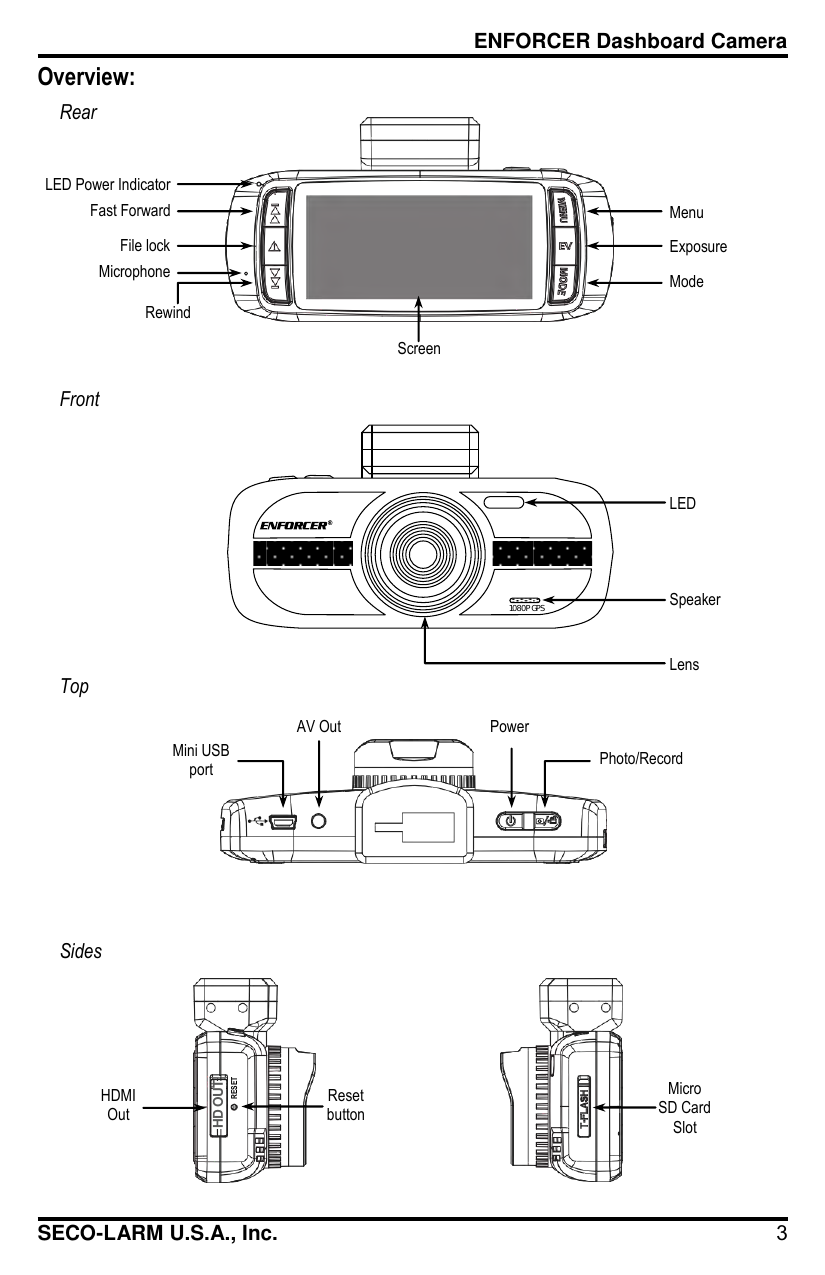
Mounting & Powering
- Insert a micro SD card into the T-FLASH slot on the side before installing.
- Slide the camera onto the bracket until it clicks.
- Decide power source: cigarette lighter (plug car charger in, connect mini USB to camera) or optional fuse box connector (DC-ACC-CS1Q — connect red wire to ignition switch's +12VDC, which must have voltage during Start/On but NOT ACC or constant 12V; connect black wire to chassis ground).
- Choose a windshield mounting spot that won't obstruct the driver's view; clean the area of dust/particles.
- Lift the suction cup lever, place the suction cup on the windshield, then push the lever down to lock the bracket.
- Connect power and adjust the camera's viewing angle.
To remove the camera from the bracket, squeeze the mounting tab and slide in the opposite direction.
Basic Operation
With power connected, the camera automatically turns ON and begins recording whenever the ignition is turned on. If the car's cigarette lighter stays powered even with the ignition off, use the physical power button to avoid battery drain. Menu navigation: press Menu to open the menu (camera must not be recording — stop recording first if the red dot is showing), Up/Down to cycle options, Record button to select, Menu again to exit.
Video Mode Settings (highlights)
- Resolution: 1080FHD, 720P, 720P 60FPS, WVGA, VGA.
- Loop Recording: Off, 2/3/5 minutes — splits continuous recording into segments.
- G-Sensor sensitivity: Off, High, Middle, Low — locks the current file on impact to prevent deletion.
- Motion Detection: On/Off — auto-starts recording when motion is detected.
- GPS Tracker: On/Off — logs location for map playback.
- GPS Speed Warning: Off, 40/60/80/100/120 (units per Speed Units setting).
- Driver Fatigue Warning: Off, 1H/2H/3H/4H full-screen alert.
- Plate Stamp: program a license plate number to display on playback.
- Password Settings: optional menu-access password.
Photo Mode Settings (highlights)
Image Size (12M down to 1.2M), Color (Normal/B&W/Sepia), Anti-Shaking, Capture Mode (Single, 2S/5S/10S timer), White Balance, ISO (Auto/100/200/400), Exposure, Date Stamp, Quality, Sharpness.
Playback & Main Settings
Playback: Delete (current/all), Protect (lock/unlock current or all), Slide Show. Main Settings: Format SD card (warning: erases all data), Language (10 options), Date/Time, Frequency (50/60Hz), LED on/off, Beep Sound, Screen Saver timing, TV Mode (NTSC/PAL), Speed Stamp, Version info, Default Setting (factory reset).
Viewing Footage on a Computer
Either connect the camera directly via USB (select Mass Storage mode) or remove the micro SD card and insert it into a computer's card reader. Install the included SL ENFORCER Dash Camera Player (Windows XP+/Mac OS 10.6.4+) to browse and open video files, view the playback window, compass, and Google Maps™ route/location data, GPS coordinates, speedometer, G-Sensor data, and trip statistics (max/average speed, total distance).
The camera can also be projected to an HDTV/monitor via the included HDMI cable (recording is not possible while connected via HDMI).
Troubleshooting
| Issue | Check |
|---|---|
| Camera will not turn on | Battery fully charged; camera not in mass storage mode |
| Camera will not record video | Camera is in video mode; enough space on the micro SD card |
| Menu won't open on button press | Camera must not be actively recording |
| Camera won't save videos/images | Format the micro SD card |
| Camera won't connect to computer | Select Mass Storage from the camera's menu |
Warranty
Warranted against defects in material and workmanship for one (1) year from date of sale to the original customer. SECO-LARM's obligation is limited to repair or replacement of the returned (transportation prepaid) unit.
SECO-LARM U.S.A., Inc. — 16842 Millikan Avenue, Irvine, CA 92606 | (949) 261-2999 / (800) 662-0800 | www.seco-larm.com