
Menu
-
-
Home Automation
- Home Automation Controllers
- Lighting & Appliance Controls
- Home Automation Sensors
-
Ventilation, Temperature & Flood Controls
- Ecovent Ventilation Controls
- Keen Home Ventilation Controls
- La Crosse Weather Reporting System
- Sensaphone Temperature/Flood
- Winland Temperature/Flood Reporting
- Ezlo Water/Flood Detection
- WaterBug Water/Flood Detection
- WaterCop Water/Flood Detection
- Specialty Water/Flood Detection
- Temperature & Heat Sensors
- Smart Irrigation Controllers
- Smart Thermostats & Ventilation Controls
- Drapery & Blind Opener Systems
- Window Opener Systems
- Door & Gate Opener Systems
- Garage Remotes & Controllers
- Smart Door Locks
-
Security
-
Home Intercom Systems
-
Specials
-
Audio/Video
-
Independent Living
-
Structured Wiring
-
More...
-
Our Brands
- 2GIG
- A&D Medical
- ABB
- Adorne
- Advanced Dynamics
- Aeotec
- Alfred
- American Hunter
- Applied Digital (ADI)
- AprilAire
- Aria Audio Technology
- Arlington Industries
- Applied Digital (ADI)
- AprilAire
- BackBoxx™
- Bellman & Symfon
- BlueSpray
- Cabletronix
- Caregiver Smart Home Automation
- Chamberlain
- Chief Manufacturing
- Cool Components
- Dakota Alert
- Danalock
- DataComm
- Data-Tronix
- D+H
- Displine
- DoorBell Fon
- DynaQuip Controls - Watercop
- Ecovent
- Elk Products
- Enbrighten
- Evolve Technologies
- Ezlo
- FirstAlert
- Flipper
- Flic
- GE
- GoControl
- Go Simply Connect
- Greenfield Direct
- Hamilton CapTel
- Home Controls In-House Exclusives
- HomeSeer
- Honeywell Home
- ION Digital
- Inovonics Wireless
- Interstate Batteries
- Intrasonic Technology (IST)
- Jasco
- KBSound
- Keen Home
- Kwikset
- La Crosse Alerts
- Letzgo Products
- Leviton
- Linear
- Linxura
- Lithe Audio
- Luxul
- Mail Chime
- MedReady
- myTouchSmart
- Napco Security Systems
- NETIO
- Nice North America
- NuTone
- OEM Systems Co.
- Presence Speakers
- On-Q By Legrand
- Open Sesame
- Optex
- Platinum Tools
- Powerline Control Systems
- Qolsys
- Resideo
- Risco Group
- Russound
- RYSE
- STI
- Sanus
- Satco
- Seco-Larm
- Security Door Controls (SDC)
- Sensaphone
- Sensative
- Serene Innovations
- Shelly
- Simply Automated, Inc. (SAI)
- Skylink
- Somfy Systems
- Sonic Alert
- Speco Technologies
- Stelpro
- Street Smart Security
- Structured Cable Products (SCP)
- TekTone
- Tripp Lite
- Truth Hardware
- U-Tec
- UCS
- USP
- Vera
- Versa
- VMP - Video Mount Products
- VSSL
- WeBoost
- Winland Electronics
- X10
- Yale
- ZTECH
- Shop By Compatibility
- Home Essentials
- Central Vac
-
Our Brands
-
- Orders
- Profile
- 1-858-693-8887
- Login
-
United States (USD $)
Add description, images, menus and links to your mega menu
A column with no settings can be used as a spacer
Link to your collections, sales and even external links
Add up to five columns
Add description, images, menus and links to your mega menu
A column with no settings can be used as a spacer
Link to your collections, sales and even external links
Add up to five columns
Platinum Tools EZ-SnapJack — Installation Instructions
September 08, 2026 2 min read
Illustrated installation instructions for the Platinum Tools EZ-SnapJack — snap-together Cat5e/Cat6 keystone jack termination, no punch-down tool required.
Full text manual (for reference)
Illustrated installation instructions for the Platinum Tools EZ-SnapJack — a snap-together keystone jack for terminating Cat 5e and Cat 6 network cable without a punch-down tool.
Illustrated Step-by-Step Instructions
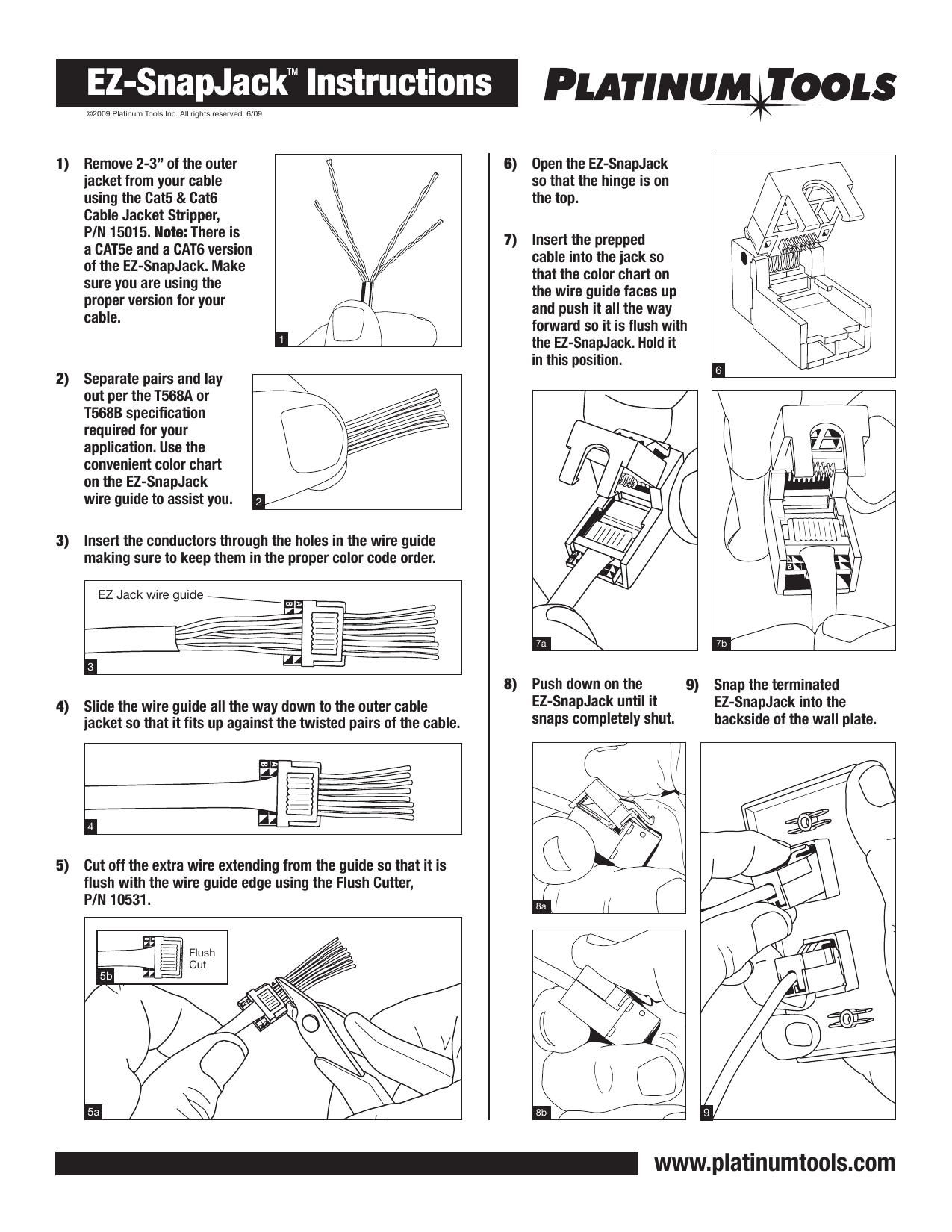
Written Steps
- Remove 2-3" of the outer jacket from your cable using the Cat5 & Cat6 Cable Jacket Stripper (P/N 15015). Note: There is a Cat5e version and a Cat6 version of the EZ-SnapJack — make sure you're using the correct one for your cable type.
- Separate the pairs and lay them out per the T568A or T568B wiring specification required for your application. Use the color chart printed on the EZ-SnapJack wire guide to help.
- Insert the conductors through the holes in the wire guide, keeping them in the proper color-code order.
- Slide the wire guide all the way down to the outer cable jacket, so it fits snug against the twisted pairs.
- Cut off the extra wire extending beyond the guide, flush with the wire guide edge, using the Flush Cutter (P/N 10531).
- Open the EZ-SnapJack so the hinge is on top.
- Insert the prepped cable into the jack with the color chart on the wire guide facing up. Push it all the way forward until flush with the EZ-SnapJack, and hold it in that position.
- Push down on the EZ-SnapJack until it snaps completely shut.
- Snap the terminated EZ-SnapJack into the backside of the wall plate.
Tools Required
- Cat5 & Cat6 Cable Jacket Stripper — Platinum Tools P/N 15015
- Flush Cutter — Platinum Tools P/N 10531
Manufacturer
Platinum Tools Inc. — www.platinumtools.com. © 2009 Platinum Tools Inc. All rights reserved.
Subscribe
Sign up to get the latest on sales, new releases and more …