
JascoPro Series In-Wall Smart Toggle Dimmer — Specifications (59384)
Product specifications for the JascoPro Series In-Wall Smart Dimmer, Toggle style (model 59384), Z-Wave Plus with S2 security.
Full text manual (for reference)
Product specifications for the JascoPro Series In-Wall Smart Dimmer, Toggle style (model 59384) — a Z-Wave Plus certified toggle dimmer with S2 security, full-range dimming, and support for multi-way switch configurations.
Key Specifications
| Power | 120VAC, 60Hz |
| Signal Frequency | 908.4/916MHz |
| Maximum Loads | 600W (2-gang: 500W, 3-gang: 400W) incandescent; 360W or 3A CFL/LED |
| Range | Up to 150 ft. from controller or closest Z-Wave device |
| Operating Temperature | 32–104°F (0–40°C) |
| Z-Wave Module | 700 series |
| Warranty | 5-year limited product warranty |
| Wiring | Requires neutral wire. Dimmer must be mounted indoors. |
Design Features
- QuickFit — improved components reduce housing depth by up to 20% compared to previous models, eliminating the need for heat tabs.
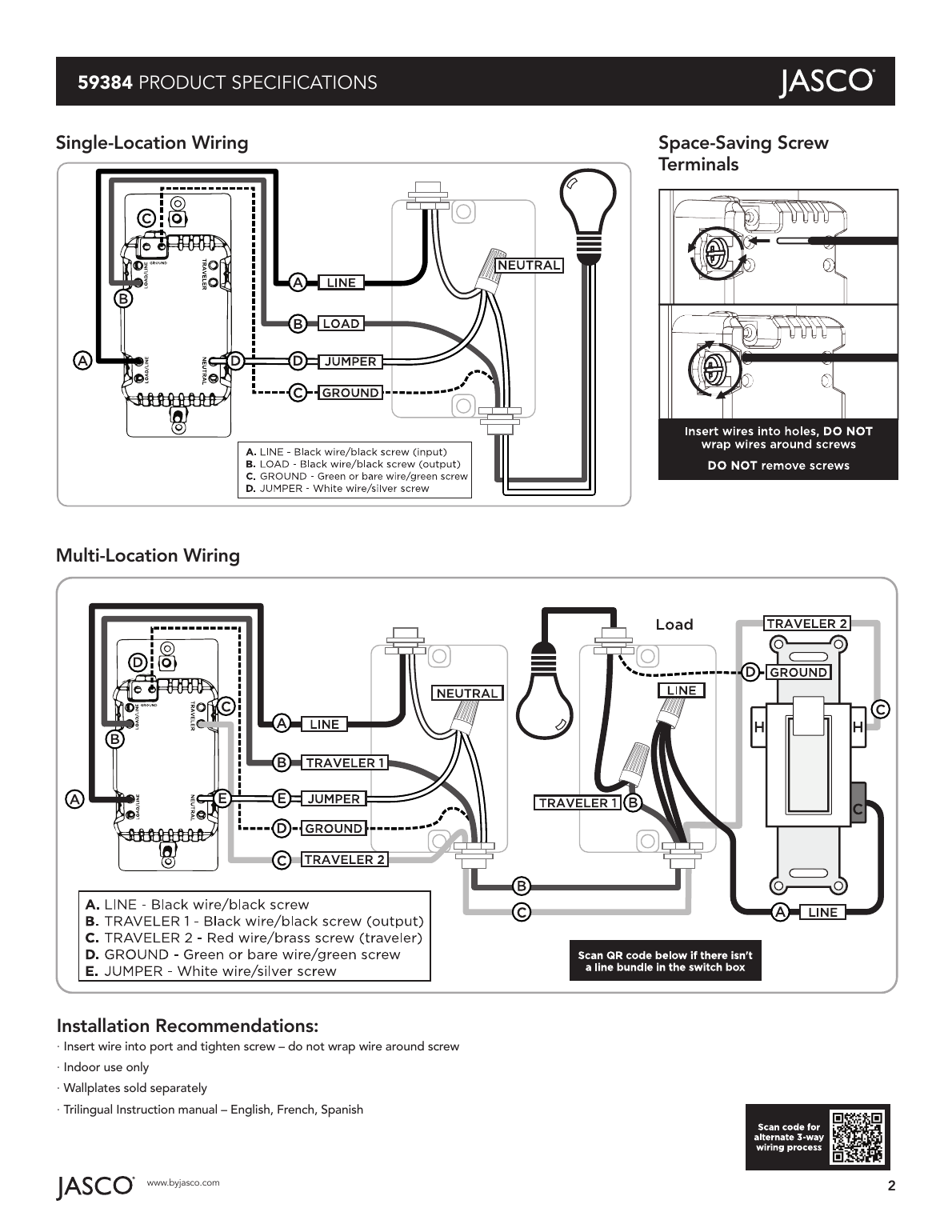
- SimpleWire — auto-sensing line-load terminals support fast installation by detecting line and load wires and configuring the dimmer accordingly. Dual ground ports support daisy-chaining in multi-switch setups.
- Remotely monitor with any mobile device.*
- Voice control works with Amazon Alexa or Google Home when used with a compatible hub.*
- May be used in single-pole installation, or with up to four JascoPro Series add-on switches in 3-, 4-, 5-, or 6-way wiring configurations.
- Works with most dimmable LED, CFL, halogen, and all incandescent bulbs.
- Turn ON/OFF and control brightness manually or via Z-Wave hub or controller.
- Can be included in multiple groups and scenes.
- Uses the Z-Wave firmware update metadata command class for standardized over-the-air firmware updates.
- Supports advanced configuration — dim rates, LED status, minimum/maximum dim levels, and alternate exclusion.
- Full-range dimmability — adjust brightness from 0–100% in 1% increments.
- Screw terminal installation — requires wiring connections for line (hot), load, neutral, and ground. Traveler wire required for 3-way installation.
- Use a standard toggle wallplate (not included).
- LED status can be inverted, set to always OFF, or always ON.
- Multicolor LED indicates switch location in a dark room.
- In-line traveler circuit protection.
- UL Listed to work with dimmable LEDs and CFLs.
- Z-Wave Plus certified.
* Requires Z-Wave hub or controller; functions may vary depending on brand.
Z-Wave Plus with S2 Security and SmartStart
- QR codes with unique, industry-standard secure key exchange add a layer of 128-bit encryption.
- Effortless device pairing to Z-Wave S2 and SmartStart certified gateways.
- Backward compatible with all generations of Z-Wave devices.
- 250% faster processor, 400% more memory, 50% more energy efficient than earlier-generation modules.
- Supports wireless upgrades to future-proof your home.
- Improved battery life and up to 50% greater wireless range.
Wiring Diagrams
Single-location and multi-location (3-way) wiring diagrams, plus the space-saving screw terminal design, are shown below.
Installation Recommendations
- Insert wire into the port and tighten the screw — do not wrap the wire around the screw.
- Indoor use only.
- Wallplates sold separately.
- Trilingual instruction manual included — English, French, Spanish.
Device Configuration
Adding Your Device to a Z-Wave Network
- Follow the instructions for your Z-Wave certified controller to add a device to the network.
- Once the controller is ready to add your device, push the toggle up or down.
You have complete control to turn your fixture ON/OFF and adjust brightness according to groups, scenes, schedules, and interactive automations programmed by your controller. If your Z-Wave certified controller features remote access, you can control your lamp from your mobile devices.
If prompted by the controller to enter the S2 security code, refer to the QR code/security number on the side of the box or the QR code label on the product. Enter the 5-digit code.
To Remove and Reset the Device
- Follow the instructions for your Z-Wave certified controller to remove a device from the network.
- Once the controller is ready to remove your device, push the toggle up or down.
To Return to Factory Defaults
- Slide the air gap switch right.
- While pressing the OFF (bottom) button, push the air gap left and continue pressing the OFF button. The LED flashes through the eight colors once.
Note: This should only be used if your network's primary controller is missing or otherwise inoperable. SmartStart-enabled products can be added to a Z-Wave network by scanning the QR code on the product with a controller supporting SmartStart inclusion — no further action is required, and the SmartStart product will be added automatically within 10 minutes of being switched on in the network vicinity.
Related Products — JascoPro Series Z-Wave In-Wall Smart Controls
- 76598 — In-Wall Smart Switch
- 59380 — Add-on Switch
- 59387 — In-Wall Smart Outlet
- 79244 — Plug-in Smart Switch
Manufacturer
Distributed by Jasco Products Company LLC, 10 E. Memorial Rd., Oklahoma City, OK 73114. Support: 1-833-981-0170, M-F, 7AM–8PM Central Time. Visit jascopro.com for the full product line.