
Ivation Automatic Pill Dispenser (GMIVPILLDW) — Easy Set-Up Guide
Easy set-up guide for the Ivation Automatic Pill Dispenser (Model GMIVPILLDW) — a rotating, alarm-driven medication dispenser with adjustable dosing discs for 1-4 doses per day.
Full text manual (for reference)
Easy set-up guide for the Ivation Automatic Pill Dispenser (Model GMIVPILLDW) — a rotating, alarm-driven medication dispenser with adjustable dosing discs for 1–4 doses per day.
Quick Reference: Setup Steps
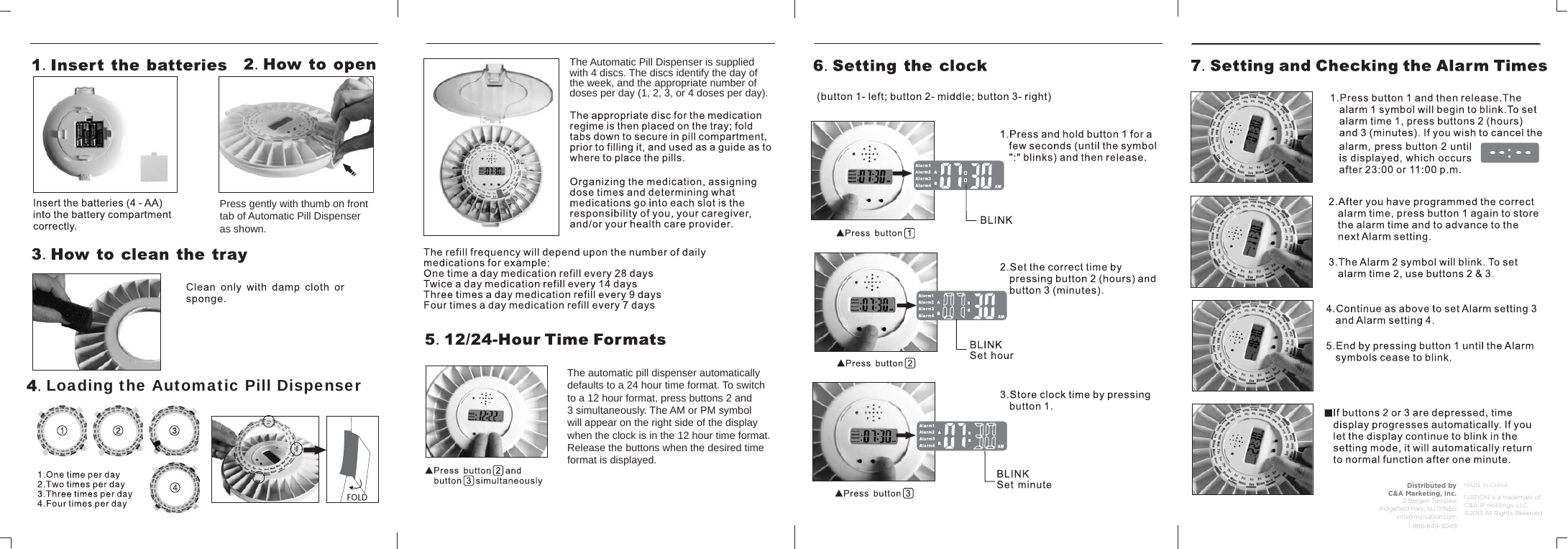
Step-by-Step Instructions
- Insert Batteries: load 4 AA batteries into the battery compartment on the underside of the unit.
- Open the Dispenser: press gently with your thumb on the front tab to open the lid.
- Clean the Tray: wipe the pill tray clean before first use.
- Load the Dispenser: the unit ships with 4 interchangeable discs, each identifying the day of the week and supporting a different number of doses per day (1, 2, 3, or 4 doses). Choose the disc matching your dosing schedule, fill the compartments, and fold the tabs down to secure each dose.
- Set 12/24-Hour Format: the dispenser defaults to 24-hour time. To switch to 12-hour format, press buttons 2 and 3 simultaneously — release when the desired format is displayed. An AM/PM symbol appears on the right side of the display in 12-hour mode.
- Set the Clock: press buttons in sequence (1, then 2, then 3) to set the hour and minute — the corresponding digits blink on the display as you adjust them.
- Set/Check Alarm Times: press through Alarm 1, 2, 3, and 4 in sequence to program up to four daily alarm times.
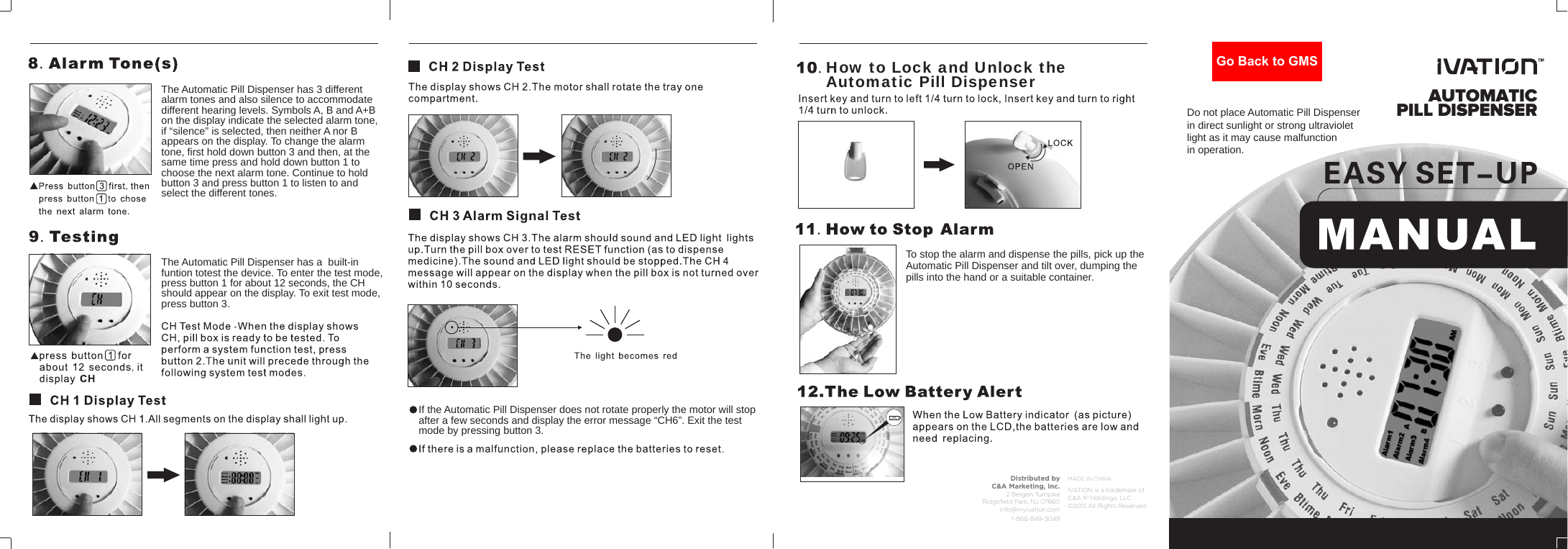
- Choose an Alarm Tone: the dispenser has 3 alarm tones plus a silent option, shown on the display as symbols A, B, or A+B (no symbol = silent). To change it, hold down button 3 and, at the same time, press and hold button 1 to cycle through and preview tones.
- Test Mode: press and hold button 1 for about 12 seconds until "CH" appears on the display to run a built-in self-test. Press button 3 to exit test mode. If the dispenser doesn't rotate properly, the motor stops after a few seconds and displays error "CH6" — exit test mode with button 3.
- Lock/Unlock: use the included key to lock or unlock the dispenser housing.
- Stopping the Alarm / Dispensing Pills: when the alarm sounds, pick up the dispenser and tilt it over to dump the scheduled dose into your hand or a container — this also silences the alarm.
- Low Battery Alert: a battery icon appears on the display when batteries are running low; replace all 4 AA batteries promptly.
Important Notes
- Do not place the Automatic Pill Dispenser in direct sunlight or strong ultraviolet light — it may cause a malfunction.
Manufacturer / Distributor
Distributed by C&A Marketing, Inc., 2 Bergen Turnpike, Ridgefield Park, NJ 07660. IVATION is a trademark of C&A IP Holdings, LLC. Support: info@myivation.com · 1-866-849-3049. Made in China.