
Danalock V3 EURO Apple HomeKit Smart Lock — Mounting Manual
Mounting manual for the Danalock V3 EURO Bluetooth smart lock with Apple HomeKit support, for Euro-profile cylinder doors.
Full text manual (for reference)
Mounting manual for the Danalock V3 BT HK EURO — a Bluetooth smart lock designed for Euro-profile cylinder doors with Apple HomeKit support.
Overview
The Danalock V3 EURO replaces the euro cylinder on your door with a smart, motorized version, controllable via the Danalock app and Apple HomeKit (with Siri voice commands and remote access via an Apple TV or iPad home hub).
Determining Cylinder Length
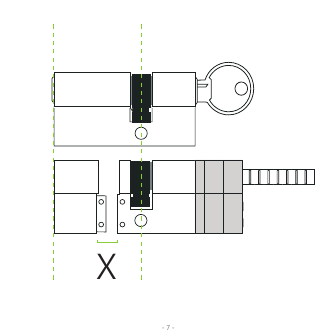
Before installation, measure your door's existing cylinder to determine the correct replacement length. The critical measurement is the "X" dimension shown above — this determines how the cylinder cam aligns once installed.
Installation — Component Overview
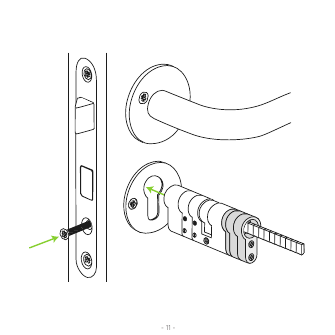
Cylinder Length Selection
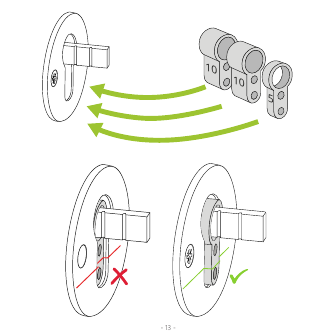
Reference sizing guide (approximate, per door thickness):
| Door Side A | Door Side B |
|---|---|
| 10mm | 15mm |
| 5mm | 15/20mm |
| 10mm | 20/25mm |
| 5+10mm | 25/30mm |
| 10+10mm | 30mm |
Mounting the Cylinder
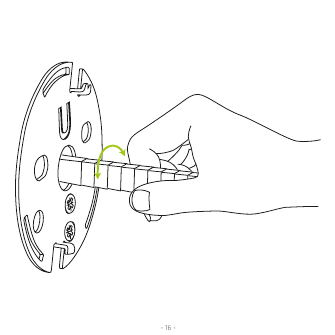
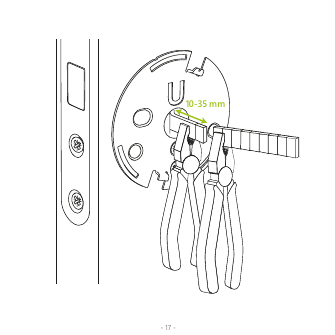
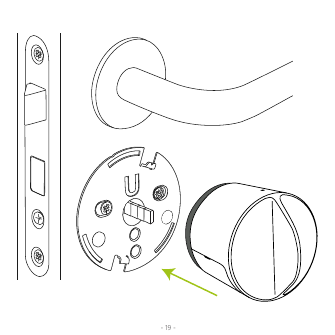
Mount the rosette plate to the door, hand-tighten the cylinder, then use pliers to firmly tighten the connecting screw (adjustable 10–35mm for door thickness). Finally, attach the Danalock smart knob to the rosette — you'll hear a "Click!" confirming it's seated correctly. The Danalock also supports dismounting for cylinder maintenance if needed.
Adding the Danalock to Apple HomeKit
Once mounted on the door, set up the Danalock with the Apple Home app:
- Instructions for using the Home app: https://support.apple.com/en-us/HT204893
- The HomeKit setup code is located inside the battery compartment and on the "Simple Guidelines" leaflet.
Calibrate the Lock
The Danalock must be calibrated to function properly — either automatically or manually via the click-commands below.
LED Signal Reference
| LED Signal | Status |
|---|---|
| Constant red until light finishes | Lock has successfully locked |
| Constant green until light finishes | Lock has successfully unlocked |
| Constant white for 3 seconds | Power on — batteries activated |
| Red flashes every 5 minutes | Critical battery level |
| Constant purple | Firmware updating |
| Blue light flashes | Settings changed/saved |
Configuring via Click-Commands
Access settings via the button in the small hole on top of the lock. Click the number of times shown, wait for the LED color to appear, then wait 5 seconds for the command to execute (a red flash means you've timed out — just wait 5 seconds and retry).
| Clicks | LED Color | Function |
|---|---|---|
| 2 | Yellow | Manual calibration — turn the lock to the unlocked position first, start calibration, turn to locked position while LED blinks, then click once more to save. Times out after 30 seconds without a response. |
| 3 | White | Auto calibration — turn to unlocked position, lift the handle if needed, leave the door open. The lock blinks white while auto-calibrating. |
| 4 | Blue | Hold-back latch — toggles Off / Short wait (5 sec) / Long wait (15 sec). Off blinks red; Short/Long wait blink green. |
| 5 | Purple | Auto lock timer — toggles Off / Short wait (locks after 15 sec) / Long wait (locks after 60 sec). |
| 6 | Cyan | End-to-end unlock — toggles on/off (green blink = on, red blink = off). |
| 8 | Blue/Green blink | Twist assist — toggles on/off (green blink = on, red blink = off). |
| 10 | Red | Reset user settings — deletes all user settings (confirmed by a red blink). |
Firmware Upgrade
Download the Danalock app from the App Store and log in as a "HomeKit only" user. Press the download icon on the front page to start the firmware upgrade. Keep your phone near the Danalock throughout the entire upgrade process.
Technical Information
Controlling this HomeKit-enabled accessory automatically and away from home requires an Apple TV with tvOS 10.0+ or an iPad with iOS 9.0+ set up as a home hub. HomeKit provides end-to-end encryption and authentication between the accessory and your iPhone, iPad, or iPod touch.
Legal Information
The Works with Apple HomeKit logo certifies the accessory connects specifically to iPod touch, iPhone, or iPad and meets Apple performance standards. Apple is not responsible for the device's operation or regulatory compliance. Apple, Apple Watch, iPad, iPad Air, iPhone, and iPod touch are trademarks of Apple Inc.; HomeKit is a trademark of Apple Inc.
Manufacturer
Danalock International ApS, Gammel Stillingvej 427C, 8462 Harlev, DK — +45 4242 8122, info@danalock.com, www.danalock.com
For localized versions of these instructions, visit guide.danalock.com