
Danalock V3 BT HK SCANDI — Apple HomeKit Mounting Manual
Mounting manual and click-command configuration reference for the Danalock V3 BT HK (SCANDI), an Apple HomeKit-enabled Bluetooth smart lock.
Full text manual (for reference)
Mounting manual for the Danalock V3 BT HK (SCANDI profile), an Apple HomeKit-enabled Bluetooth smart lock that replaces the interior thumb-turn of a standard deadbolt.
Installation Overview
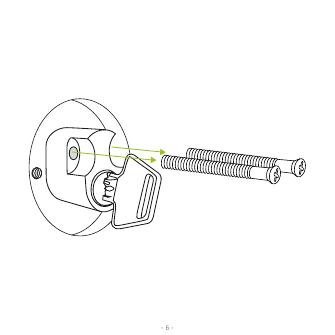
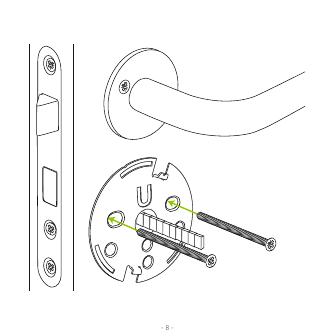
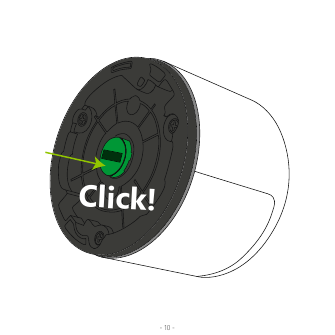
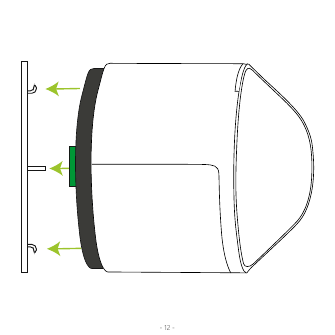
The Danalock V3 mounts over your existing deadbolt mechanism, replacing only the interior thumb-turn assembly — the exterior key cylinder and strike plate remain unchanged. Installation involves removing the existing interior hardware, mounting the new plate, and clicking the Danalock module onto the mounting hub.
Set Up With Apple HomeKit
Once the Danalock is mounted on the door, it's ready to be set up with the Apple Home app. Instructions on using the Home app are available directly from Apple's support site. The HomeKit setup code can be found both inside the battery compartment and on the "Simple Guidelines" leaflet included in the box.
Calibrating the Lock
The Danalock needs to be calibrated to function properly, either automatically or manually using the click commands below.
LED Signal Reference
| LED Mode | Status Indication |
|---|---|
| Constant red until light finishes | Lock has successfully locked |
| Constant green until light finishes | Lock has successfully unlocked |
| Constant white for 3 seconds | Power on — batteries activated |
| Red light flashes every 5 minutes | Critical battery level |
| Constant purple | Firmware is being updated |
| Blue light flashes | Settings are changed/saved |
Configuring via Click-Commands
Configure the Danalock via the button in the small hole on top of the lock. Click through settings — the LED changes color per the scheme below. When you reach the desired setting, wait 5 seconds and the Danalock will act on your command. If you overshoot to a click count with no LED response, just wait 5 seconds; the LED flashes red to indicate a timeout, and you can start over.
| Clicks | LED Color | Activity |
|---|---|---|
| 2 | Yellow | Manual calibration — turn the Danalock to the desired unlocked position, start calibration, wait for yellow blink, then turn to the desired locked position while it blinks and click once to save. Confirms with a green blink. Cancels automatically after 30 sec of no response. |
| 3 | White | Auto calibration — turn to unlocked position (lift the handle if needed), leave the door open, and start; the Danalock blinks white while auto-calibrating. |
| 4 | Blue | Hold-back latch — toggles Off / short wait (5 sec) / long wait (15 sec) each time entered. Off responds with a red blink; short wait with short green blinks; long wait with one long green blink. |
| 5 | Purple | Auto lock timer — toggles Off / short wait (locks after 15 sec) / long wait (locks after 60 sec). Off responds with red; short/long wait with green blink patterns. |
| 6 | Cyan | End-to-end unlock — toggles on/off; turning off responds with one red blink, turning on with one green blink. |
| 8 | Blue/Green blink | Twist assist — toggles on/off; turning off responds with one red blink, turning on with one green blink. |
| 10 | Red | Reset user settings — deletes all user settings on the Danalock. Responds by blinking red. |
Firmware Upgrade
To install the latest firmware, download the Danalock app from the App Store and log in as a "HomeKit only" user. Press the download icon on the app's front page to start the upgrade. Keep your phone near the Danalock during the entire firmware upgrade process.
Technical Information
Controlling this HomeKit-enabled accessory automatically and away from home requires an Apple TV with tvOS 10.0+ or an iPad with iOS 9.0+ set up as a home hub. HomeKit technology provides end-to-end encryption and authentication between the accessory and your iPhone, iPad, or iPod touch.
Use of the Works with Apple HomeKit logo means the accessory has been designed to connect specifically to iPod touch, iPhone, or iPad and has been certified by the developer to meet Apple performance standards. Apple is not responsible for the operation of this device or its compliance with safety and regulatory standards.
Manufacturer
Danalock International ApS — Gammel Stillingvej 427C, 8462 Harlev, Denmark. +45 4242 8122. info@danalock.com. www.danalock.com