
ChannelPlus H611 Telephone Entry Module — Wiring Reference
Wiring reference guide for the ChannelPlus H611 Telephone Entry Module (Linear OpenHouse™ structured wiring system) — surge suppression, system disconnect, and RJ-31X security connector for up to 4 phone lines.
Full text manual (for reference)
Quick reference guide for the ChannelPlus H611 Telephone Entry Module (part of the Linear OpenHouse™ structured wiring system). This manual is highly illustrated — the diagram below and the full downloadable PDF show all wiring pinouts and connector detail.
Overview
The H611 Telephone Entry Module is a system disconnect and surge suppressor for up to 4 telephone lines, with an RJ-31X connector for security alarm panel integration.
- System disconnect from the telephone company (telco)
- Surge suppression to 50 Joules for 4 lines
- Alarm panel connector, RJ-31X
Safety Information
- Never install telephone wiring during a lightning storm.
- Never install telephone jacks in wet locations.
- Never touch uninsulated telephone wires or terminals unless the telephone line has been disconnected at the network interface.
- Use caution when installing or modifying telephone lines.
- Do not use this product near water — bath tub, sink, laundry tub, wet basement, or swimming pool.
- Never push objects of any kind into this product through cabinet slots — they may touch dangerous voltages.
- Use only UL listed cabinets, such as the Linear H218 or H236.
Wiring Reference Diagram
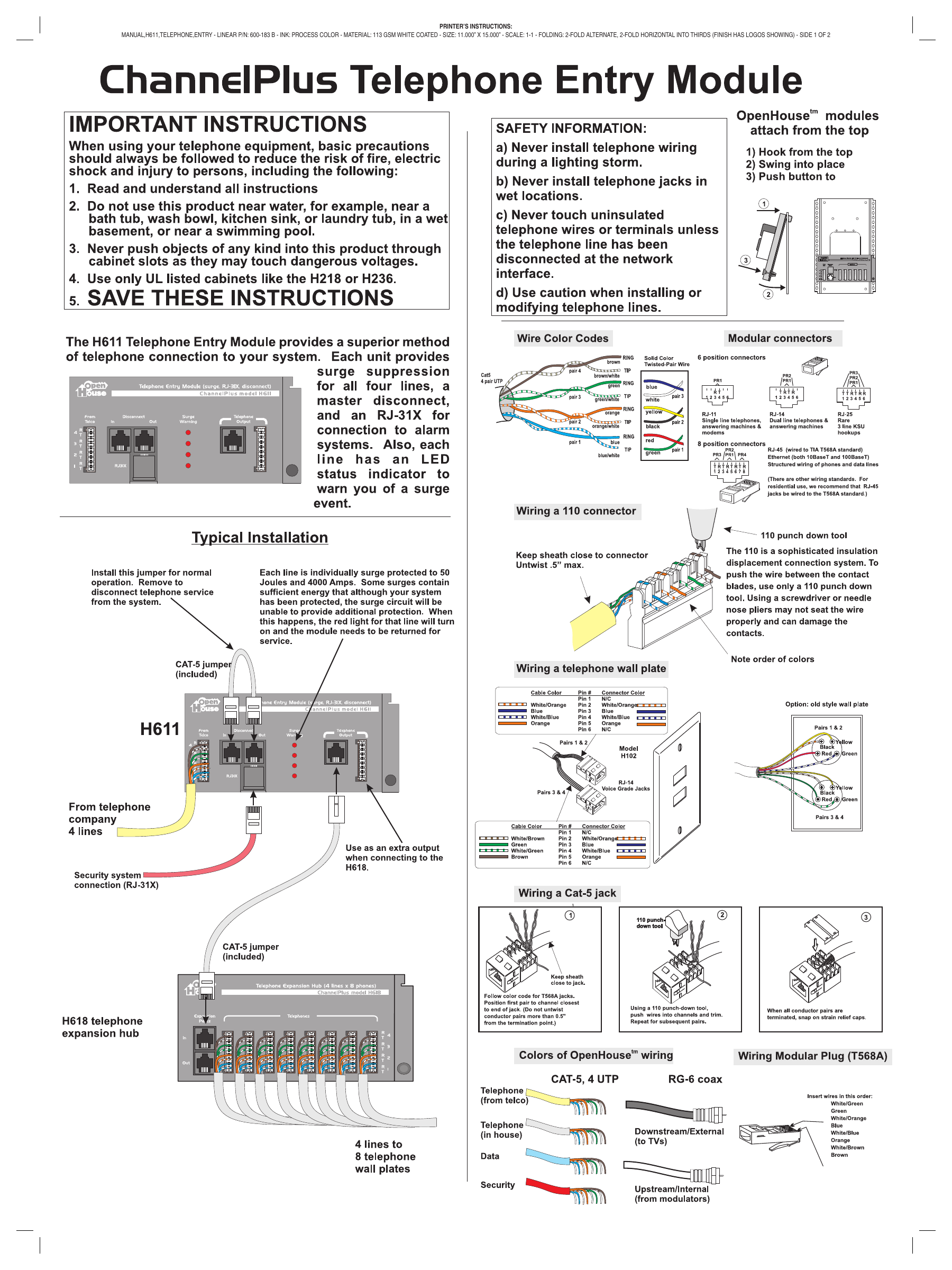
The diagram below covers the typical H611 installation, Cat-5 wire color codes, modular connector pinouts (RJ-11/RJ-14/RJ-25/RJ-45), wiring a 110 connector, wiring a telephone wall plate and Cat-5 jack, and the standard OpenHouse wiring color codes.
Wiring Notes
- Cat-5 4-pair UTP color codes: Pair 1 (blue/blue-white), Pair 2 (orange/orange-white), Pair 3 (green/green-white), Pair 4 (brown/brown-white).
- Modular connectors: RJ-11 (single line telephones, answering machines, modems), RJ-14 (dual line telephones & answering machines), RJ-25 (rare 3-line KSU), RJ-45 (Ethernet 10BaseT/100BaseT, wired to T568A standard for residential structured wiring).
- Wiring a 110 connector: Keep sheath close to the connector; untwist no more than 0.5" max. Use only a proper 110 punch-down tool — a screwdriver or needle-nose pliers may not seat the wire properly and can damage the contacts.
- Wiring a telephone wall plate (Model H102, Voice Grade Jacks): Follow the cable-color-to-pin mapping printed on the H611/H619 wiring label; Pins 2, 3, 4, and 5 carry the active pairs, Pins 1 and 6 are not connected.
- Wiring a Cat-5 jack: Follow the T568A color code. Position the first pair to the channel closest to the end of the jack (do not untwist conductor pairs more than 0.5" from the termination point). Using a 110 punch-down tool, push wires into channels and trim, then snap on the strain relief cap.
Warranty
Linear LLC warrants this product to be free from defects in material and workmanship for 2 years, measured from the date code labeled on the product. The warranty is limited to repair or replacement of products returned freight-prepaid to Linear LLC — there is no provision for labor cost or other reimbursement.
- Not covered: product abuse (including surge damage from lightning), water damage, or damage from natural disasters. The most common form of product abuse is surge damage caused by lightning.
- The warranty is voided by tampering with the date code, labels, or other markings on the product.
- Products damaged in transit due to improper packaging or by the carrier are not covered — the sender is responsible for filing a claim against the carrier.
- The user is responsible for all labor costs associated with removing, reinstalling, and returning the product.
All warranty returns require a Return Product Authorization Number (RPA#). Contact Linear Technical Services at 1-800-421-1587 for an RPA# and details.
Manufacturer
Linear LLC | (760) 438-7000 (USA & Canada) | (800) 996-5225 Toll Free | Fax (800) 468-1340 | www.openhousesystem.com