
Channel Vision AB-318 Micro-USB Bluetooth Wall-Dock — Instructions
Quick reference guide for the Channel Vision AB-318, a Micro-USB Bluetooth wall-dock for A-Bus audio systems.
Full text manual (for reference)
Quick reference guide for the Channel Vision AB-318 — a Micro-USB Bluetooth wall-dock for A-Bus® audio systems. This manual is heavily illustrated; the diagrams below and the full downloadable PDF cover complete wiring and installation details.
Overview
The AB-318 is an on-wall Bluetooth Micro-USB docking station for CAT5 audio systems. The non-skid pad helps hold the music player in place, and its elegant, contemporary styling makes it a good choice for anyone who wants to enjoy their music without defacing the wall.
Features
- Compatible with all A-BUS audio systems
- Charges Micro-USB devices
- Senses audio to automatically override the main audio source
- Uses CAT5 cabling
- Mounts in a standard 2-gang box
- Bluetooth streaming
Connections
- Input RJ-45 & 110 Connectors — connect to the CAT5 audio hub (use only one CAT5 cable).
- Output RJ-45 & 110 Connectors — connect to the CAT5 audio amplifier input (use only one CAT5 cable).
- Front/top: hinged dock lid rotates down to cover the dock connector.
- Front/bottom: dock connector (connects to Micro-USB device) and non-skid pad (secures the device).
Bluetooth Pairing
- Turn Bluetooth on in the pairing device and scan for Bluetooth devices.
- Click on "Android Dock-XXXX" (where XXXX is the last 4 digits of the MAC address) in the Bluetooth device scan list.
- The pairing device will request a PIN code — the default is 1234.
- Enter the PIN code, then your device will pair with the dock.
- Turn on music to begin streaming.
Disconnecting: Disconnect the Bluetooth connection from your device's Bluetooth menu.
Connecting to another device: Disconnect the current pairing, then scan and pair with the new device using the same default PIN (1234).
Installation Diagrams
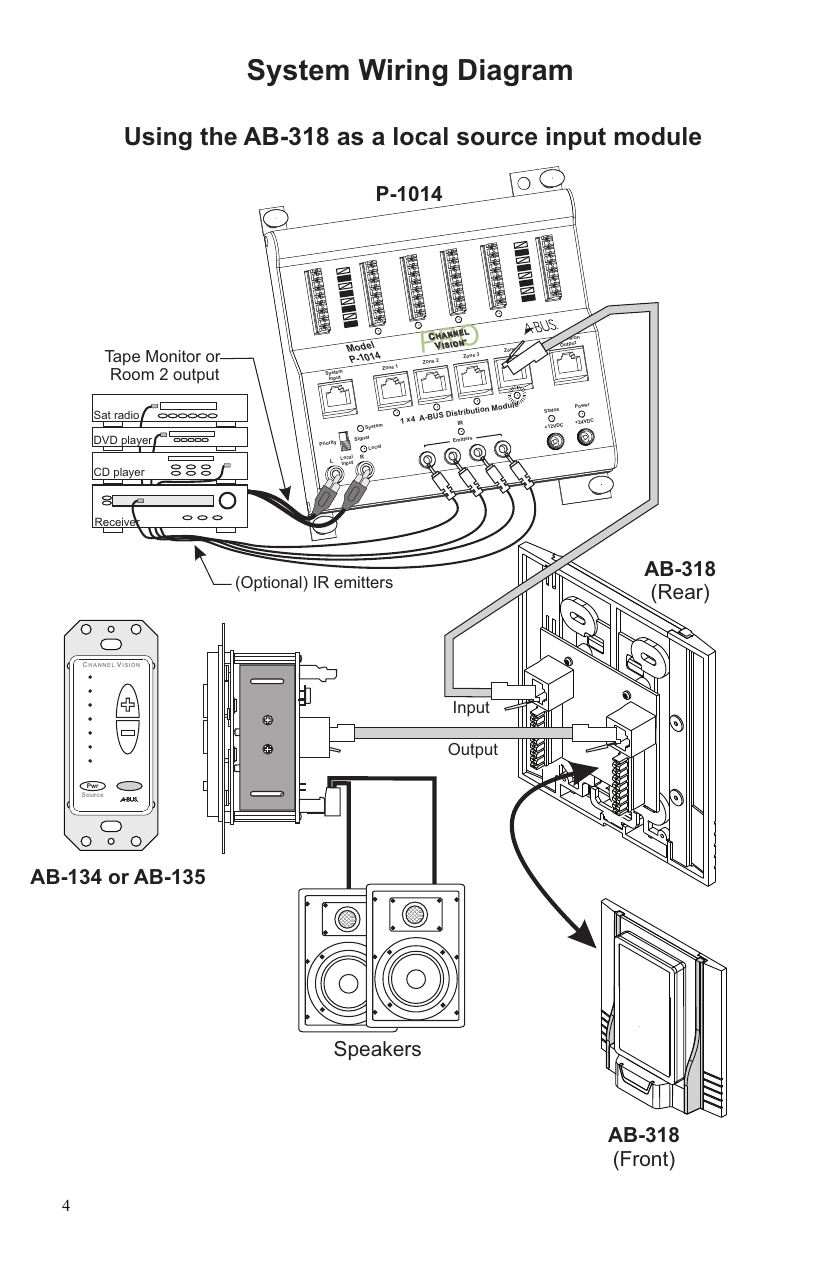
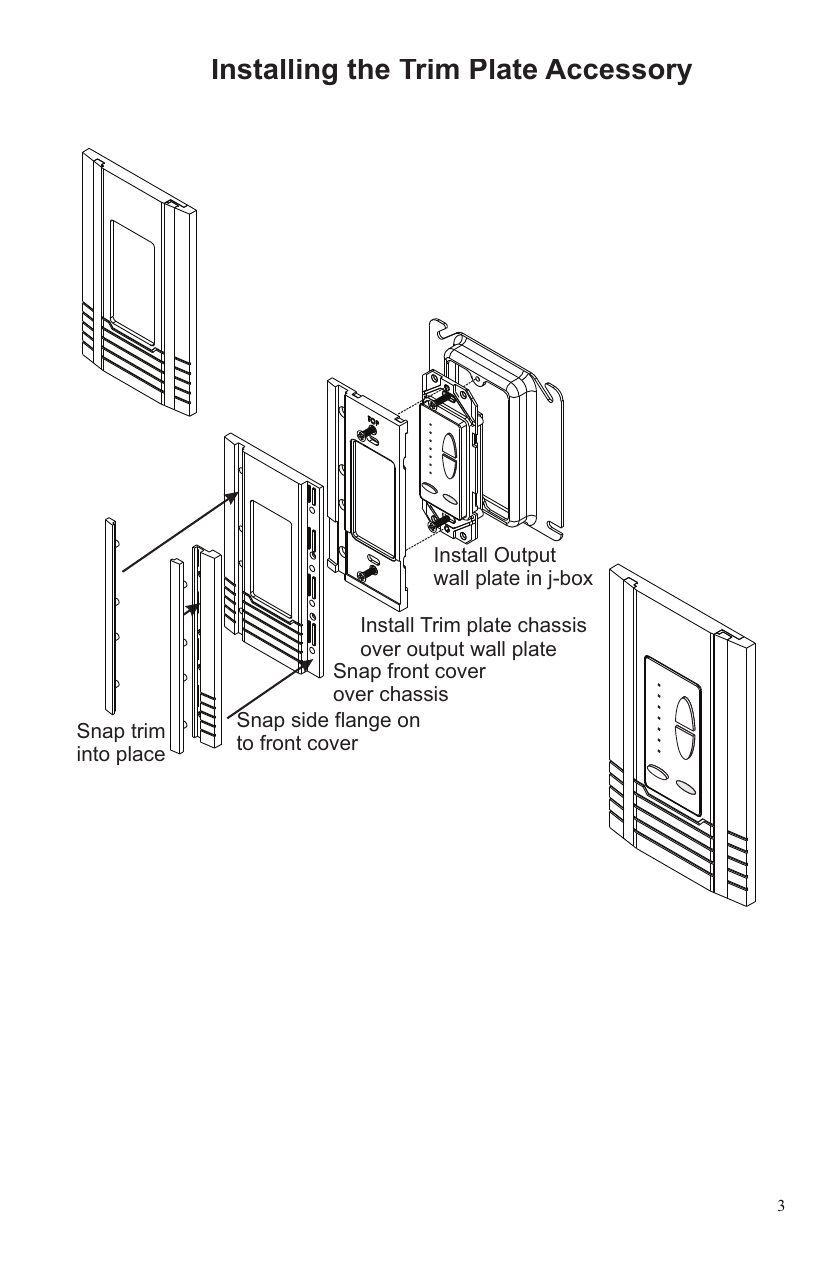
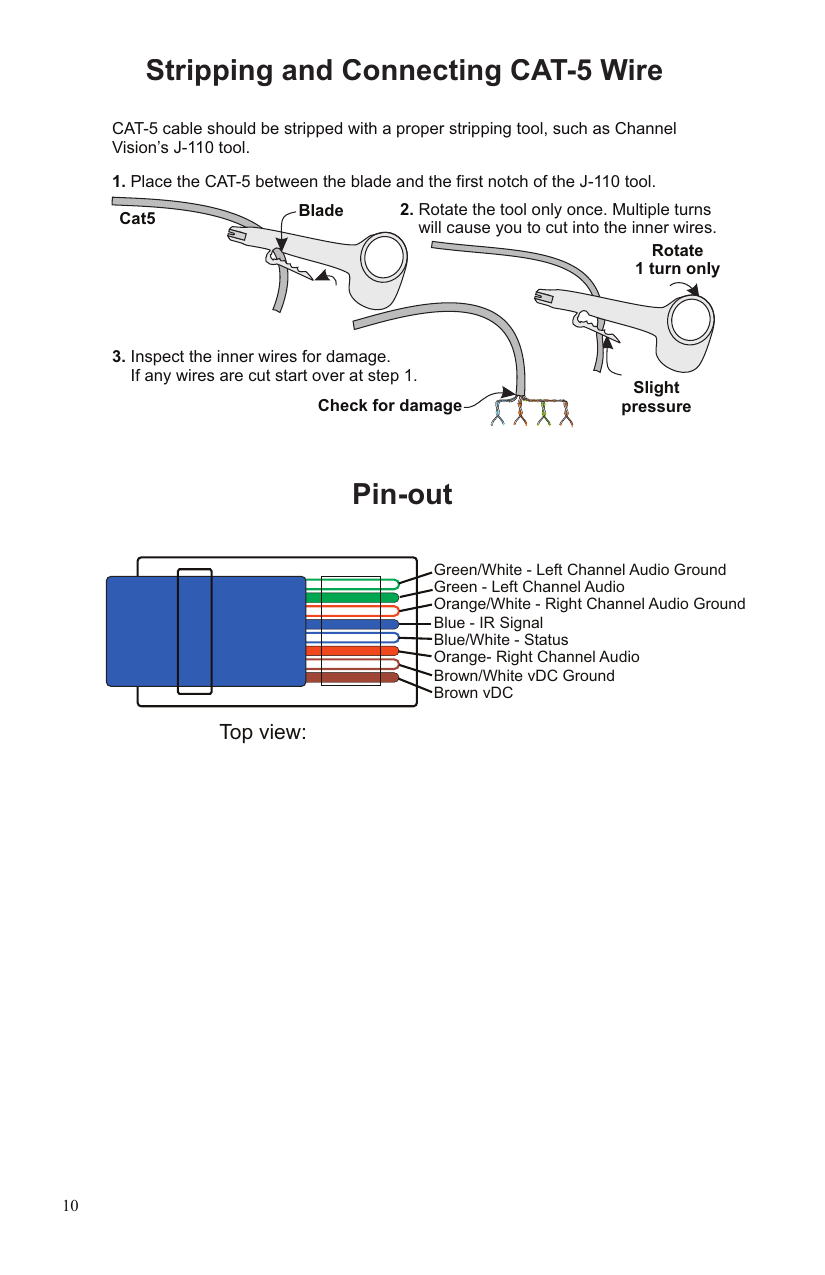
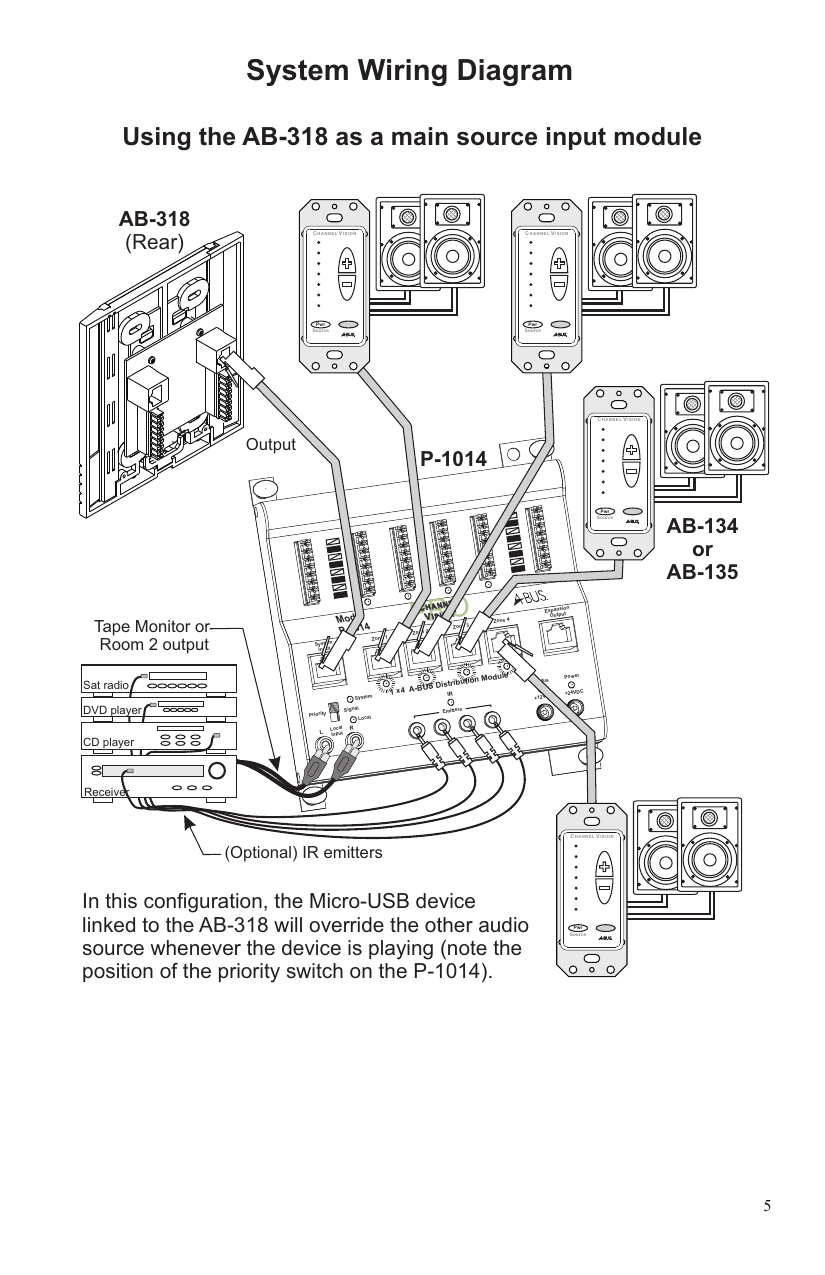
Wall Dock Installation Overview
- Connect all wiring.
- Attach the main chassis to the j-box using the provided four 6-32 screws.
- Feed the dock connector circuit board through the opening in the front cover.
- Hang the front cover on the main chassis from the two top tabs.
- Secure the front cover with the two small screws at the bottom.
- Place the dock platform over the slide rail and push downward until the retention snaps engage.
- Slide the side protectors into the slots on the main chassis.
3-gang installation: A single-gang control keypad can be installed next to the AB-318 in a 3-gang junction box — install the keypad and single-gang trim plate in the far left position, leave off the right-side flange and trim piece, then install the dock in the left side of the 3-gang j-box (it overlaps and snaps into the single-gang trim plate).
Connection Tips & Troubleshooting
Note: Maximum charging voltage is 5VDC / 500mA. Do not plug in a tablet computer to this dock — doing so can damage either device and will void the warranty.
| Problem | Troubleshooting |
|---|---|
| Not linking with Bluetooth device, or linked but no audio plays | Restart the Bluetooth dock; restart the Bluetooth device; make sure the Bluetooth device is in play mode. |
| Audio quality issues | Verify CAT5 cable is wired to the TIA-568A standard at both ends (mis-wiring can distort sound or damage components). Verify speakers are connected in phase. If no audio, confirm the source is playing and the keypad power button is on. |
| Hum in system | Plug all system parts into the same outlet, or try a ground-lifting plug — different electrical grounds across components can cause an audible 60Hz hum. Solution: use a common-ground circuit. |
Additional tips: The AB-318 charges a Micro-USB device — the device's screen should show it's charging (press the volume buttons on the keypad to confirm power/LEDs are lit). Max recommended wire length between wall dock and CAT5 audio hub is 250 ft.; longer runs may work but aren't recommended due to power loss. For Micro-USB device issues unrelated to docking, contact the device manufacturer.
Warning: Do not turn the volume all the way up if no audio is present — doing so could damage speakers if audio reconnects.
Specifications (typical @25°C)
- Operating Voltage (from Hub): 24VDC
- Cable Requirements: CAT-5 or better
- Recommended Max. Cable Length: 250ft.
- Operating Temperature: -10°C to +50°C
Specifications subject to change without notice. Tested to comply with FCC standards (Part 15).
Warranty
Channel Vision Technology will repair or replace any defect in material or workmanship occurring during normal use, with new or rebuilt parts, free of charge in the USA, for one year from the date of original purchase — a no-hassle warranty, no mail-in card needed. Does not cover shipping damage, acts of God, failures caused by third-party products, or failures due to accident, misuse, abuse, or alteration. Extended only to the original purchaser when purchased from an authorized reseller, with proof of purchase required. Mail-in service: call (800) 840-0288 toll free for a Return Authorization number.
Channel Vision products are not intended for use in medical, lifesaving, life-sustaining, or critical environment applications.
Contact
Channel Vision Technology · 234 Fischer Avenue, Costa Mesa, California 92626 USA · (714) 424-6500 · (800) 840-0288 · fax (714) 424-6510 · techsupport@channelvision.com · www.channelvision.com