
Channel Vision A0301 — Universal Input Module Instruction Manual
Instruction manual for the Channel Vision A0301 Universal Input Module — wiring diagrams, system components, and IR repeating setup for CAT5 Audio Systems.
Full text manual (for reference)
Instruction manual for the Channel Vision A0301 Universal Input Module — a decorator-style faceplate device for CAT5 Audio Systems that accepts audio from any standard L/R line-level source (TVs, MP3 players, computers) and can be used as a local room input or as the main system input.
Overview
- Compatible with Channel Vision's CAT5 Audio Systems
- Automatically senses audio to override the main audio source
- Provides 2 IR emitter outputs
- Uses standard CAT5 cabling for input/output (110 and RJ-45 connectors — use one or the other, not both)
- LED indicator flashes when IR signal is present
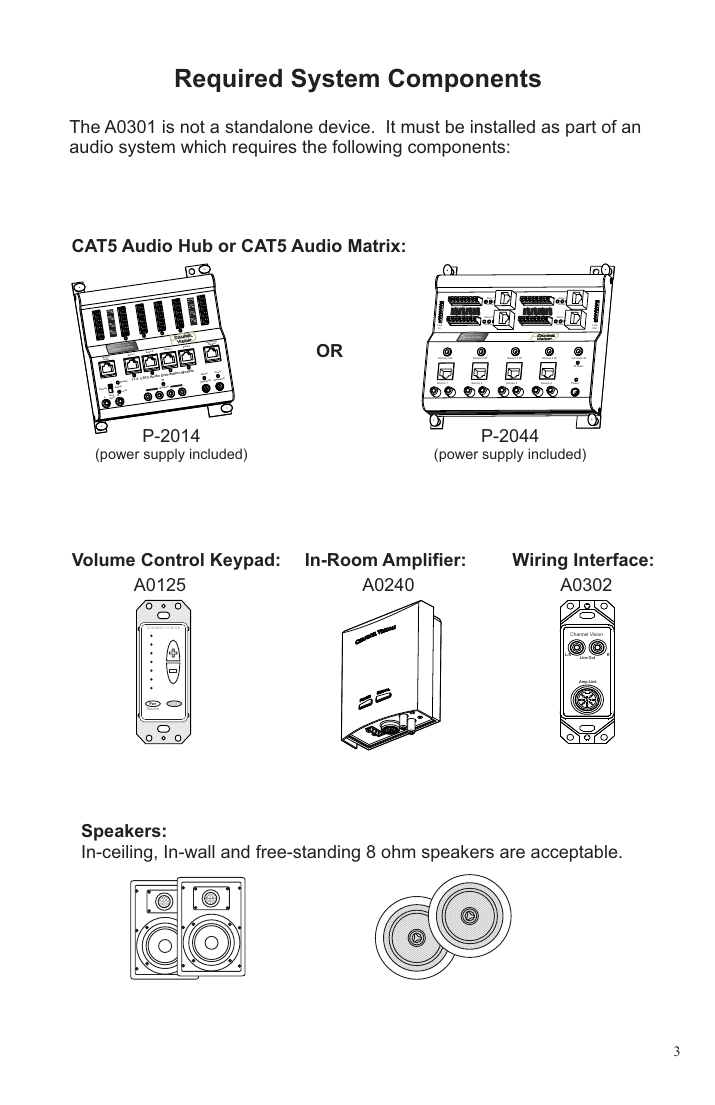
Required System Components
The A0301 is not a standalone device — it must be installed as part of a complete CAT5 audio distribution system, which requires:
- CAT5 Audio Hub or CAT5 Audio Matrix (e.g. P-2014 or P-2044)
- Volume Control Keypad (A0125)
- In-Room Amplifier (A0240)
- Wiring Interface (A0302)
- Speakers: in-ceiling, in-wall, or free-standing, 8-ohm compatible
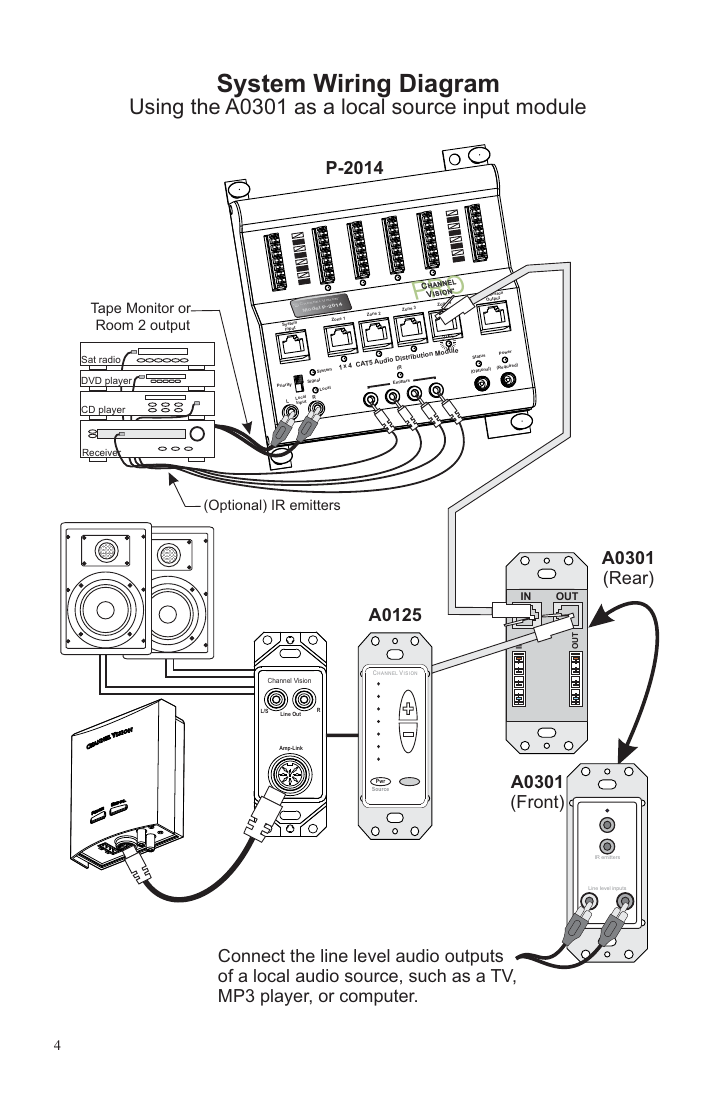
Using the A0301 as a Local Source Input
Connect the line-level audio outputs of a local source (TV, MP3 player, computer) directly to the A0301's front-panel RCA inputs. The A0301 is wired in-line between the CAT5 Audio Hub/Matrix (System Input) and the A0125 volume control keypad, letting the room's local source override the main system audio when present.
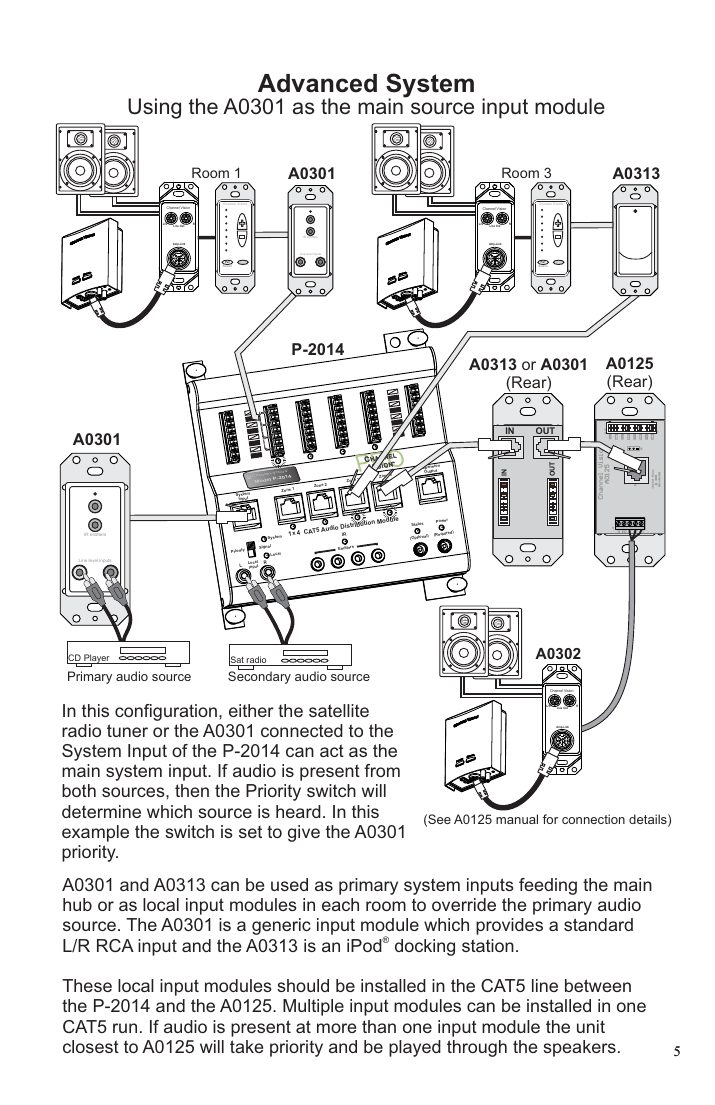
Using the A0301 as the Main System Input
The A0301 (and its iPod-dock counterpart, the A0313) can also serve as the primary system input feeding the main hub, while additional local A0301/A0313 units are placed in individual rooms to override the primary source. If audio is present at more than one input module, the unit closest to the A0125 keypad takes priority. A Priority switch on the main hub also lets you choose which of two competing main sources (e.g. satellite radio vs. the A0301) is heard when both are active.
IR Repeating
The A0301 provides 2 IR emitter outputs. Place IR-3002 emitters over the IR receiver on each source component, and connect that source's audio L/R output (e.g. from a receiver's tape monitor output) to the A0301. IR signals detected at the A0125 keypad are repeated at both the local A0301 and the main A0301, so users can control source components from any room.
CAT5 Wiring Notes
- Strip CAT5 cable with a proper stripping tool (e.g. Channel Vision's J-110 tool) — rotate only once, as multiple turns can damage the inner wires. Inspect wires for damage before proceeding.
- TIA-568A RJ-45 pinout used by this system: Green/White = Left channel ground, Green = Left channel, Orange/White = Right channel ground, Blue = Signal, Blue/White = Status, Orange = Right channel, Brown/White = Ground, Brown = 24VDC.
Specifications
- Operating Voltage: 18VDC
- Cable requirements: CAT5 or better
- Operating Temperature: -10°C to +50°C
Warranty
Channel Vision Technology will repair or replace any defect in material or workmanship occurring during normal use for one year from the original purchase date — a no-hassle warranty with no mail-in card required. Excludes shipping damage, third-party product failures, and damage from accident, misuse, abuse, or alteration. Extended only to the original purchaser; proof of purchase is required for warranty repairs. For mail-in service, call (714) 424-6500 for a Return Authorization number before shipping.
Manufacturer: Channel Vision Technology, 234 Fischer Avenue, Costa Mesa, CA 92626 — (714) 424-6500 / (800) 840-0288 — techsupport@channelvision.com