
ABB-Welcome M22484-W — 4.3" Video Indoor Station Manual
Full product manual for the ABB-Welcome M22484-W 4.3" Video Indoor Station (USA) — touchscreen indoor unit for the ABB-Welcome video door intercom system.
Full text manual (for reference)
Overview
The ABB-Welcome M22484-W is a 4.3" Video Indoor Station for the ABB-Welcome door communication system (this model is the USA variant; the same product family includes M22483-W with induction loop, and M22481-W). It has a 480x272 pixel color touchscreen display for receiving calls from Outdoor Stations, surveillance monitoring, and intercom communication between indoor stations.
Safety & Intended Use
- Electric voltage warning: disconnect mains power before installation or disassembly. Work on the 100–240V supply system must be performed only by qualified electricians.
- Must only be installed in dry indoor rooms, as an integral part of the ABB-Welcome system (operates exclusively with ABB-Welcome components).
- Never use hard/sharp objects on the touch screen — use a finger or plastic stylus. Clean with a soft cloth and standard glass cleaner only; never use abrasive agents.
Control Elements
- 4.3" colour display
- Call button: access Intercom screen (standby), accept a call (ringing), terminate a call (in-call), or activate manual call (surveillance)
- Unlock button: release default lock of the default Outdoor Station (standby); long-press 3 seconds to toggle "Auto unlock" on the primary Indoor Station; releases the calling/monitored station's lock during a call or surveillance
- Surveillance button: monitor default Outdoor Station (standby); obtain image on secondary indoor station in "One on" mode; long-press to take a snapshot during a call; switch video stream or end surveillance
- Mute button: activate/mute ringtone; long-press mutes ringtone for all Indoor Stations in the apartment; mutes microphone during a call
- Program button: releases the 2nd lock of the default Outdoor Station by default, or opens the Program Button screen if multiple functions are assigned
- Setting button: enters system settings (standby); adjusts volume/colour/contrast/brightness during a call or surveillance
- Microphone, speaker, and (on M22483-W only) an induction loop for hearing-impaired users with hearing aids
Terminal Description
- Outdoor Station selector switch — sets the address of the default Outdoor Station
- Indoor Station selector switch — X10/X1 set tens/units digits, X100/X200 dip switches set hundreds digits
- Primary/Secondary switch — only one Indoor Station per apartment may be set to Primary (ON = Primary)
- Terminal resistor switch — set to "RC on" on the last device of the line in video or mixed audio/video installations
- a1/b1 bus connector and a potential-free contact for a doorbell pushbutton
Technical Data
| Operating voltage | 20–30 VDC |
| Standby current | 24V, 6 mA |
| Operating current | 24V, 150 mA (200 mA with induction loop) |
| Display | 4.3", 480 x 272 pixels |
| Operating temperature | 5°C to +45°C (storage: -20°C to +60°C) |
| Dimensions | 152 x 124 x 22.6 mm |
Installation
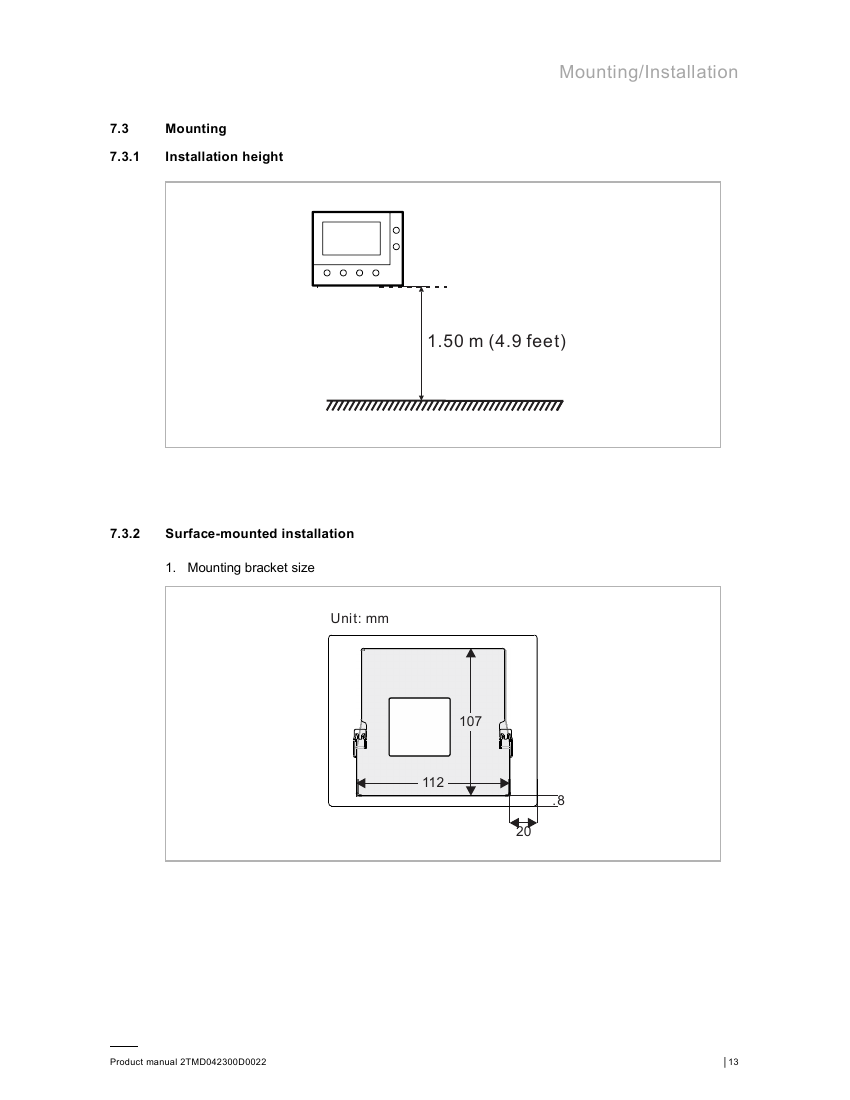
Recommended mounting height is 1.50 m (4.9 feet) from floor to device center. The unit supports surface-mounted installation (with or without an electrical accessory box, in VDE&BS&CN, NEMA/America, NEMA/Italy, or Swiss box formats) or desktop installation.
General wiring rules: terminate all wiring branches via a connected bus device; do not install the system controller next to the bell transformer or other power supplies; do not run system bus wires alongside 100–240V wires; do not share cables between door opener wiring and the system bus; use only two wires for the system bus in multi-core cable; never route incoming/outgoing bus, or internal/external bus, inside the same cable.
Initial Setup
On first power-on (or after factory reset), the Indoor Station walks through: language selection (up to 17 languages), license agreement, date/time, camera list, program button, and intercom list — each of the latter four can be skipped and configured later from the Settings menu.
Operation
Incoming Calls
From an Outdoor Station: the call icon flashes white; press the call button to accept. Two snapshots are taken automatically at 1 and 5 seconds into the call request. The call request times out after 30 seconds if unanswered; during communication, the call auto-terminates after 120 seconds (settings-adjustable). In "One on" mode with a (mini) system controller, only the primary Indoor Station shows the image automatically — the secondary station must press the surveillance button to get the image.
From another Indoor Station / Guard Unit: same ring/accept flow, without the automatic snapshots.
Surveillance
Press the surveillance button in standby to monitor the default Outdoor Station (15-second display window). While monitoring, use the call button for a manual call-out, the unlock button to release that station's lock, or the surveillance button again to switch video streams or end monitoring.
Settings Menu
- Camera list: add/rename/preview/remove cameras; configure "visual doorbell" behavior.
- Program button: assign up to 3 functions (2nd lock, Light, Door, or Actuator), each with its own address.
- Intercom list: add up to 3 intercoms (Intercom internal, Intercom external, or Guard Unit); internal intercoms don't require an address, external/guard unit entries do.
- Audio settings: feedback tone on/off, ringtone volume, ringtone type per source (default Outdoor Station, other Outdoor Station, Intercom, Doorbell), and missed-call indicator on/off.
- Unlock password (primary Indoor Station only): enable a 3–8 digit password required for unlocking.
- Date/time, display, and language settings; "About" screen; and factory reset.
Cyber Security
As part of a networked door communication system, it is the customer's responsibility to provide and maintain a secure network connection (firewalls, authentication, encryption, antivirus, etc.) to protect the device and system against unauthorized access, interference, or data theft. ABB is not liable for damages resulting from security breaches on the customer's network.