
ABB-Welcome M22311/M22313 4.3" Video Hands-Free Indoor Station — User Manual
Full user manual for the ABB-Welcome M22311/M22313 4.3" Video Hands-Free Indoor Station: control layout, menu settings, mounting instructions, and technical specs.
Full text manual (for reference)
Quick reference guide for the ABB-Welcome M22311/M22313 4.3" Video Hands-Free Indoor Station. This manual is heavily illustrated with on-screen menu diagrams and mounting instructions across 220 pages (multiple languages). This page summarizes the safety essentials, control layout, menu settings, mounting options, and technical specs from the English section.
Safety Warnings
- Electric voltage risk: Work on the 100-240V supply system may only be performed by authorized electricians. Disconnect the mains power supply prior to installation and/or disassembly.
- Low-voltage and 100-240V cables must not be installed together in a flush-mounted socket — risk of a 100-240V load on the low-voltage bus line in the event of a short-circuit.
- The M2231x-x is an integral part of the ABB-Welcome M door communication system and only operates with components from that system. Install only in dry indoor rooms.
Control Elements
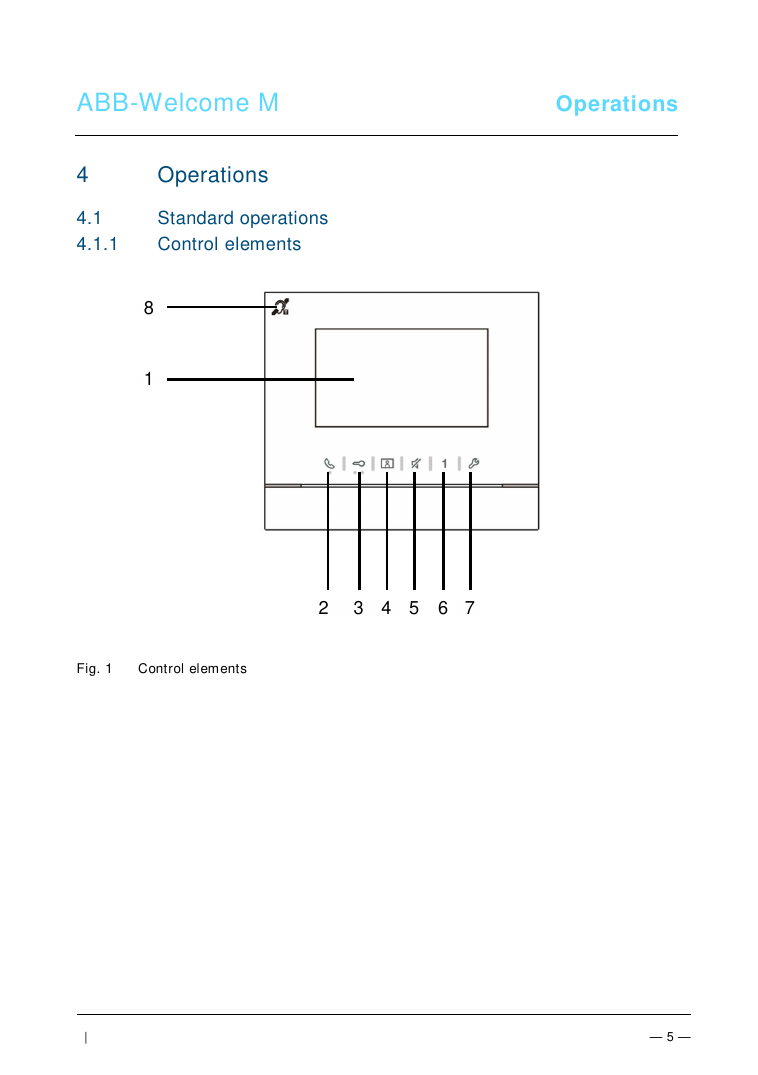
- Communication button: Press to accept/end an incoming call (within 30 sec); in standby, press to enter the communication menu; hold to activate broadcast to other indoor stations in the same apartment.
- Unlock button: Press to open the door at any time. Hold 10+ seconds to toggle Auto-Unlock (automatically opens the door on any incoming call). LED flashes rapidly if the door stays open past the set time (requires a door sensor).
- Surveillance button: In standby, press to view the default outdoor station; while the display is on, press to cycle to the next outdoor station or hold to take a snapshot. Flashing LED indicates a missed call in History.
- Mute button: Press to mute the indoor station's ringtone; hold to mute all indoor stations in the apartment; during an incoming call, press to reject it; during a conversation, press to mute the microphone.
- Programmable button 1: By default, releases the lock connected to an outdoor station (COM-NC-NO). Hold 3 seconds in standby to send an SOS alarm to the guard unit. Can also be configured for intercom calls or calling the guard unit.
- System setting button: Enters the system settings menu.
- Induction loop (M22313 only)
Key Menu Settings
Press the system setting button to access:
- Intercom settings — up to 32 intercom lists (internal, within the apartment, or external, between apartments — requires a master indoor station for external calls)
- Switch actuator — up to 10 actuator lists for controlling connected locks/lights
- Program button — assign functions to the programmable button (release 2nd-lock, call guard unit, intercom call, switch actuator)
- Call forward — forward visitor calls to another indoor station or the guard unit when away (disables auto-unlock when active; master station only)
- Auto unlock — set up to 2 time windows for automatic door unlock on incoming calls (defaults to 10 hours if no time range is set; disables call forward when active; master station only)
- Set OS password — a 6-8 digit door-open code usable with an outdoor station keypad (master station only)
- Ringtone — separate ringtones for default outdoor station, other outdoor stations, apartment doorbell, and other calls (guard unit/intercom)
- Volume — ringtone volume and touch-button feedback tone on/off
- Date and time — including summer time (DST) toggle
- Other settings — auto full-screen, auto-snapshot, door status check (requires a sensor on the outdoor station), missed-call notification
- Blacklist — up to 32 blocked addresses to prevent unwanted calls from other apartments (master station only)
- History — up to 100 recorded events (dialed, received, missed calls) with date/time and snapshot if enabled; two pictures are captured whenever a visitor rings the bell
- Language, Information, and Reset Factory Default — reset all settings (keeps intercom lists/history) or clear all data (full factory reset)
Device Address & Configuration Switches
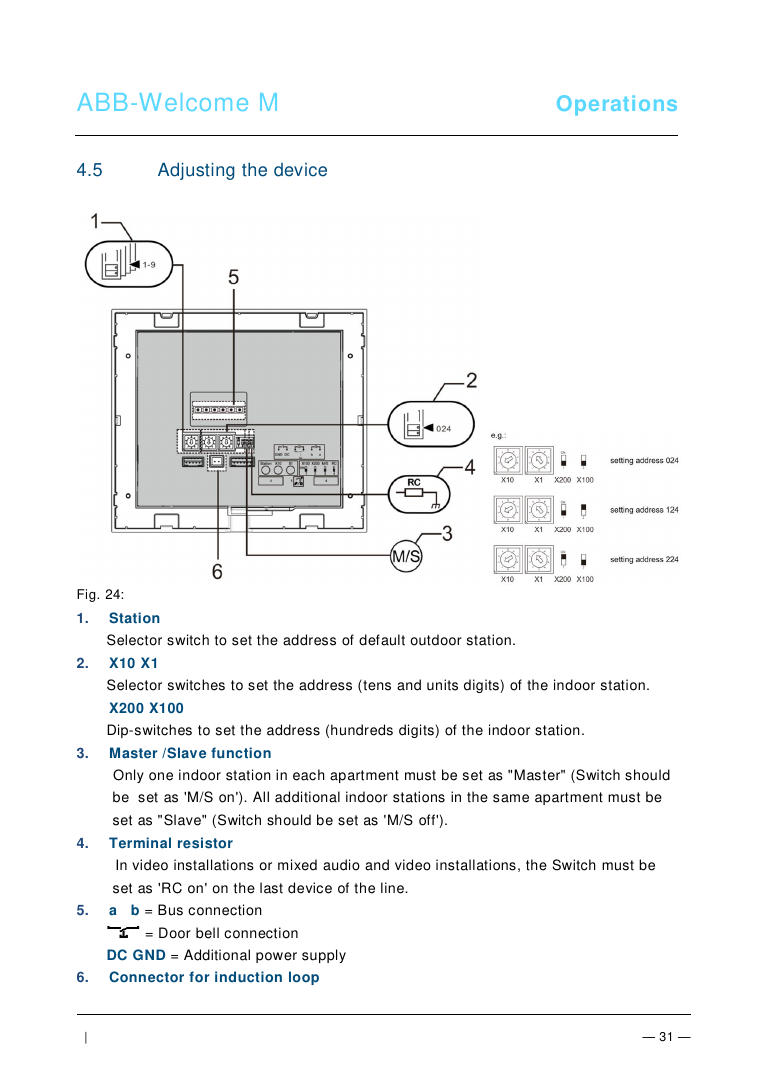
- Station selector switch — sets the address of the default outdoor station
- X10/X1 selector switches — set the tens/units digits of the indoor station address; X200/X100 dip-switches set the hundreds digit
- Master/Slave switch — exactly one indoor station per apartment must be set to Master ("M/S on"); all additional indoor stations in the same apartment must be set to Slave ("M/S off")
- Terminal resistor switch — set to "RC on" only on the last device on the bus line (video or mixed audio/video installations)
- a/b bus connection, door bell connection, and DC GND — for an additional power supply
- Induction loop connector
Mounting / Installation
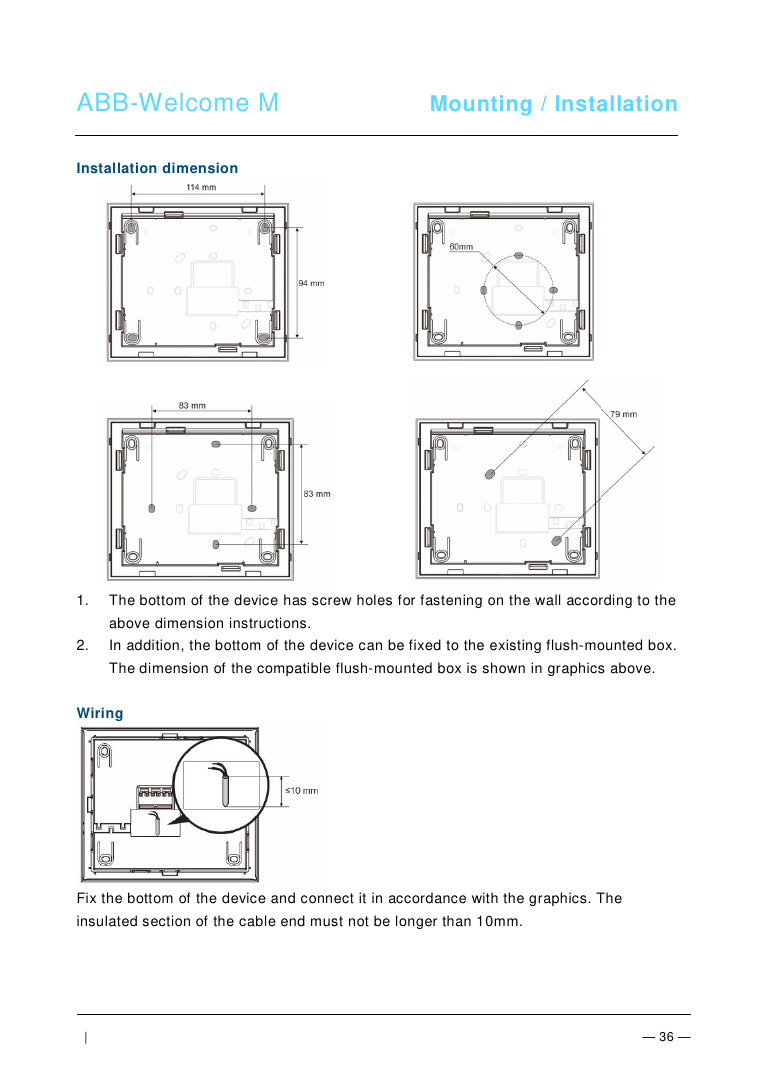
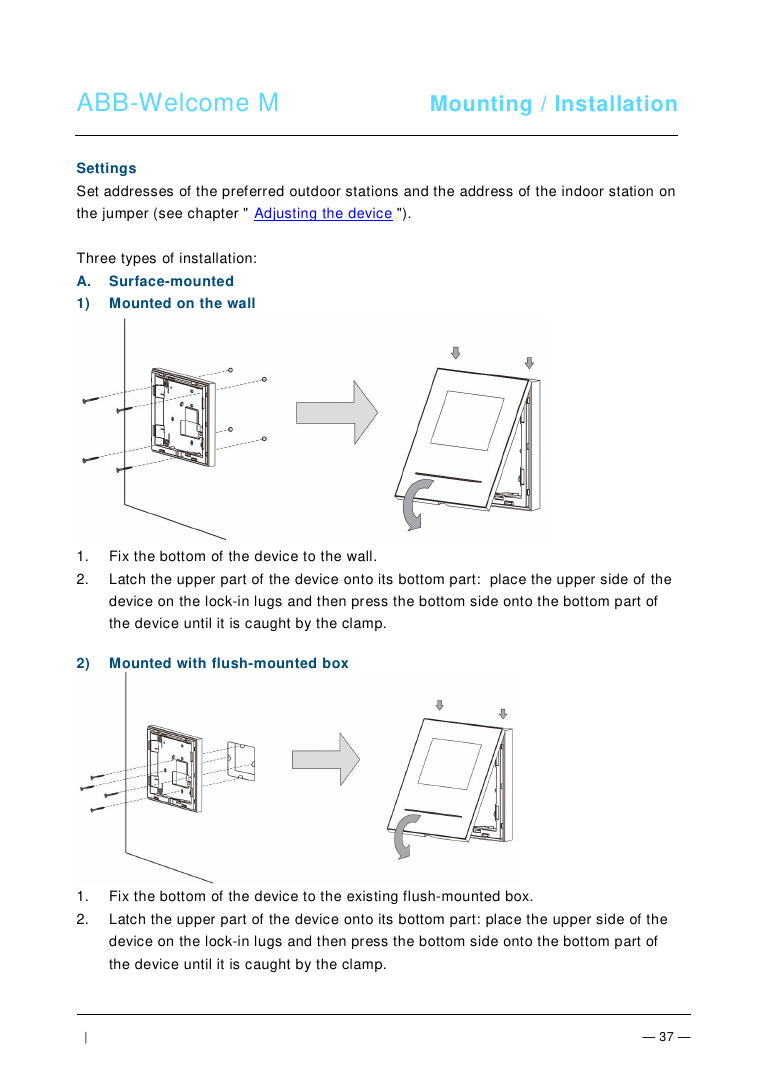
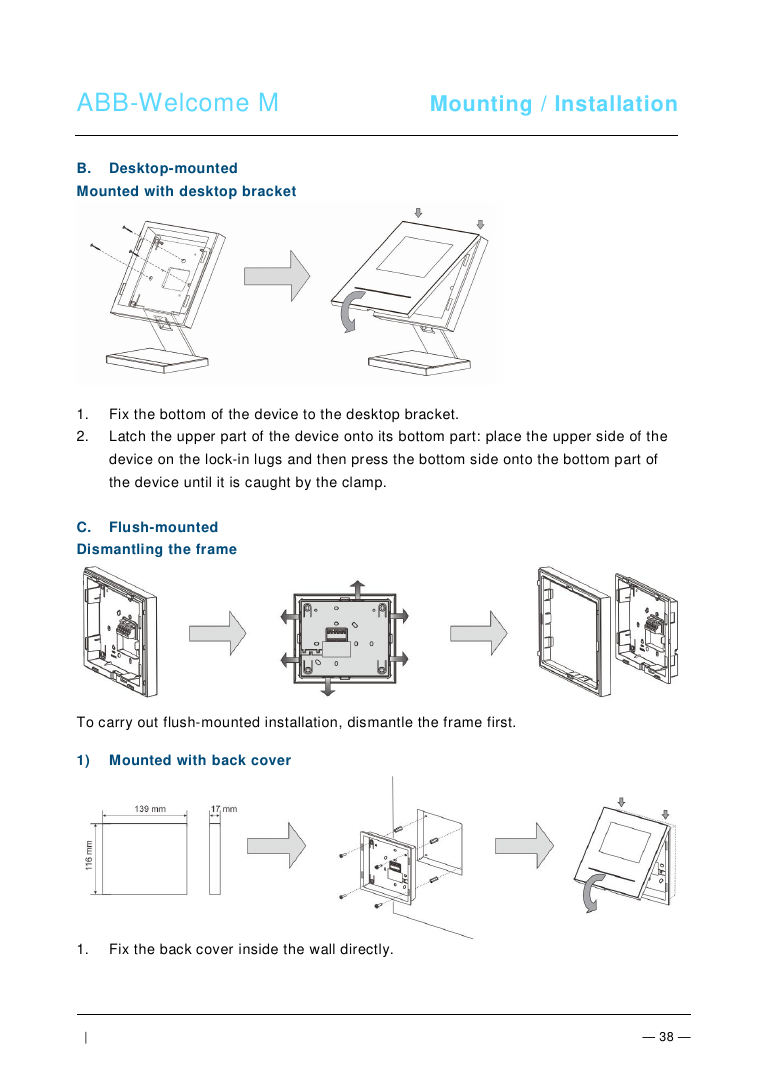
Supports three installation types — wall surface-mount, desktop-mount (with bracket), or flush-mount (with back cover or metal flush-mounted box):
General Installation Rules
- Terminate all wiring branches via a connected bus device (indoor station, outdoor station, or system device)
- Do not install the system controller directly next to a bell transformer or other power supply (avoid interference)
- Do not run system bus wires together with 100-240V wires
- Do not share cables between door opener wiring and system bus wiring
- Use only two wires for the system bus, even within a four-core or multi-core cable
- Never install incoming and outgoing bus wiring, or internal and external bus wiring, inside the same cable when looping
- Insulated cable-end sections must not exceed 10mm when wiring the terminal block
Technical Data
| Spec | Value |
|---|---|
| Display resolution | 480 x 272 |
| Display size | 4.3" |
| Operating temperature | -10°C to +55°C |
| Storage temperature | -40°C to +70°C |
| Protection rating | IP 30 |
| Single-wire clamps | 2 x 0.28 mm² – 2 x 1 mm² |
| Fine-wire clamps | 2 x 0.28 mm² – 2 x 1 mm² |
| Bus voltage | 20-30 V |
Cleaning
- Never use hard or sharp objects on the touch screen — use your finger or a plastic stylus only.
- Clean surfaces with a soft cloth and a commercially available glass cleaner; never use abrasive cleaning agents.
Environmental Compliance
ABB products comply with EU Directive 2002/96/EG (WEEE) and 2002/95/EG (RoHS), and the EU-REACH ordinance (EC No. 1907/2006). Used electric and electronic devices must not be disposed of with domestic waste — dispose of at an appropriate collecting depot.
Manufacturer
ABB / Busch-Jaeger — part of the ABB-Welcome M door communication system product line.