
ABB-Welcome IP H8303 Guard Unit — Product Manual
Full commissioning, operation, and cyber security reference for the ABB-Welcome IP H8303 Guard Unit — the concierge/security touchscreen station for door entry systems.
Full text manual (for reference)
Product manual for the ABB-Welcome IP Guard Unit (H8303, H8303-02) — a 7" touchscreen concierge/security station for managing incoming calls, surveillance, lock groups, and emergency unlock across a Welcome IP door entry system.
Safety Warning
Electric voltage! Dangerous currents flow through the body when coming into direct or indirect contact with live components — this can result in electric shock, burns, or death. Disconnect mains power prior to installation/disassembly. Work on 100-240V supply circuits must only be performed by qualified specialist staff.
Intended Use
As part of the Busch-Welcome IP system, this device can only be used with accessories from the system.
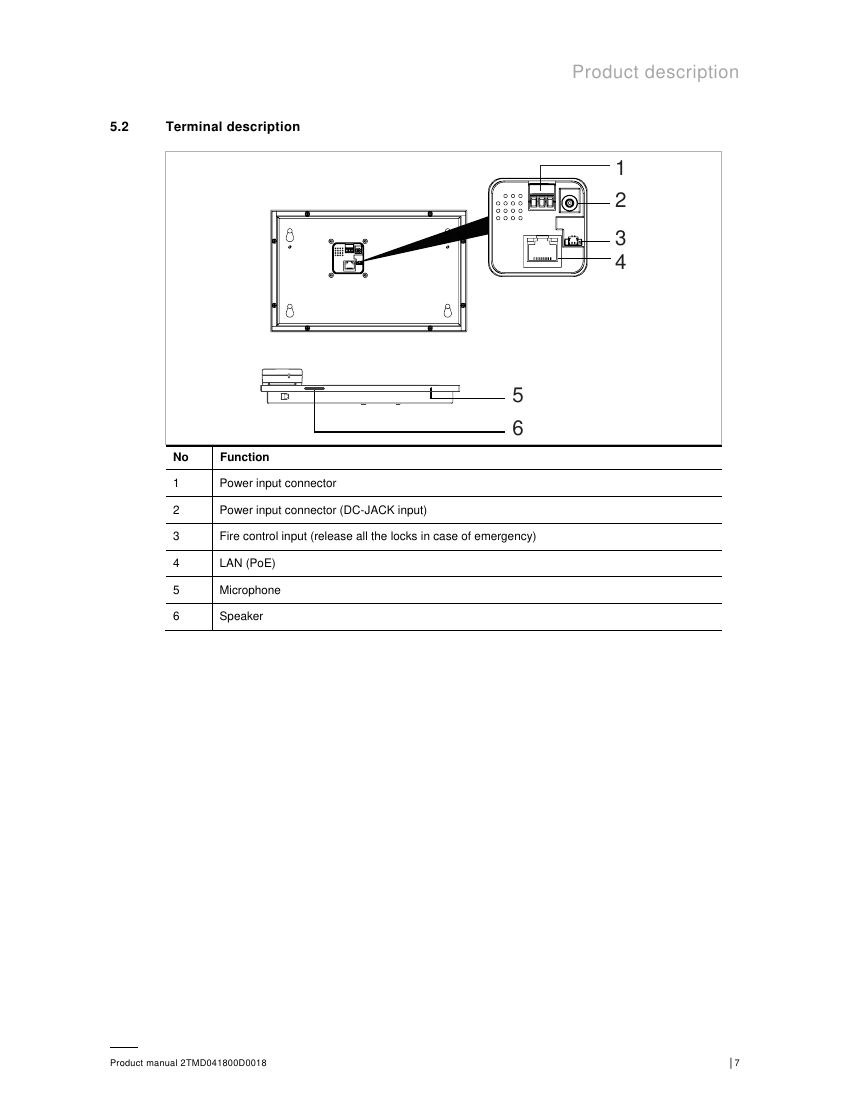
Control Elements & Terminals
- Handset and touchscreen for calls, intercom, and surveillance
Technical Data
| Rating voltage | 24 V DC |
| Operating voltage range | 20-27 V DC |
| Rating current | 27 V DC 230mA / 24 V DC 260mA |
| Display | 7", 1024 x 600 pixel |
| Product dimensions | 265 mm x 165 mm x 115 mm |
| Operating temperature | -10°C to +55°C |
| PoE standard | IEEE 802.3af |
| Network connection | IEEE 802.3, 10Base-T/100Base-TX, auto MDI/MDI-X |
Commissioning Overview
The guard unit enters initial setup automatically on first power-up, or after "Clear all data" from Engineering Settings. Setup includes: select language, accept licensing terms, and set date/time. From "System settings" you can configure:
- Sound — touch sound, ringtone per station type, volume, and repeated-tone (30s repeat vs. ring once)
- Language — system-wide display language
- Display — clear-screen countdown, brightness, screensaver (digital clock / built-in pictures), auto full screen
- Date and time — auto-sync from management software, manual set, summer time
- Monitor settings — download camera list from management software
- Engineering settings (password-protected) — device number (1-32), call mode (physical/logical address), 2nd lock release, security/compatible mode toggle, clear all data
Passwords
| Password | System default |
|---|---|
| Engineering password | 345678 (must be changed on first access) |
| Lock group password | 123456 |
| Emergency unlock password | 123456 |
| Reset user settings password | 123456 |
Password rule: Passwords must not contain continuously increasing/decreasing digit sequences (e.g. 123456, 654321) or 3+ consecutive identical digits (e.g. 123444, 666888). Entering the wrong password 10 times within 5 minutes locks out further attempts for 5 minutes.
Security Mode vs. Compatible Mode
The guard unit runs in Security mode by default for maximum security — this requires a certificate issued by the management software to be installed before use. Without management software, the unit can run in Compatible mode instead, but data transmission between devices is then unencrypted, which risks data leaks and attacks. Compatible mode is only recommended when the device must talk to previous-generation products.
Operation
- Incoming calls — from outdoor stations show caller ID and live video (10s countdown in the final seconds); accept, release default/2nd lock, mute, switch cameras, snapshot, and adjust volume from the call screen.
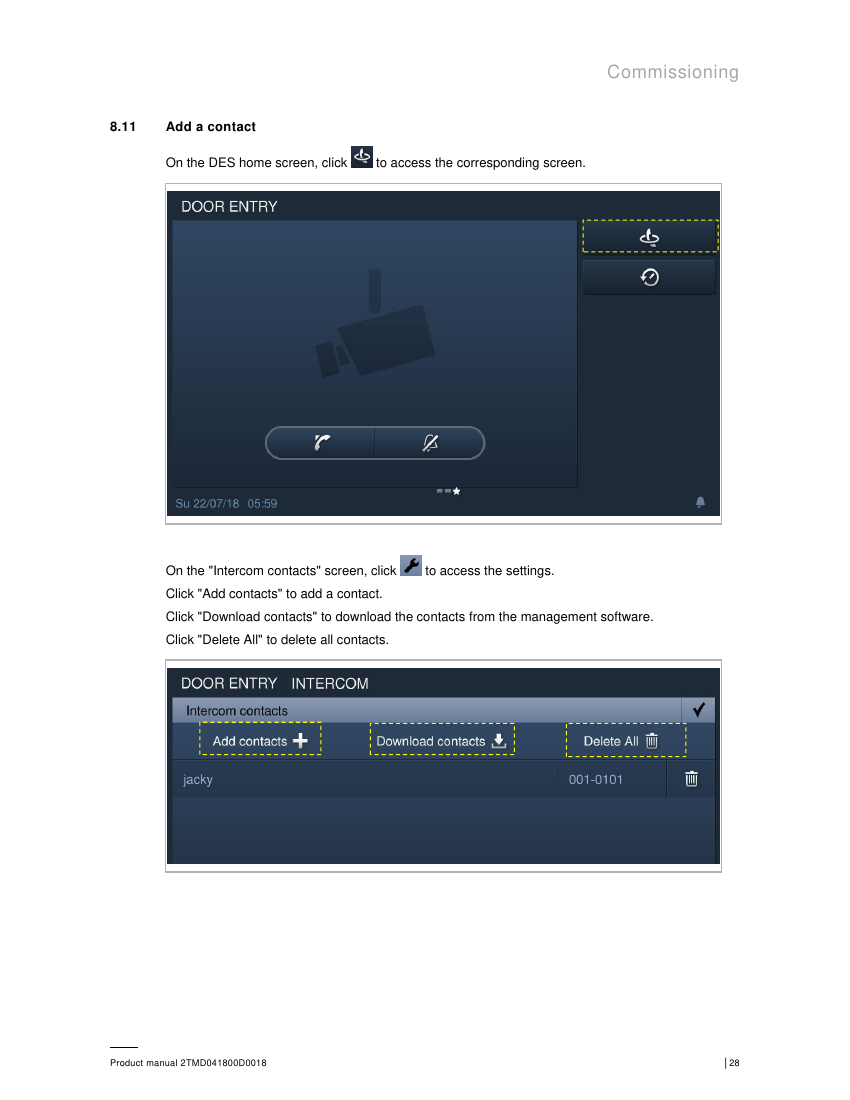
- Intercom — call other apartments/devices via contact list or by entering a physical/logical address directly.
- Surveillance — view outdoor stations or connected cameras on demand; supports the same lock release, mute, and snapshot controls as incoming calls. You can jump straight to a specific outdoor station/gate station by entering its building + device number.
- Call forwarding — transfer an incoming outdoor-station call to a specific indoor station.
- History — stores up to 30 call records (up to 3 photos each); unread calls are highlighted.
- Emergency unlock — manually lock/unlock a designated emergency area using the emergency unlock password.
- Lock group — lock/unlock a group of doors together using the lock group password.
- Fire linkage — (Security mode only) automatically triggers emergency unlock/lock group actions when a fire alarm is received; lock open type (e.g. "Normally closed") is configurable.
- Alarm record — stores up to 100 alarm events (SOS, zone alarm, duress alarm, tamper alarm) received from indoor/outdoor stations, with sound notification.
Cyber Security Notes
- The H8303 must be connected to a secure network — firewalls, authentication, encryption, and antivirus protections are the customer's responsibility.
- Open ports: 5070 (UDP, SIP client), 7777 (TCP/UDP, device management), 8887 (TCP, firmware update), 10777 (TLS, secure device management channel).
- All devices should run in Security mode by default, signed by a public CA (typically the management software) at commissioning.
- Resetting the device to factory settings before removal clears all configuration and sensitive data.
- MAC filtering and rate limiting on the network switch are recommended to prevent DoS attacks.
- Firmware updates are delivered via signed files from the management software; only ABB-signed firmware is accepted, and no custom code can be executed on the device.
FCC Compliance
This device complies with Part 15 of the FCC Rules and has been tested and found to comply with Class B digital device limits, providing reasonable protection against harmful interference in a residential installation.