
ABB-Welcome IP-Gateway (83342-500) — Operating Instructions
Operating instructions for the ABB-Welcome IP-Gateway (model 83342-500), bridging the Welcome door entry bus to the local IP network for remote video door communication.
Full text manual (for reference)
Operating Instructions for the ABB-Welcome IP-Gateway (model 83342-500) — a door communication component that bridges the ABB-Welcome door entry bus to the local IP network, enabling remote video door communication via the Welcome mobile app and Busch-ComfortTouch® indoor stations.
What It Does
- Makes communication possible between the Welcome door communication system and the local IP network via its IP address.
- Allows use of a Busch-ComfortTouch® as a door communication indoor station, and enables the Welcome smartphone app.
- Connects to the myABB-LivingSpace internet portal, from which other Welcome products can be configured through a web browser.
Safety & Qualifications
⚠️ Electric voltage warnings:
- Risk of death from 100–240V during a short-circuit in the low-voltage line — low-voltage and 100–240V lines must never be installed together in a flush-mounted socket.
- Install only if you have the necessary electrical engineering knowledge and experience. Incorrect installation endangers life and can cause serious property damage (e.g. fire).
- Work on the 100–240V supply system may only be performed by authorized electricians. Disconnect mains power before installation or disassembly.
Minimum expertise required for installation: apply the "five safety rules" (DIN VDE 0105 / EN 50110) — disconnect from power, secure against reconnection, verify no voltage present, connect to earth and short-circuit, and cover/barricade adjacent live parts. Use suitable personal protective equipment, proper tools/measuring devices, and confirm the supply network type (TN/IT/TT) and grounding requirements before starting.
Installation, commissioning, and maintenance must only be performed by trained, properly qualified electrical installers who have read and understood this manual, in accordance with valid national regulations.
System Requirements
- A Welcome door entry system with at least one outdoor station and one system controller
- An IP network with WLAN connectivity for mobile devices
- An outdoor station with a camera (required for video transmission)
- The IP gateway must be connected to the router via a LAN cable
For Tenants (mobile app use)
- Tablet PC or similar device with iOS or Android, and an internet connection (3G/UMTS or WLAN) with a data plan supporting VoIP
- Laptop/tablet/browser for accessing the myABB-LivingSpace portal (my.abb-livingspace.com) to configure the gateway on the home network
- Minimum DSL-6000 internet connection or faster, and at least 3G (UMTS) mobile internet — slower connections degrade video streaming quality
Commissioning Options
| Option | Description |
|---|---|
| Option 1 — UPnP | Commissioning via the Windows UPnP service (Windows Vista or higher) |
| Option 2 — IP address | Enter the gateway's IP address directly |
The gateway hosts a browser-based configuration UI reachable from any computer on the same network. Setup for mobile devices then proceeds: (1) register/log in to the myABB-LivingSpace portal, (2) connect the IP gateway to the portal, (3) install the "Welcome" app, (4) couple the gateway with the app.
Configuration Pages Available
The web UI exposes configuration pages for: Network information/configuration, Basic settings, Change password, Device settings (Add device), Portal Login, APP Management, Associated ComfortTouch 2.x / 3.x (including Add user), Import/Export configuration file, Firmware Update, NTP settings, and Versions Information. A separate section covers Telephone Gateway configuration, and mobile app integration steps are documented separately for Android 4.0+ and iOS 4+.
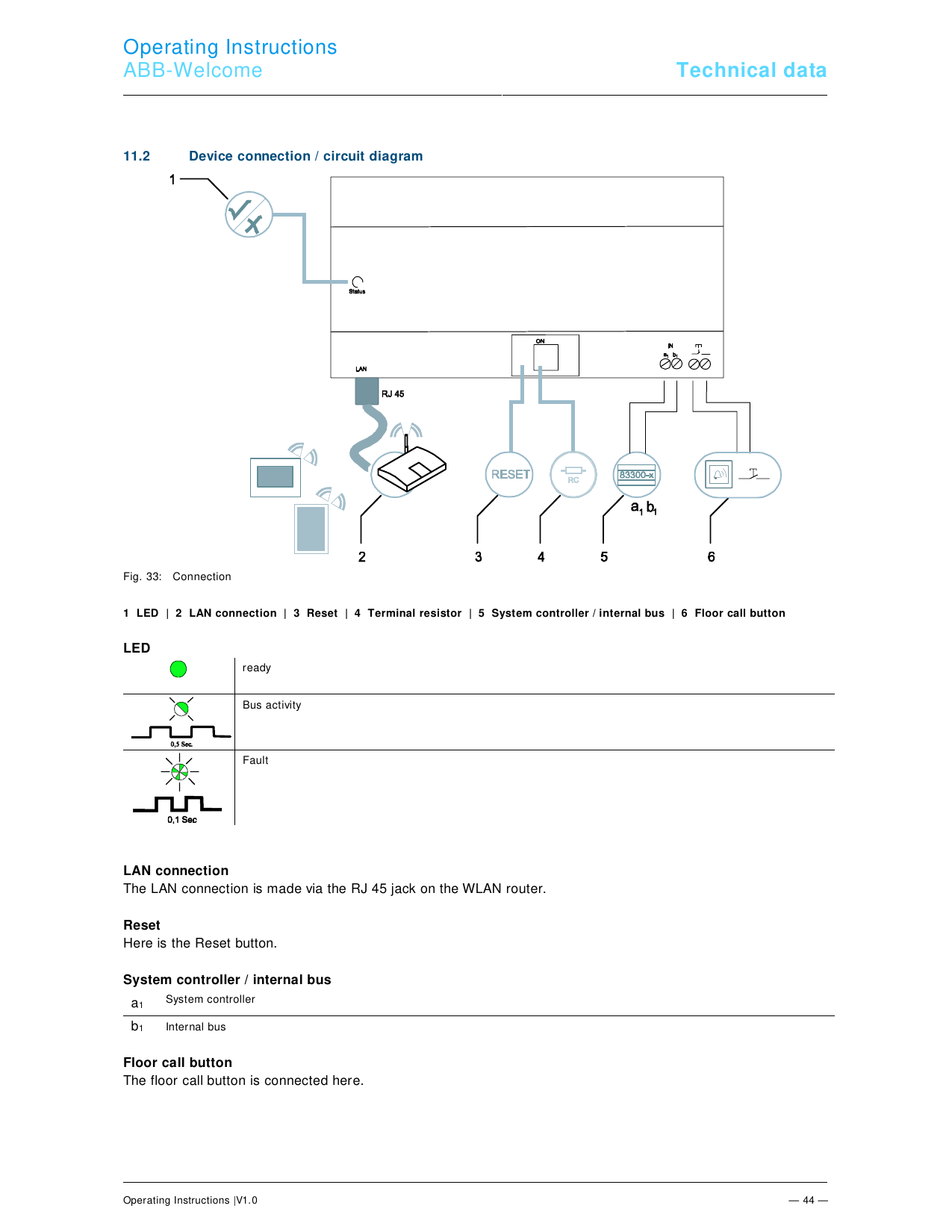
Device Connection / Circuit Diagram
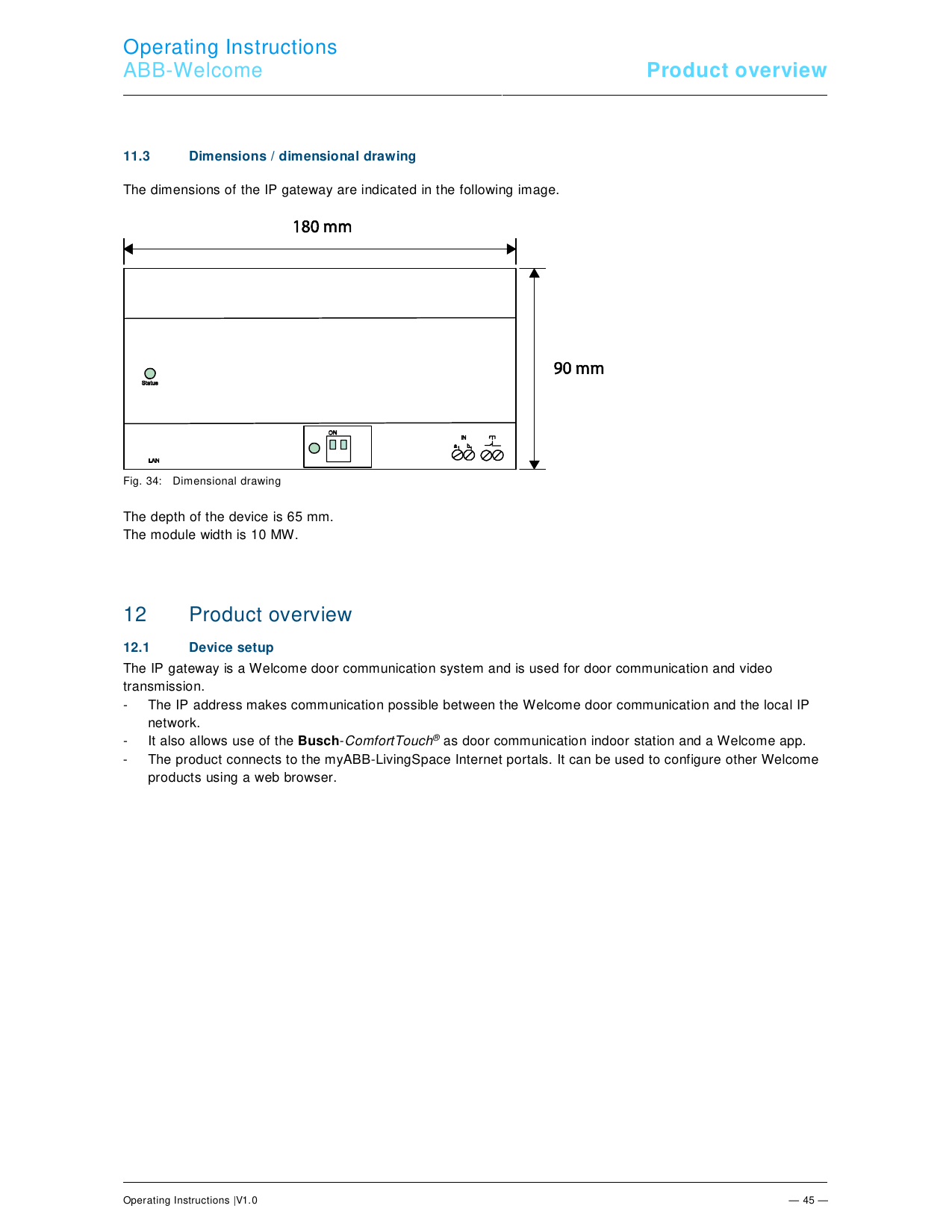
Dimensions
Installation & Mounting
The device (MDRC) must only be installed on mounting rails per DIN EN 50022 — it latches directly onto the mounting rail.
Technical Data
| Parameter | Value |
|---|---|
| Operating temperature | −25 to 55°C |
| Protection type (related installation only) | IP 20 |
| Single-wire clamps | 2 × 0.28–1 mm² |
| Fine-wire clamps | 2 × 0.28–1 mm² |
| Size | 10 TE |
| Bus input voltage | 20–30V DC |
Environmental / Disposal
Used electric and electronic devices must not be disposed of with domestic household waste — dispose of at the appropriate collection depot. The product contains recyclable raw materials and complies with EU Directive 2002/96/EC (WEEE), 2002/95/EC (RoHS), and the EU REACH ordinance (EC) No. 1907/2006.
Reference: Operating Instructions V1.0, 01.07.2015. Manufacturer: ABB.