
Sonic Alert SBH400SS — Loud-Vibrating Alarm Clock with Bed Shaker Manual
Full instructions for the Sonic Alert SBH400SS loud-vibrating alarm clock with bed shaker, including setup, alarm/snooze operation, and the bed shaker accessory.
Full text manual (for reference)
Full instructions for the Sonic Alert SBH400SS Loud-Vibrating Alarm Clock with Bed Shaker — a heart-shaped bedside alarm clock designed for the hard-of-hearing, featuring adjustable volume, dimmer, and a bed shaker/vibrator accessory.
Safety Warnings
- CAUTION: To reduce the risk of electrical shock, do not remove the cover (or back) from the product. No user-serviceable parts inside — refer servicing to your Sonic Alert dealer.
- WARNING: To prevent fire or shock hazard, do not expose this appliance to rain or moisture.
- Before connecting to mains, make sure the requirements specified on the apparatus correspond to the available power supply (AC 120V / 220–240V, 50Hz/60Hz).
General Data
- Power consumption: 8W, 120V / 60Hz (Adaptor AC ~9V 750 mA, UL-listed transformer)
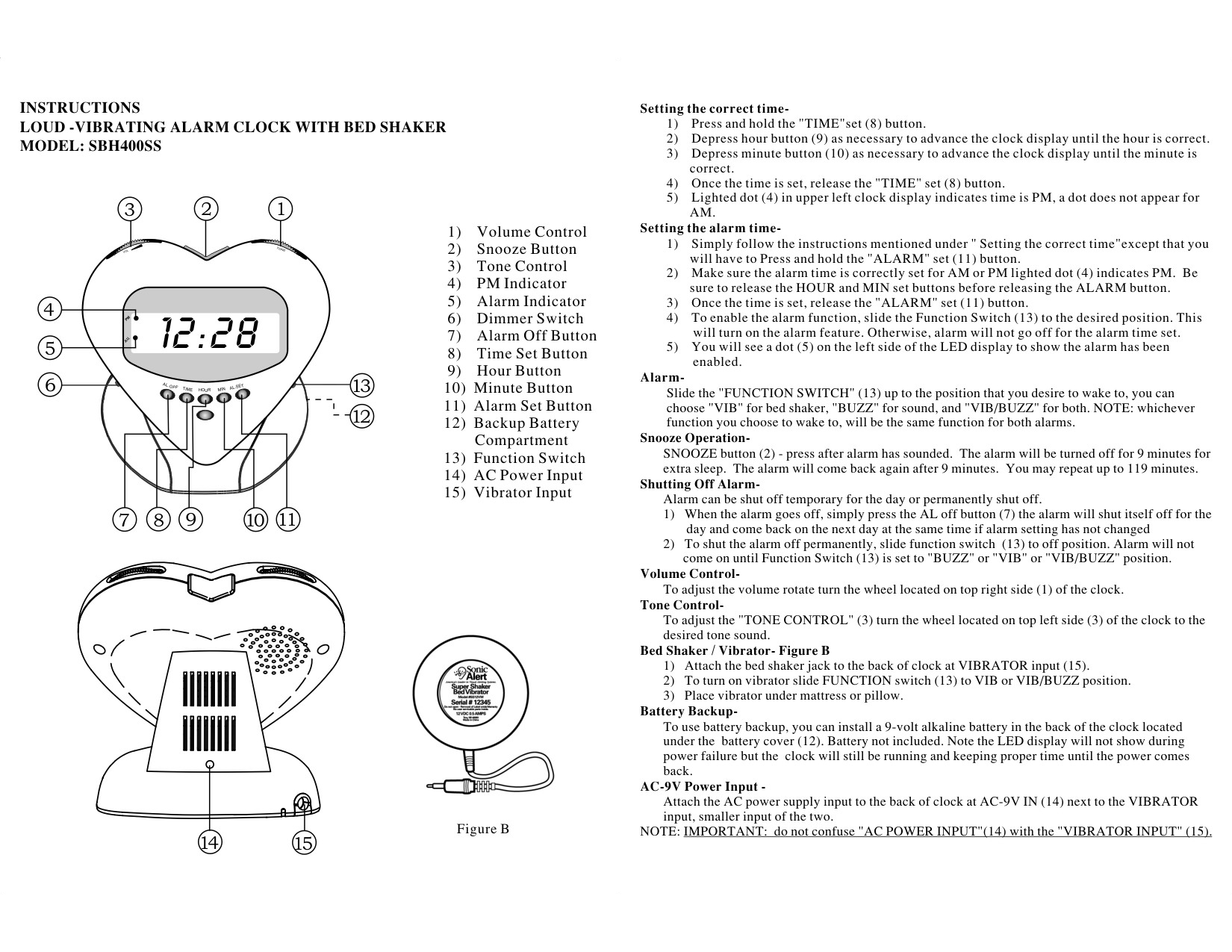
Component Legend
- Volume Control
- Snooze Button
- Tone Control
- PM Indicator
- Alarm Indicator
- Dimmer Switch
- Alarm Off Button
- Time Set Button
- Hour Button
- Minute Button
- Alarm Set Button
- Backup Battery Compartment
- Function Switch
- AC Power Input
- Vibrator Input
Setting the Correct Time
- Press and hold the "TIME" set (8) button.
- Press the hour button (9) as necessary to advance the display until the hour is correct.
- Press the minute button (10) as necessary to advance the display until the minute is correct.
- Once the time is set, release the "TIME" set (8) button.
- A lighted dot (4) in the upper left of the display indicates PM — no dot appears for AM.
Setting the Alarm Time
- Follow the same steps as "Setting the correct time," but press and hold the "ALARM" set (11) button instead.
- Confirm the alarm time is correctly set for AM or PM — the lighted dot (4) indicates PM. Release the HOUR and MIN buttons before releasing the ALARM button.
- Once set, release the "ALARM" set (11) button.
- To enable the alarm, slide the Function Switch (13) to the desired position — otherwise the alarm will not sound at the set time.
- A dot (5) on the left side of the display confirms the alarm is enabled.
Alarm Function
Slide the "FUNCTION SWITCH" (13) to the position you want to wake to: "VIB" for bed shaker only, "BUZZ" for sound only, or "VIB/BUZZ" for both. Note: whichever function you choose applies to both alarm settings.
Snooze Operation
Press the SNOOZE button (2) after the alarm sounds — the alarm turns off for 9 minutes, then resumes. You may repeat snooze for up to 119 minutes total.
Shutting Off the Alarm
- Temporary (for the day): Press the AL OFF button (7) — the alarm shuts off for the day and returns the next day at the same time (if the setting hasn't changed).
- Permanent: Slide the Function Switch (13) to the OFF position. The alarm won't sound again until the switch is returned to BUZZ, VIB, or VIB/BUZZ.
Volume & Tone Control
- Volume: Rotate the wheel on the top right side (1) of the clock.
- Tone: Rotate the wheel on the top left side (3) of the clock to the desired tone sound.
Bed Shaker / Vibrator (Figure B)
- Attach the bed shaker jack to the back of the clock at the VIBRATOR input (15).
- Slide the FUNCTION switch (13) to VIB or VIB/BUZZ to enable the vibrator.
- Place the vibrator under the mattress or pillow.
Battery Backup
Install a 9-volt alkaline battery (not included) under the battery cover (12) on the back of the clock. During a power failure, the LED display will not show, but the clock will continue running and keeping accurate time until power returns.
AC Power Input
Attach the AC power supply to the back of the clock at the AC-9V IN (14) jack — next to (and smaller than) the VIBRATOR input.
Important: Do not confuse the "AC POWER INPUT" (14) with the "VIBRATOR INPUT" (15).
1-Year Limited Warranty
The Sonic Boom Alarm Clock Model SBH400SS is warranted against manufacturing defects in materials and workmanship for one (1) year from the date of purchase. Within this period, Sonic Alert will repair or replace the unit (at their option) without charge for parts and labor. Send the unit (postpaid) with a copy of your sales slip as proof of purchase to:
Sonic Alert Inc., 1050 E. Maple Road, Troy, MI 48083
www.SonicAlert.com · 1-800-566-3210 V/TTY
This device complies with Part 15 of the FCC Rules. Made in China. Doc ref: 093-HK205-003.