
SANUS SA-IWP1-W1 In-Wall TV Power and Cable Management — Installation Instructions
Installation instructions for the SANUS SA-IWP1 In-Wall Flat Panel TV Power and Cable Management system.
Full text manual (for reference)
Installation instructions for the SANUS SA-IWP1 In-Wall Flat Panel TV Power and Cable Management system, which routes power and A/V cables behind a wall-mounted TV without an electrician.
Tools Needed
- Stud finder
- Level
- Tape measure
- Pencil
- Phillips screwdriver
- Slotted screwdriver
- Drywall saw
Important Safety Instructions
Legrand electrical products conform to and should be properly grounded in compliance with the current National Electrical Code or codes administered by local authorities. All electrical products may present a possible electric shock or fire hazard if improperly installed or used.
- Risk of fire and shock — only intended for use on 15-amp branch circuits.
- Risk of fire — do NOT install the power supply cord within the wall cavity.
- Risk of fire and shock — do NOT connect this box to any other circuits or outlets.
- Do not use this product for any purpose not explicitly specified by the manufacturer.
- Manufacturer is not responsible for damage or injury caused by incorrect assembly or use.
- If you don't understand these instructions or have doubts about installation safety, contact Customer Service.
Installation Overview
- Installation Preparation — find your desired locations between wall studs, no more than 6 feet apart.
- Trace — use the included cutting template to trace the opening locations on the wall.
- Cut — cut the openings with a drywall saw.
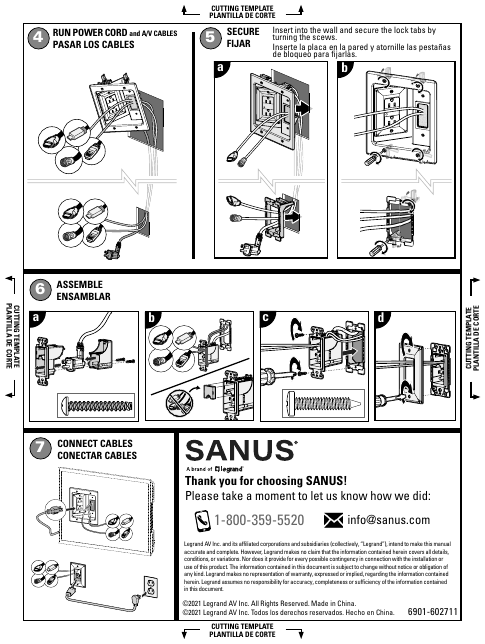
- Run Power Cord and A/V Cables — route the in-wall rated power cable and your audio/video/data cables between the two wall openings.
- Secure — insert each module into the wall opening and secure it by turning the built-in lock-tab screws.
- Assemble — assemble the input and output module faceplates.
- Connect Cables — connect your TV, soundbar, or other device cables to the output module behind the TV.
Notes
An in-wall rated power cable connects the power input module (near the existing outlet) to the power output module (behind the TV), which includes a 6 ft. UL-rated power cord. A/V and data cables are routed separately through dedicated low-voltage openings and cannot be routed alongside the power cable. A unique brush strap cable catcher prevents cables from falling behind the wall.
Manufacturer: Legrand AV Inc., made in China · Customer Service 1-800-359-5520 · info@sanus.com · ©2021 Legrand AV Inc.