
On-Q/Legrand lyriQ iPod Charge and Play Kit (AU5015-xx) — Installation Guide
Installation instructions for the On-Q/Legrand lyriQ iPod Charge and Play Kit (AU5015-xx) — a source input with USB charging for lyriQ multi-source audio distribution systems.
Full text manual (for reference)
Installation instructions for the On-Q/Legrand lyriQ™ iPod™ Charge and Play Kit (P/N AU5015-xx) — a portable audio source input and USB charging station for lyriQ multi-source whole-house audio distribution systems.
Overview
The Legrand AU5015-xx lyriQ™ iPod™ Charge and Play Kit consists of three components: the Charging Main Source Input, a Portable Music Player Desktop Stand, and a 6' cable running from the headphone jack on a user-supplied portable MP3 player to the left and right RCA jacks on the Charging Main Source Input.
The Charging Main Source Input can be used instead of the AU1004-xx Flush Mount Single Source Input as part of any lyriQ Multi-Source Audio Distribution System. Its USB interface charges the user's portable device (up to 0.5A @ 5V, or up to 2.5 watts) while that device is used as an audio source.
What's Included
- Charging Main Source Input — includes a decorator wall plate, a left/right RCA jack for MP3 player input, and a USB connector for charging (charges Apple iPhones and iPods; cannot charge an Apple iPad).
- 6' (six foot) cable — left/right RCA plugs on one end, 3.5mm stereo headphone plug on the other end that connects to the portable device's headphone output jack.
- Portable Music Player Desktop Stand — holds the user's portable MP3 device; has an adjustable slot to accommodate the device's USB cable (push in the tabs on each side to adjust).
Note: The Charging Main Source Input does not have IR input or output capability.
The kit typically resides at the entertainment center or another location where a portable audio source device may be used, and connects to the enclosure-mounted lyriQ Four Source, Eight Zone Distribution Module via a single Category 5 cable run. The Charging Main Source Input receives stereo audio from the headphone output of the portable audio source; volume is controlled on the source device itself.
Installation
Important: Read the documentation included with all associated lyriQ products before installation. If unsure of any procedure, contact Legrand Technical Support at 1-800-321-2343 option 1, or contact a Legrand installer.
Note: The lyriQ iPod Charge and Play Kit, like other Legrand lyriQ audio components, is powered by the Legrand lyriQ Four Source, Eight Zone Distribution Module.
- Run a Category 5 cable from a low voltage bracket at the room location containing the lyriQ iPod Charge and Play Kit (typically the entertainment center location) to the lyriQ Four Source, Eight Zone Distribution Module located in the Enclosure.
- Make sure the Power Supply is not connected to the Distribution Module at this time.
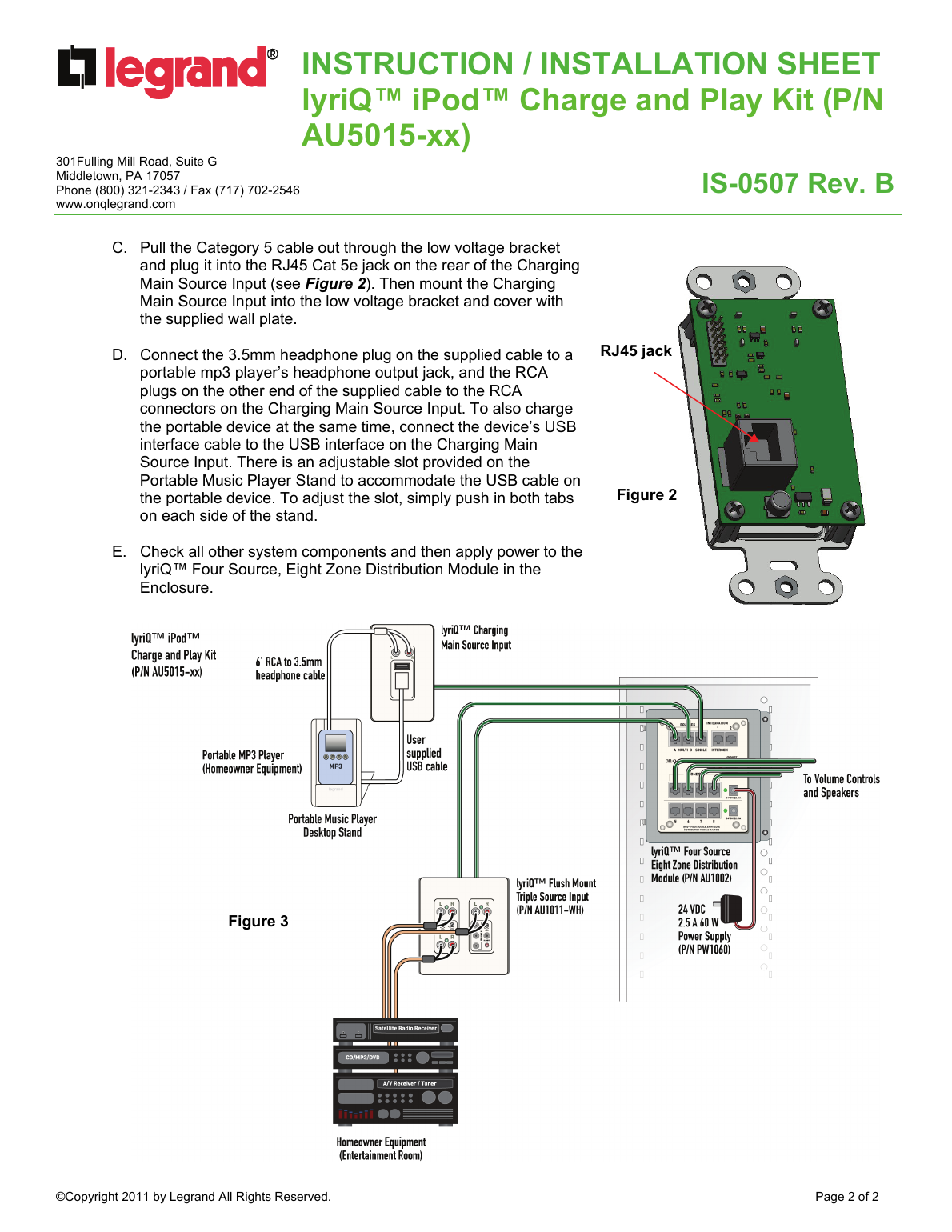
- Pull the Category 5 cable out through the low voltage bracket and plug it into the RJ45 Cat 5e jack on the rear of the Charging Main Source Input. Then mount the Charging Main Source Input into the low voltage bracket and cover with the supplied wall plate.
- Connect the 3.5mm headphone plug on the supplied cable to a portable MP3 player's headphone output jack, and the RCA plugs on the other end to the RCA connectors on the Charging Main Source Input. To also charge the portable device at the same time, connect the device's USB interface cable to the USB interface on the Charging Main Source Input. Use the adjustable slot on the Portable Music Player Stand to accommodate the USB cable.
- Check all other system components, then apply power to the lyriQ Four Source, Eight Zone Distribution Module in the Enclosure.
Support
Legrand Technical Support: 1-800-321-2343 (option 1) | www.onqlegrand.com