
JascoPro 76598 — In-Wall Smart Toggle Switch Specifications
Product specifications for the JascoPro Series In-Wall Smart Switch, Toggle (Model 76598), a Z-Wave Plus toggle switch with S2 security and SmartStart support.
Full text manual (for reference)
Product specifications for the JascoPro Series In-Wall Smart Switch, Toggle (Model 76598) — a Z-Wave Plus toggle-style smart switch with S2 security and SmartStart support.
Overview
The JascoPro 76598 is a blue LED backlit toggle switch that turns a connected device ON/OFF manually or via a Z-Wave hub or controller. It requires a neutral wire and must be mounted indoors. It uses a standard toggle wallplate (not included).
Design Features
- QuickFit — improved components reduce housing depth by up to 20% compared to previous models and eliminate the need for heat tabs
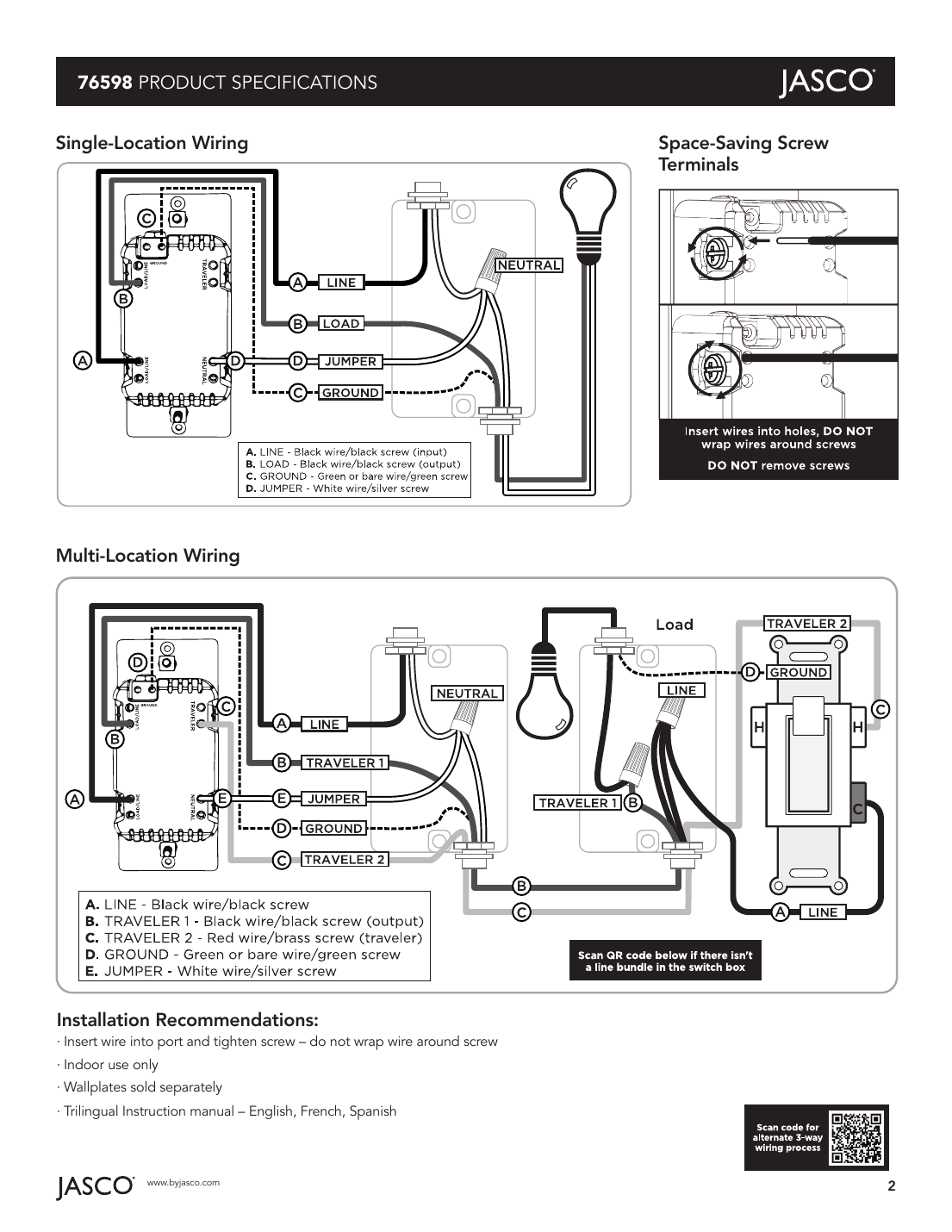
- SimpleWire — auto-sensing line-load terminals support fast installation by detecting line and load wires and configuring the switch accordingly; dual ground ports support daisy-chaining in multi-switch setups
- New blue LED backlit toggle — four adjustable settings (always OFF, always ON, alternate, exclusion, LED status)
- Screw terminal installation; requires wiring connections for line (hot), load, neutral, and ground — traveler wire required for multi-pole installation
- Uses a standard toggle wallplate (not included)
- LED status can be inverted manually, always OFF, or always ON
- In-line traveler circuit protection
- Z-Wave Plus certified
- Remotely monitor with any mobile device (requires Z-Wave hub or controller)
- Voice control works with Amazon Alexa or Google Home when used with a compatible hub
- May be used in single-pole installation or with up to four JascoPro Series add-on switches in 3, 4, 5, or 6-way wiring configurations
- Works with all LED, CFL, incandescent, and halogen bulbs
- Can be included in multiple groups and scenes
- Uses the Z-Wave firmware update meta data command class for standardized OTA firmware updates
- Supports advanced configuration
Z-Wave Plus with S2 Security and SmartStart Features
- QR codes with unique, industry-standard secure key exchange add a layer of 128-bit encryption
- Effortless device pairing to Z-Wave S2 and SmartStart certified gateways
- Backward compatible with all generations of Z-Wave devices
- 250% faster processor, 400% more memory, 50% more energy efficient than previous generation
- Supports wireless upgrades to future-proof your home
- Improved battery life and up to 50% greater wireless range
Wiring Diagrams
The following diagram shows single-location wiring (LINE, LOAD, GROUND, and JUMPER/neutral connections), the space-saving screw terminal design, and multi-location (3-way) wiring with traveler connections.
Installation Recommendations
- Insert wire into port and tighten screw — do not wrap wire around screw
- Indoor use only
- Wallplates sold separately
- Trilingual instruction manual — English, French, Spanish
Device Configuration
Adding the Device to a Z-Wave Network
- Follow the instructions for your Z-Wave certified controller to add a device to the network.
- Once the controller is ready to add your device, push the toggle up or down.
If prompted for the S2 security code, refer to the QR code/security number on the side of the box or the QR code label on the product. Enter the 5-digit code. SmartStart enabled products can also be added by scanning the QR code with a controller providing SmartStart inclusion — no further action needed, product added automatically within 10 minutes of being switched on near the network.
Removing the Device
- Follow the instructions for your Z-Wave certified controller to remove a device from the network.
- Once the controller is ready to remove your device, push the toggle up or down.
Factory Reset
Only use if your network's primary controller is missing or otherwise inoperable.
- Slide the air gap switch right.
- While pressing the OFF (bottom) button, push the air gap left and continue pressing the OFF button. The LED flashes through the eight colors once.
Specifications
| Spec | Value |
|---|---|
| Power | 120VAC, 60Hz |
| Signal frequency | 908.4/916MHz |
| Maximum load | 960W incandescent, 1/2HP motor, or 1800W (15A) resistive |
| Range | Up to 150 ft. from controller or closest Z-Wave device |
| Operating temperature | 32–104°F (0–40°C) |
| Z-Wave module | 800 series |
| Wiring requirement | Requires neutral wire |
| Dimensions | 4.13 in. x 2.63 in. x 1.13/1.75 in. |
| Use | Indoor use only |
| Warranty | 5-year limited product warranty |
Warranty & Support
5-year limited product warranty. Compliances, specifications, and availability are subject to change without notice. Distributed by Jasco Products Company LLC, 10 E. Memorial Rd., Oklahoma City, OK 73114. Support: 1-833-981-0170, M-F, 7AM-8PM Central Time.