
GreatCall Splash (5Star) — Quick-Start Guide
Setup, activation, and everyday-use quick-start guide for the GreatCall Splash personal urgent response device powered by 5Star.
Full text manual (for reference)
GreatCall Splash (5Star) — Quick-Start Guide
Setup and everyday-use guide for the GreatCall Splash personal urgent response device, powered by 5Star™.
Overview
The Splash comes with 5Star, a personal urgent response service giving immediate, dependable access to NAED-certified Response Agents trained to help in uncertain or unsafe situations, 24 hours a day, 7 days a week.
Activation Steps
- Gather the required information: home and billing address, phone number, email address, credit or debit card information, emergency contact details, and the Splash Serial Number. Remove the "DO NOT POWER ON BEFORE ACTIVATING" sticker from the back of the device to reveal the Serial Number — do not remove the serial number sticker itself.
- Go online or call to set up your account. New accounts: follow the instructions at www.greatcall.com/Activate. Replacement, upgrade, or add-on Splash device: call 1-800-675-0158.
- Turn on the Splash to activate. When instructed online or on the phone, press the Power Button. You'll hear "Setting up device, please wait" followed by "Welcome to 5Star" within a few minutes. You'll then receive a confirmation phone call on the Splash — press and release the Call Button to answer it. Once complete, the Splash is activated.
Using the Splash
- Calling 5Star for help in any situation: Press and release the Call Button. You'll hear "Calling 5Star."
- Calling 9-1-1 in a critical emergency: Press and hold the Call Button until you hear "Calling 9-1-1 Now," then release.
- To end any active call: Press and release the Call Button. You'll hear "Call Ended."
Charging the Splash
- Plug the small end of the Power Cord into the Charging Cradle.
- Plug the other end of the Power Cord into a wall outlet.
- Place the Splash into the Charging Cradle. You'll hear a tone and the Battery Indicator will begin flashing green.
- Your Splash is charged when the Battery Indicator remains solid green.
Important: The Charging Cradle is not water-resistant. If your Splash gets wet, dry it before placing it into the Charging Cradle — failure to do so may cause an electrical shock or fire hazard.
Status Indicators
| Battery Indicator Color | Meaning |
|---|---|
| Solid Green | Fully charged |
| Flashing Green | Charging |
| Flashing Red | Battery is low |
| Off | Does not require charging, or device is off |
| Service Indicator Color | Meaning |
|---|---|
| Flashing Green | Good wireless coverage |
| Flashing Red | No wireless coverage |
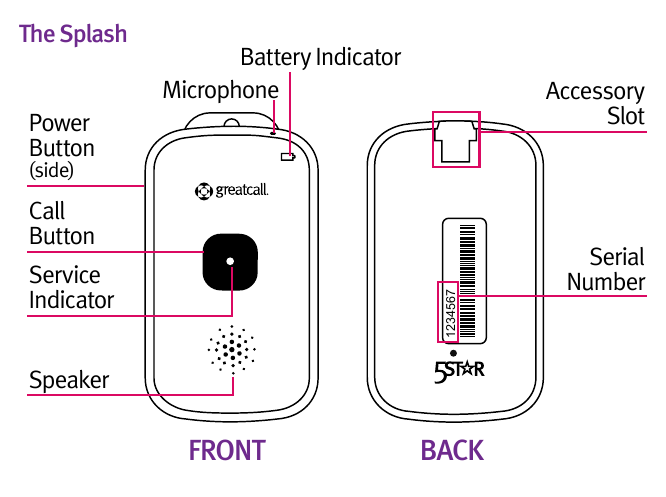
Device Diagram — The Splash
Support
- Call GreatCall Customer Service: 1-800-463-5412
- Email: customerservice@greatcall.com
- Mail: GreatCall Customer Service, P.O. Box 4428, Carlsbad, CA 92018
GreatCall®, PEOPLE YOU CAN COUNT ON®, and 5Star™ are trademarks of GreatCall, Inc.