
ChannelPlus 5415HD — HD Encoder/Modulator Installation Manual
Installation manual for the ChannelPlus (Linear) 5415HD frequency-agile digital HD video modulator, with full programming, troubleshooting, and specs.
Full text manual (for reference)
Overview
The ChannelPlus (Linear) 5415HD is a frequency-agile digital HD video modulator (encoder/modulator) — the first ChannelPlus 5400 Series model capable of broadcasting HD video using the digital HD cable broadcast standard QAM. It converts video and audio signals into a user-selected cable television channel, viewable on any HDTV connected via coax and tuned to that channel.
Controls and Connections
The user selects the output frequency (channel) using the "program" button to enter the desired channel number. Connections on the unit include:
- RF Output
- Power supply input (+12VDC, 1500mA)
- Digital audio input (S/PDIF)
- Component video input (Y, Pr, Pb)
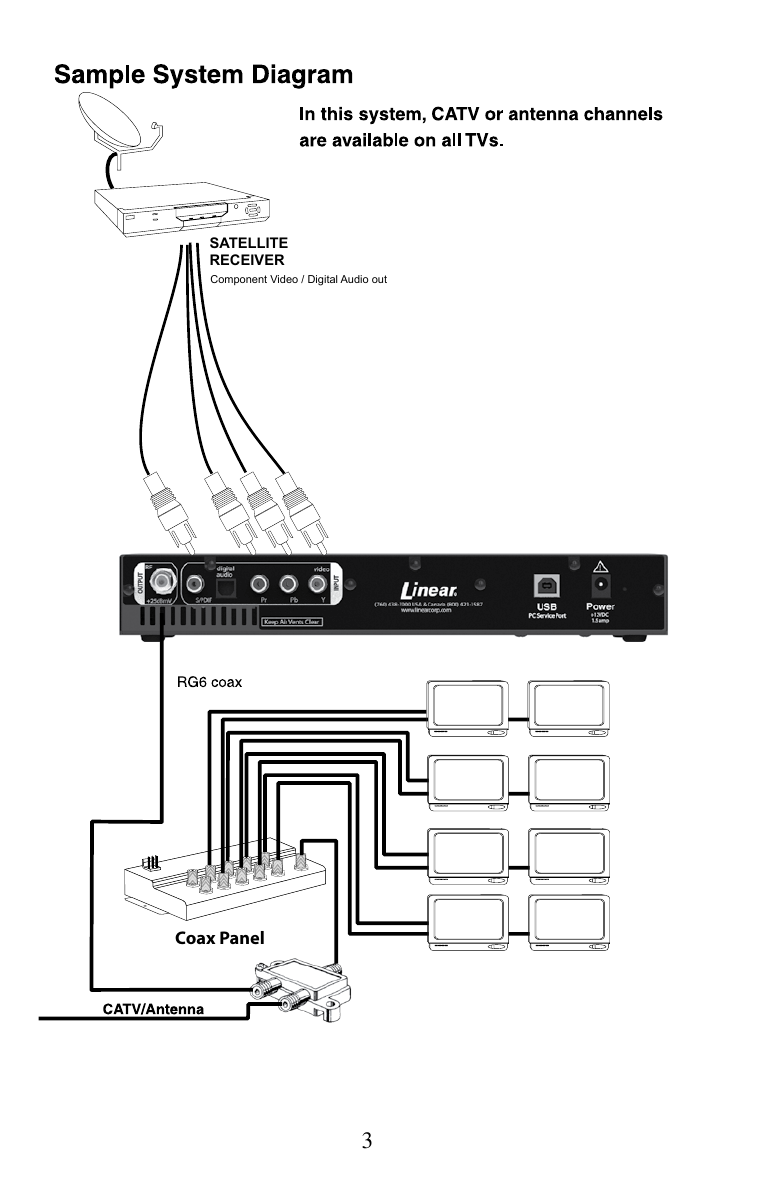
Programming the Channel
To program the modulator to a channel (example: channel 67):
- Press "program." The Status LED will flash yellow with each button press.
- Wait for the Status LED to flash green once, indicating it's ready for the next digit.
- Enter each digit of the channel number, waiting 3 seconds between digits — the LED flashes green once to acknowledge each digit.
- After the last digit, wait 6 more seconds. The unit plays back the programmed channel by flashing the LED (e.g. 6 times, pause, then 7 times, to confirm channel 67).
- If an invalid channel is entered, the Status LED flashes red three times and the previous setting is retained.
Valid channels: CATV 2–135. Channel 2.1 is the factory setting.
Channel spacing: None required — can sit directly adjacent to any well-formed channel.
Reading Back the Programmed Channel
Example: modulator programmed to channel 108.
- Hold the program button until the LED flashes once.
- The LED blinks 1 time and pauses.
- LED blinks 10 times, pauses ("10" is read back as "0").
- LED blinks 8 times — confirming channel 108.
Tuning Your Channel at the HDTV
Typically, just enter the channel number at the HDTV. Tuning may take a few seconds. If that doesn't work, try entering the channel number followed by "-1" or ".1". You may need to run a channel scan — make sure the scan is run in Cable mode (not Antenna mode).
Changing Modulation Standards
Most cable services use a Standard (STD) channel lineup; HRC and IRC placements are occasionally used. Reprogram the modulator to use these standards by entering the following channel numbers via the channel programming procedure:
| STD | Channel 205 |
| HRC | Channel 206 |
| IRC | Channel 207 |
Troubleshooting
| Issue | Solution |
|---|---|
| No picture | Verify the video source is on and producing a signal; verify the HDTV has a QAM (digital cable) tuner; run a full channel scan in cable mode; verify the modulator isn't conflicting with another channel. |
| Idle screen (bouncing logo) | Modulator can't detect the video source — verify the source is on and producing a signal, and that component cables are connected correctly (green-green, blue-blue, red-red). |
| Image breakup | Channel may not be fully vacant, or there's an RF power balance issue. Try a different channel; verify RF power is balanced with other modulators and the cable company's signal. |
| "1080 video input is not supported" | Set the video source to a maximum resolution of 720p. |
| No audio | Verify audio is connected via S/PDIF or digital audio connector, and source audio output is set to PCM or AC-3. |
Specifications
| Video input | Component Video (Y, Pb, Pr), RCA connectors |
| Resolutions supported | 480i, 480p, 720p at 59.94 frames/fields per second |
| Audio input | S/PDIF digital audio, RCA or optical connector |
| Audio formats | 48K/44.1k/32k bit PCM, AC-3 pass-through |
| Video encoder profile | MPEG2 HD Profile 2 (ISO13818-2), MP@HL (1280x720) |
| Video transport bit rate | 38.78 Mbps maximum |
| Avg. encoding data rate | 15 Mbps |
| PCM/AC-3 encoding | AC-3, ATSC A/52, Dolby Digital© (AC-3) 1–5.1 channel |
| RF modulation type | QAM 256 (ITU-T J83 Annex B, Americas) |
| Cable standards | HRC, IRC, or STD (default) |
| Frequency range | 50–900 MHz (channels 2–135) |
| Output power | +25 dBmV typical |
| Power supply | AC input 100–240V, 50/60Hz, 0.7A; DC output +12V, 1.5A |
| Efficiency level | IV |
| Radio emissions | FCC Home or Office (B) |
| Dimensions (W x H x D) | 10.5" x 1.7" x 4.75" |
| Weight | 0.95 kg (33.5 oz) |
| Operating temp/humidity | +32°F to +95°F (0°C to +35°C), 20%–80% non-condensing |
Warranty
Linear LLC warrants this product against defects in material and workmanship for 2 years from the date code on the product. The warranty is limited to repair or replacement (freight prepaid to Linear LLC) — no labor cost reimbursement is provided. Excludes damage from abuse, negligence, electrical surge (including lightning), water damage, natural disasters, tampering with date codes/labels, or improper shipping packaging. All returns require a Return Product Authorization Number (RPA#) — contact Linear Technical Services at 1-800-421-1587.
Manufacturer Contact
Linear LLC / ChannelPlus — (760) 438-7000. USA & Canada Toll Free: (800) 996-5225. Fax: (800) 468-1340. www.channelplus.com / www.linearcorp.com